


AI Fraud Is Getting Better but the Documents Still Slip
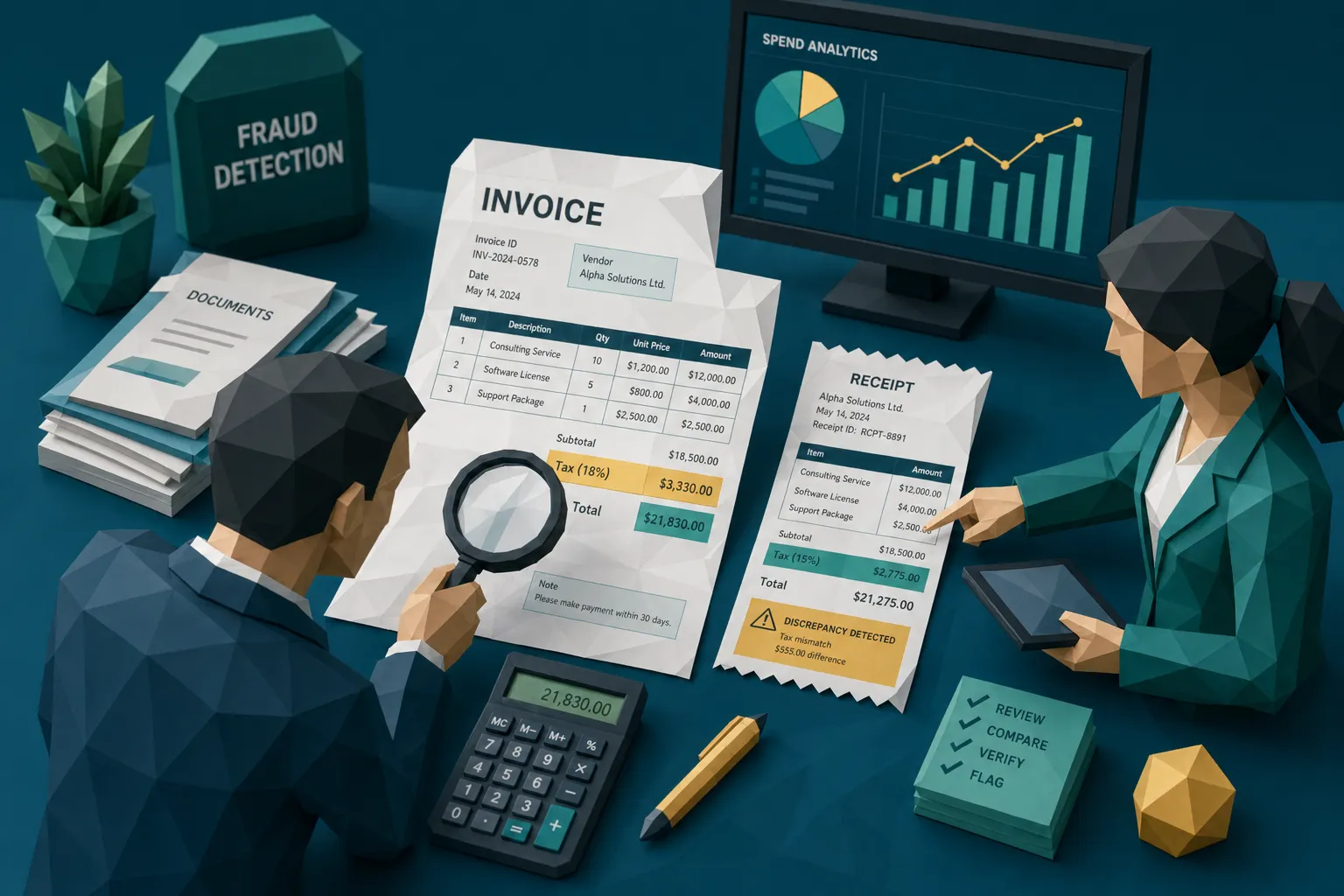

Spend enough time reviewing suspicious invoices and receipts and you develop a deeply unglamorous superpower: you can ruin a fake document by looking at the tax line.
I have spent roughly a decade around fraud teams, claims handlers, AP managers, and finance leaders. The tools have changed dramatically. Ten years ago, the suspicious file was often a clumsy Photoshop job with a font that looked like it had wandered in from another planet. Today, AI fraud is cleaner, faster, and frankly more polite. It says please, attaches a nice PDF, and hopes your workflow is too busy to ask awkward questions.
Here is my hot take: AI fraud is getting better, but documents still slip because documents have to agree with reality. Dates, totals, vendor details, payment rails, metadata, and prior submissions all create little traps. The fake may look beautiful. The story around it often limps.
The hot take: AI fraud still has to obey paperwork
Fraud has always been a paperwork business. Even when the scam starts with a fake accident, a padded repair, or a bogus vendor, it usually needs a document to get paid. A receipt. An invoice. A medical bill. A contractor estimate. A reimbursement attachment.
That is why I think the current obsession with whether an image looks AI-generated is only half useful. Yes, AI tools can create convincing evidence. The BBC reported that Admiral saw a 71% rise in fraudulent claims, with AI-generated fake images and deepfakes playing a role. Verisk’s 2025 Fraud Report also points to a shift in claimant behavior, including younger consumers being more willing to consider altering claim evidence with AI.
That should get every claims leader’s attention. But panic is not a control. Better document scrutiny is.
The FBI notes that insurance fraud costs are substantial, and that the burden can show up in higher premiums for ordinary families. In AP, the problem is just as practical. The Association for Financial Professionals has reported widespread targeting of organizations through payments fraud. These are not theoretical losses. They are checks, ACH transfers, reimbursements, claim payouts, and vendor payments leaving the building.
And the funny thing about even very good AI fraud is that it still has to pass through very boring business processes. Boring is where we win.
Why the document still slips
A document is not a painting. It is a record of an event that supposedly happened.
A genuine invoice has a vendor history behind it. A real repair receipt has a job, a location, materials, a technician, tax rules, and usually some kind of payment trail. A valid employee expense has a trip purpose, a time, a place, a merchant, and a person who was meant to be there. A health claim bill should fit a care timeline, provider identity, and payment context.
AI fraud tends to focus on the surface: make the receipt look plausible, make the invoice layout believable, generate a clean logo, produce a nice total. But the surface is not the whole file. Every document carries a stack of quiet signals. Some are visual. Some are hidden in metadata. Some live in the math. Some only appear when you compare the document to the payment information, claim details, prior submissions, or vendor records.
That is why a simple authenticity check can miss the point. A fake may not scream fake. It may whisper something much more useful: this tax amount does not match the subtotal, this image was edited after the claim was filed, this vendor bank account appeared yesterday, this receipt has the same skeleton as one submitted six months ago.

The giveaway is usually boring
One of my favorite expense fraud examples involved a restaurant receipt that looked fine at first glance. Merchant name, date, tip, total, all there. No dramatic Photoshop scars. No suspiciously floating numbers. It was the kind of document that makes a reviewer think, fine, next.
Then we added the numbers.
The subtotal, tax, tip, and total did not reconcile. Not by a lot, but enough. The employee had edited the total and forgotten that arithmetic is a merciless little accountant. The claim did not fall apart because the receipt looked fake. It fell apart because reality kept its receipts too.
I have seen the same pattern in claims. A contractor invoice looks reasonable, but the file creation timestamp is after the claim adjuster requested additional proof. A repair estimate uses a vendor name that matches a real business, but the remit-to details point somewhere else. A medical bill has believable line items, but the payment instructions have been altered in a way that does not match previous provider records.
This is why I tell teams to stop asking only whether the document looks real. Ask whether the document behaves like a real document.
Insurance claims: the fake evidence is getting cinematic
Insurance claims are a perfect target for AI fraud because the payout often depends on submitted evidence. A claimant may submit photos, invoices, receipts, contractor estimates, repair bills, or medical documents. If those documents are accepted at face value, the payment can move quickly.
That speed is good for honest claimants. We all want clean claims handled fast. Nobody wants to punish the person whose kitchen actually flooded because someone else discovered an image generator and a moral blind spot.
But claims teams now have to assume that evidence can be created or modified at low cost. A roof repair invoice can be inflated. A hotel receipt can be generated. A replacement item invoice can be reused from another claim. A photo of damage can be altered to make the loss appear more severe. And because many of these documents are submitted as images or PDFs, the manipulation can sit outside the fields your core claims system is reading.
Property-related claims show this clearly. Building records, maintenance history, board approvals, vendor communications, and invoices all matter. Tools like Boardly for centralizing building documents and board communication are useful in that world because clean records make weird documents easier to challenge. When the source trail is messy, fraud gets more hiding places.
The same lesson applies inside carriers. If a claim invoice is reviewed apart from payment history, vendor history, metadata, and prior submissions, the fraudster only needs the document to look good in isolation. That is a low bar in 2026.
AP and expenses: fraud loves speed
Accounts payable automation has done a lot of good. It reduces manual entry, speeds approvals, and keeps vendors from sending angry emails with the subject line second request in all caps. I am a fan.
But AP automation can accidentally create the perfect runway for AI fraud. An invoice arrives. OCR extracts the fields. The workflow checks vendor name, invoice number, PO, amount, and approver. If those fields pass, the original document may become background scenery. That is dangerous.
Fraudsters understand process. They know that high-volume AP teams are judged on cycle time. They know that expense teams do not have the staff to manually inspect every receipt. They know that insurance adjusters have service-level agreements and claimants waiting. So the fake document does not need to defeat a Hollywood forensic lab. It only needs to survive a busy Tuesday.
The ACFE’s occupational fraud research has long estimated that organizations lose around 5% of revenue to fraud. Whether you manage AP, payroll, employee expenses, or claims, that number should make you sit up straighter in your chair. Fraud often starts small enough to look like noise, then becomes a pattern once nobody pushes back.
And AI makes testing controls cheap. A fraudster can generate multiple versions of an invoice, change dates, adjust totals, swap logos, and resubmit. If your system only checks extracted text and exact duplicates, near-duplicates and visually altered documents can stroll right through wearing a fake mustache.
The control I would add everywhere: document integrity before payment
If I could add one control to every claims, AP, and expense workflow, it would be pre-payment document integrity screening. Not after the check clears. Not during an annual audit when everyone has forgotten the context. Before money moves.
The best screening looks at several practical signals together:
- Original file preservation: Keep the original upload whenever possible because screenshots, forwarded PDFs, and compressed images can destroy useful evidence.
- Visual tampering: Check whether fonts, edges, shadows, compression patterns, and pasted regions behave consistently across the document.
- Metadata clues: Review timestamps, edit history, device or software traces, and location data where available.
- Mathematical consistency: Recalculate totals, tax, discounts, unit prices, mileage, and reimbursable amounts.
- Duplicate and near-duplicate patterns: Compare documents against prior submissions, even when the file name, amount, or date has changed.
- Payment context: Tie the document to vendor details, bank information, claim timing, employee behavior, and previous payment history.
That last one matters more than many teams realize.
Why payment context beats a pretty authenticity score
A lot of fraud tools can say whether a file seems suspicious. That is useful, but the higher-signal question is whether the document fits the payment story.
Consider a supplier invoice that looks clean. The logo is right. The invoice number format seems normal. The total matches the PO. But the bank account changed from the vendor’s historical account to a new one. Or the payment instructions appear in a slightly different font than the rest of the invoice. Or the same invoice layout has been submitted by another vendor in a different entity.
Now consider an insurance claim receipt. The claimant says emergency repairs happened on a Saturday morning. The receipt metadata suggests the image was created days later. The vendor listed on the invoice has no history with similar jobs in that region. The requested payment account does not match previous records. Each signal alone might be explainable. Together, they are a conversation with SIU.
This is where Docklands AI takes a practical view of AI fraud. The goal is not to stare at a document in isolation and make a mystical judgment. Docklands AI uses document forensics and payment information from a claim, expense, or payment to build a deeper fraud picture. That combination helps teams separate harmless weirdness from evidence worth investigating.
Because let us be honest: real documents are messy too. People scan things badly. Vendors use ancient templates. Employees take receipt photos in taxis like they are documenting Bigfoot. The trick is not to flag every ugly file. The trick is to identify the documents whose ugliness, math, metadata, and payment context point in the same suspicious direction.
What Docklands AI looks for
Docklands AI is built for the document layer where a lot of modern fraud hides. It helps detect AI-generated documents, photoshopped or tampered invoices and receipts, metadata anomalies, mathematical irregularities, and signs of physical manipulation.
For claims teams, that means screening invoices and receipts before payout, so suspicious evidence can be routed with context instead of gut feel. For AP teams, it means checking supplier invoices before payment approval or payment run. For employee expense teams, it means catching altered, duplicated, or synthetic receipts before reimbursement.
The product is designed to fit into operational workflows through API and webhook integration, with reporting and analytics for teams that need visibility across projects, users, and fraud patterns. Security features such as 2FA and support for multiple users and projects matter too, because fraud detection is only helpful if the process around it is controlled.
I like controls that make reviewers faster rather than turning everyone into a part-time detective. A good alert should say what looks wrong, why it matters, and what the reviewer should inspect next. Nobody needs a black box with a dramatic red button. We need evidence, context, and fewer bad payments.
The awkward truth about AI fraud in 2026
AI fraud will keep improving. The receipts will get cleaner. The fake invoices will get more convincing. The damaged-room photos will look less like a video game screenshot. That is the bad news.
The good news is that fraud still has to pass through documents, workflows, and payment controls. It still has to survive math. It still has to align with metadata. It still has to match vendor behavior, claim timing, expense policy, and payment history.
Fraudsters are betting that teams will look at documents quickly and separately. We should do the opposite. Look at every document consistently, connect it to the money, and route only the risky ones for deeper review.
That is how you keep speed for honest claims, valid invoices, and legitimate expenses while making life much less comfortable for the person generating fake paperwork at 11:47 p.m. with suspicious confidence.
Frequently Asked Questions
What is AI fraud in invoices and receipts? AI fraud in invoices and receipts involves using AI tools to create, alter, or enhance documents so they appear legitimate. Common examples include synthetic receipts, edited totals, fake repair invoices, altered claim evidence, and reused documents with changed dates or amounts.
Can human reviewers spot AI-generated documents? Sometimes, but manual review is inconsistent at scale. A reviewer may catch obvious formatting issues, but modern AI-generated documents can look clean. Stronger detection comes from combining visual checks, metadata review, math validation, duplicate detection, and payment context.
Where should document fraud screening happen? The best place is before payment. For insurers, that means during claim intake or before payout authorization. For AP teams, it means before invoice approval or payment runs. For expense teams, it means before reimbursement.
Does every suspicious document mean fraud? No. A suspicious signal means the document needs review. Real documents can have strange metadata, bad scans, or formatting quirks. The strongest cases usually involve multiple signals, such as visual edits plus math errors plus payment-context mismatches.
How is document fraud detection different from OCR? OCR reads text from a document. Fraud detection asks whether the document can be trusted. OCR may extract the invoice total correctly while missing the fact that the total was edited, the metadata is odd, or the same receipt was submitted before with changes.
See what your documents are already telling you
If AI fraud is your concern, do not wait for a perfect fake to become a paid loss. Run recent claims, invoices, or expense receipts through a document integrity review and compare what you find against your current controls.
Docklands AI helps teams detect manipulated, photoshopped, and AI-generated invoices and receipts before payment. If your workflow still treats the attachment as background scenery, now is a good time to make the document speak up.
Request a Demo Today!
Book your demo below.


