


Choosing an AP Automation Solution With Real Fraud Checks


Most AP automation projects start with a perfectly reasonable promise: process invoices faster, reduce manual entry, close the books with fewer headaches, and stop making the AP team live inside a spreadsheet swamp.
Lovely. I am all for it. I have spent enough time around month-end invoice queues to know that nobody joins finance because they dream of chasing missing PO numbers at 7:42 p.m.
But here is my hot take after a decade in fraud work: an AP automation solution that does not perform real fraud checks can make fraud faster too. It can route a fake invoice beautifully. It can approve an altered PDF with excellent workflow discipline. It can pay a duplicated document with the calm confidence of a machine that has never had to explain leakage to a CFO.
So if you are choosing an AP automation solution in 2026, do not only ask how quickly it extracts fields. Ask whether it can challenge the invoice before money leaves the building.
The uncomfortable truth about AP automation
Most AP automation tools are built to make good invoices move quickly. That is useful. The problem is that fraudsters also understand the workflow. They know how to make an invoice look ordinary enough to pass through capture, matching, approval, and payment.
The risk is not theoretical. The Association for Financial Professionals has repeatedly shown how widespread payments fraud is among organizations, and the FBI’s 2023 IC3 report reported $2.9 billion in losses tied to business email compromise, a favorite route into AP teams.
I once reviewed a case where the invoice itself looked boring. That is usually when I start to worry. Same vendor logo. Same PO reference. Same service description. The only meaningful change was buried in the remittance details, and the PDF had been edited just enough to redirect payment. The AP system saw a match. The approver saw a familiar supplier. The fraudster saw payday.
That is the gap. Automation is very good at asking, does this invoice fit the process? Fraud detection has to ask, does this invoice deserve to be trusted?
What most AP automation does well
Before I sound like the grumpy person in the corner of the procurement meeting, let me be clear: AP automation is valuable. A good system can clean up intake, extract invoice data, route approvals, match invoices against POs, reduce duplicate manual entry, and maintain a cleaner audit trail.
For high-volume teams, that is not optional anymore. If you are processing thousands of invoices across multiple entities, locations, or business units, manual review becomes theater. Everyone acts careful, but the queue is too large and the pressure is too high.
The issue is that many platforms treat the invoice as a data container. They pull out supplier name, invoice number, amount, tax, due date, and bank information. Then the original document fades into the background.
Fraudsters love that. If the system only cares about extracted fields, the attacker only needs those fields to look plausible. They do not need a perfect fake. They need a fake that survives a busy Tuesday.
If you want a deeper breakdown of where common tools fail, we have covered that in our guide on how accounts payable automation software misses invoice fraud. The short version is simple: workflow automation and fraud detection are cousins, not twins.
What real fraud checks should mean
When I hear a vendor say they have fraud detection, I ask what they actually inspect. If the answer is mostly rules, limits, and approval routing, that is not enough.
Rules are useful, but rules catch yesterday’s fraud. Real fraud checks inspect the document, the file history, the calculations, the duplicates, and the payment context together. They should help your AP team understand why something is suspicious, not just throw a red icon into the queue and hope someone has time to care.
The tool should inspect the original document
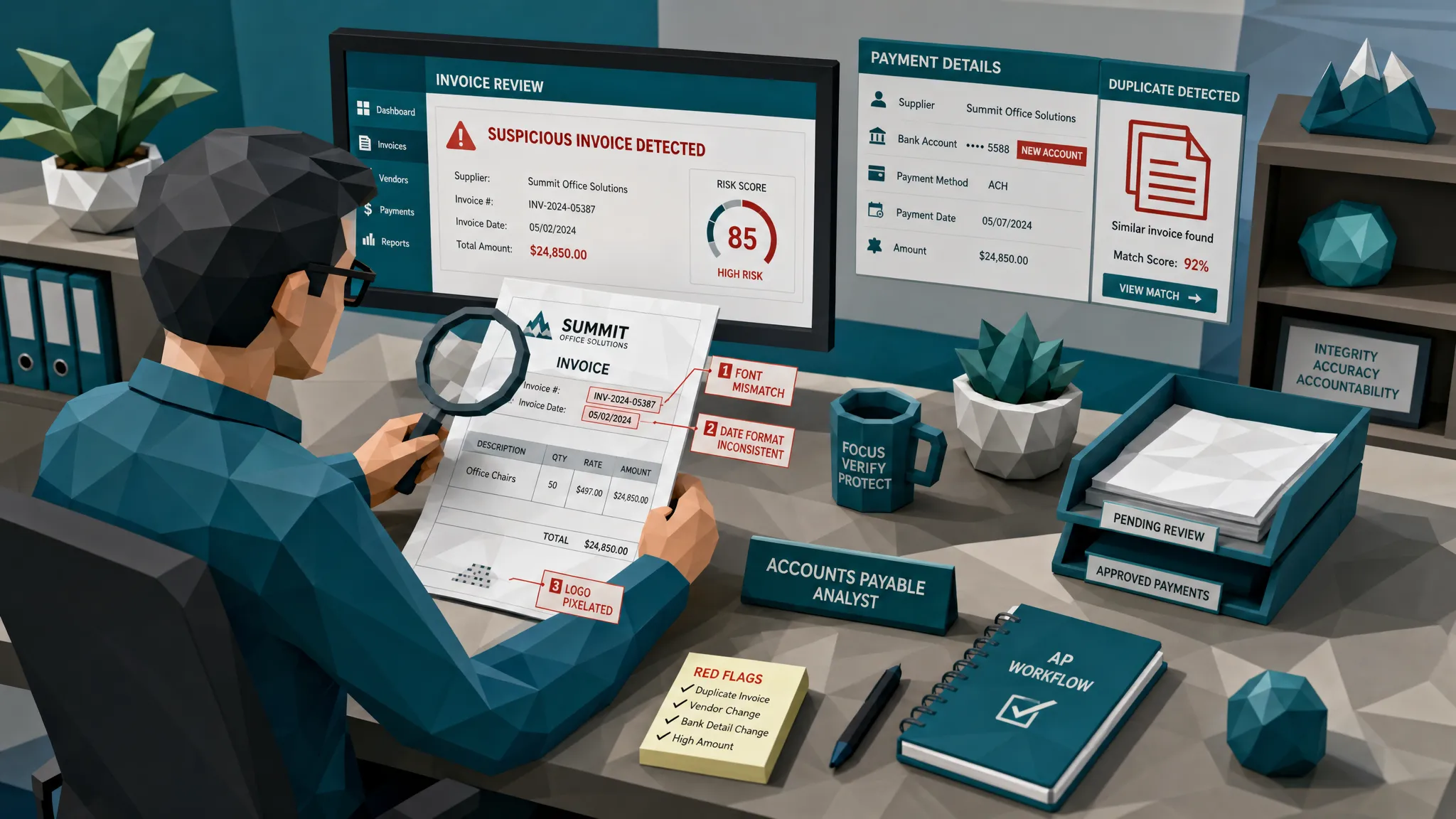
A suspicious invoice often leaves clues in the file itself. Edited text may have different compression artifacts. A pasted bank account line may not match the surrounding pixels. Fonts may shift. Logos may be stretched. A scanned document may contain physical manipulation, such as overwritten totals or inconsistent shadows.
A normal AP automation solution may extract the amount correctly and still miss that the amount was edited. That is like congratulating yourself for reading the ransom note clearly.
Look for document-level checks that can identify signs of tampering, Photoshop-style edits, physical alteration, and synthetic invoices. The words may vary by vendor, but the capability should be concrete: show me what changed, where the suspicious area is, and why the file deserves review.
Metadata should be treated as evidence, not trivia
Metadata is one of those topics that sounds boring until it saves you a six-figure payment. File creation dates, modification history, software traces, device information, and missing metadata can all matter.
To be fair, metadata alone does not prove fraud. Plenty of legitimate invoices are compressed, forwarded, rescanned, or exported from accounting systems. But when metadata contradicts the story, I want AP to know.
For example, if a supplier invoice claims to be from last month but the PDF was created yesterday using consumer editing software, that does not mean you reject it instantly. It does mean you ask better questions before approving payment.
Math checks should go beyond totals
I have seen fake invoices where the logo was convincing and the supplier details were plausible, but the tax calculation was off by a few cents in a way that no real invoicing system would produce. Fraudsters are getting better, but arithmetic is still where many sloppy fakes trip over their shoelaces.
A serious AP automation solution should validate line-item logic, subtotal calculations, tax treatment, discounts, currency consistency, and rounding patterns. For recurring suppliers, it should also notice when pricing or quantities suddenly behave oddly.
Again, the goal is not to stop every harmless discrepancy. The goal is to combine weak signals into a stronger fraud picture.
Duplicate detection must catch near-duplicates
Classic duplicate checks are too literal. They look for the same invoice number, supplier, and amount. Useful, yes. Sufficient, no.
Modern invoice fraud often uses near-duplicates: the same document with a changed date, a slightly adjusted total, a new invoice number, or a modified bank detail. If your system only catches exact matches, it will miss the fraudster who spent three minutes being mildly creative.
Near-duplicate detection should compare the document image, layout, content patterns, supplier behavior, and payment information. It should catch the invoice that is not identical, but feels suspiciously like one you have already seen.
Payment context is where many tools get exposed
This is the piece I care about most. A fraud check that looks only at the document is useful. A fraud check that also looks at payment context is much stronger.
Ask whether the solution can evaluate payment information on the claim, expense, or supplier invoice. Is the bank account new? Has the vendor used it before? Is the payee name inconsistent? Did payment instructions change late in the workflow? Has the same account appeared across unrelated suppliers?
In fraud reviews, the document is often only half the story. The money trail is the other half.
Do not confuse compliance workflow with fraud prevention
A clean approval chain feels reassuring. It gives everyone a sense that the invoice passed through the right hands. But approval is not authentication.
I have seen senior approvers sign off on fraudulent invoices because the document looked familiar and the amount was within expectations. That is not because approvers are careless. It is because they are human, busy, and usually not trained as forensic document examiners.
This is why I get nervous when companies say, we have controls, we require manager approval. That is good governance. It is not enough to catch an edited invoice, a synthetic supplier document, or a remittance swap.
A real fraud check should happen before approval or before payment, preferably both for higher-risk invoices. It should give the approver better evidence, not just another checkbox.
Map the whole invoice journey before you buy
Before choosing an AP automation solution, sketch the path an invoice takes from creation to payment. Include email inboxes, supplier portals, ERP systems, procurement tools, approval workflows, and banking platforms.
This matters because invoices do not live in one neat system. Smaller and mid-sized companies may run invoicing, CRM, tasks, and reporting through an all-in-one platform such as a business management platform with CRM and invoicing, while larger companies may have a patchwork of ERPs, AP tools, supplier portals, and shared inboxes.
Fraud checks need to fit that messy reality. If the screening only happens after the document has been converted, compressed, renamed, or stripped of useful evidence, you may lose signals that would have helped you catch the problem earlier.
My preference is simple: preserve the original file, screen it as early as possible, then re-check high-risk payments before release.
Questions I would ask every vendor
You do not need a 90-question RFP to separate serious fraud capability from brochure glitter. In a first demo, I would ask these questions and then wait for specifics.
- Do you inspect the original invoice file or only extracted fields? If the tool only reads data, it may miss visual tampering and file-level clues.
- Can you detect edited, photoshopped, physically altered, and AI-generated invoices? Ask for examples of the evidence shown to reviewers.
- How do you handle metadata? You want more than a yes. You want to know which signals are analyzed and how false alarms are managed.
- Can you detect near-duplicates, not just exact duplicates? Fraudsters rarely submit the exact same file twice if they know what they are doing.
- Do you connect document findings to payment context? Bank changes, payee mismatches, and repeated accounts can turn a weak signal into a strong one.
- Can alerts explain themselves? AP teams need evidence they can act on, not vague risk scores.
- Does it integrate through API or webhooks? Fraud checks should strengthen your workflow without forcing a full process rebuild.
- Can you report trends to AP leaders and audit teams? If you cannot see patterns over time, you are stuck fighting one invoice at a time.
The best vendors will answer in plain English. If every answer sounds like a magic model doing mysterious model things, I would keep shopping.
The right operating model: fast lanes and evidence lanes
A fraud-aware AP process should not turn every invoice into a courtroom drama. That would be miserable and expensive.
The better model is risk routing. Clean invoices keep moving. Questionable invoices receive light clarification. High-risk invoices go to a trained reviewer with evidence attached.
That evidence should be specific. For example: suspicious edit near remit-to account, metadata created after invoice date, near-duplicate of invoice submitted last quarter, subtotal does not reconcile to line items, payment account never used by this supplier before.
This helps AP avoid two bad outcomes: paying fraud quickly or burying the team in low-value alerts. I have watched both happen. The second one is sneakier, because alert fatigue eventually teaches people to ignore the tool they bought to protect them.
Where Docklands AI fits
Docklands AI is built for the fraud gap that traditional AP automation often leaves open. It analyzes invoices and receipts for signs of manipulation, including AI-generated documents, Photoshop-style tampering, metadata anomalies, mathematical irregularities, physical manipulation, and duplicate or suspicious document patterns.
The important part, in my view, is that Docklands does not treat the invoice as an isolated image. It uses payment information from the claim, expense, or payment workflow to build a deeper fraud picture. That matters because a fake invoice may look acceptable until you compare it with the payee, bank account, vendor history, and surrounding transaction context.
For AP teams, Docklands can sit alongside existing systems through API and webhook integration. That means you do not have to rip out your ERP or AP workflow to add stronger fraud checks. You add a document and payment-context screening layer where it matters most: before payment.
Docklands also supports reporting, analytics, multiple users and projects, and security controls such as 2FA. For finance leaders, that makes fraud review less dependent on one heroic AP manager with a sixth sense for dodgy PDFs.
The buying mistake I would avoid
The biggest mistake is buying AP automation as if fraud is a future problem. Fraud is not a separate phase you add after go-live when someone gets burned. By then, your team has built habits around speed, and adding friction feels like failure.
Build fraud checks into the buying decision from day one. Ask for sample outputs. Test real historical invoices, including known exceptions if you have them. Include AP, treasury, internal audit, and fraud or risk teams in the review. Make the vendor show how suspicious invoices are stopped, explained, escalated, and resolved.
And please, do not accept the phrase fraud detection unless the vendor can show what it detects. A policy rule is not the same as document forensics. A duplicate invoice number check is not the same as near-duplicate detection. A manager approval is not the same as proof that the invoice is genuine.
Frequently Asked Questions
What fraud checks should an AP automation solution include? It should inspect the original invoice for tampering, analyze metadata, validate math, detect exact and near-duplicate invoices, identify AI-generated or synthetic documents, and connect findings to payment context such as bank details and payee history.
Is OCR enough for invoice fraud detection? No. OCR helps extract data, but it does not prove the document is authentic. An edited invoice can produce perfectly readable OCR fields while still containing manipulated payment details, altered totals, or suspicious file history.
Should fraud checks happen at invoice intake or before payment? Ideally, both. Intake screening catches problems early and preserves evidence. A pre-payment check is useful for high-risk invoices, late bank-detail changes, or documents that changed during the workflow.
Will stronger fraud checks slow down AP automation? They should not slow down clean invoices if implemented correctly. The goal is to route low-risk invoices straight through and send only suspicious items to reviewers with clear evidence.
How is Docklands AI different from a standard AP automation platform? Docklands AI focuses on invoice and receipt fraud detection rather than general AP workflow automation. It checks documents for manipulation, metadata issues, mathematical irregularities, AI-generated content, and payment-context risk, then integrates with existing workflows through APIs and webhooks.
Choose speed, but make it skeptical
AP automation is worth doing. Faster processing, cleaner approvals, and fewer manual tasks are all good things. But speed without skepticism is how fraudulent invoices get paid with impressive efficiency.
If you are choosing an AP automation solution, make real fraud checks part of the core requirement. The system should not only move invoices. It should question them.
If you want to see how Docklands AI can add document and payment-context fraud checks to your AP workflow, visit Docklands AI and explore how we help teams detect manipulated, photoshopped, and AI-generated invoices before they become paid losses.
Request a Demo Today!
Book your demo below.


