


Duplicate Invoice Detection Should Start Before Approval
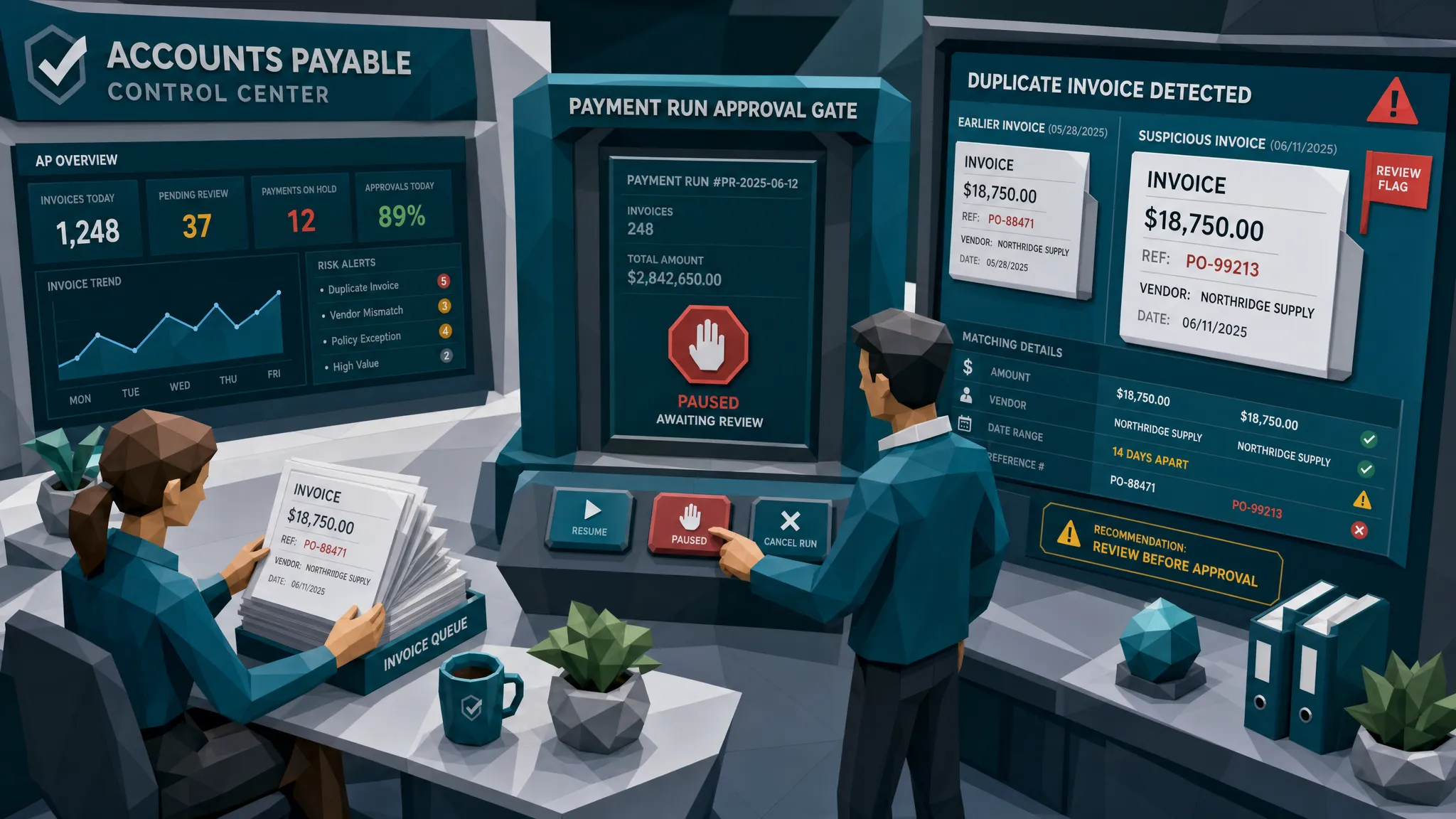

After 10 years of looking at questionable invoices, I have a fairly unpopular opinion: duplicate invoice detection that happens after approval is mostly an apology note with better formatting.
Yes, it can still stop a payment if you are lucky. Yes, it can help recover money if you are very lucky. But the moment a duplicate invoice gets approved, it gains a kind of internal glow. The approver said yes. The workflow said yes. The ERP starts treating it like respectable paperwork.
I call this approval laundering. It sounds dramatic, but if you have ever tried to stop a payment run at 4:57 p.m. on a Friday because an invoice “looks familiar,” you know the drama is real.
The better place to catch duplicates is before approval, while the document is still just a submitted claim for money, not an endorsed obligation. That shift sounds small. In practice, it changes everything.
The old duplicate check is too polite
Most accounts payable teams already have some form of duplicate invoice detection. The classic version checks vendor name, invoice number, date, amount, and maybe PO number. If the same combination appears twice, the system waves a little flag.
That is useful. It also assumes the duplicate is going to behave nicely.
Fraudulent duplicates rarely behave nicely. They come in with a slightly changed invoice number, a revised PDF export, a different file name, a moved decimal, a changed remittance block, or the same supporting receipt attached to a different claim. Sometimes the invoice is not malicious at all, just a supplier resubmitting because nobody replied to their first email. Either way, the business risk is the same: you may pay twice.
According to the Institute of Finance and Management, duplicate payments can represent a small percentage of total AP spend, but for large organizations that small percentage can turn into very real money. I have seen finance teams argue over a $40 software receipt for 20 minutes, then nearly release a duplicated five-figure contractor invoice because the second copy had “FINAL” in the file name. Humans are funny. Workflows are funnier.
The problem is not that AP teams are careless. It is that traditional duplicate checks are often placed too late and compare too little.
What counts as a duplicate invoice now?
A duplicate invoice used to mean the same invoice submitted twice. In 2026, that definition is too narrow.
A duplicate can be the same invoice with a different invoice number. It can be a recycled receipt used across two employee expense reports. It can be a contractor invoice where the amount changed but the labor description, date range, and document image are almost identical. It can be the same claim invoice submitted under two policy files. It can even be a generated or edited document that borrows a real supplier’s layout and bank details.
This is why I prefer to talk about duplicate behavior rather than duplicate fields. Fields are what fraudsters edit. Behavior is harder to hide.
For AP teams, duplicate behavior might be a second invoice that shares the same vendor, date, amount, and visual structure as a previously paid invoice. For insurance claim teams, it might be the same repair invoice resurfacing under a different claimant. For expense managers, it might be a receipt cropped, renamed, and submitted by a different employee.
The “same invoice number” check is a start. It is not the finish line. It is barely the warm-up stretch.
Why approval makes duplicate invoices harder to stop
Approval changes psychology. Before approval, an invoice is a request. After approval, it becomes something people feel they have to disprove.
I once worked with a team reviewing duplicate invoices from a multi-site business. The second invoice had a slightly different reference number, but the document image matched an earlier submission almost perfectly. Same layout. Same line spacing. Same service period. Same awkward typo in the description, which was frankly the most honest part of the file.
The AP analyst spotted it, but the invoice had already been approved by a regional manager. Suddenly the conversation shifted from “is this a duplicate?” to “why would the manager approve it if it was wrong?” That is the trap. Approval becomes social proof.
This is especially painful in high-volume teams. By the time invoices reach payment review, everyone is under pressure. Suppliers are chasing. Month-end is looming. The payment run has 800 items. Nobody wants to be the person who pauses the whole batch because two PDFs have suspiciously similar vibes.
That is why duplicate invoice detection should start before approval. Not because approvers are bad at their jobs, but because they should not be asked to validate documents without being shown the risk first.
Exact-match detection misses the duplicates that matter most
Exact matches are easy. Near-duplicates are where the money leaks.
A near-duplicate invoice might share 90% of its content with a previous invoice, but have a changed date, total, payment instruction, or project code. OCR may extract the fields cleanly and still miss that the underlying document was edited. A rules engine may treat “INV-1048” and “INV-1048-R” as separate invoices. A human approver may only see the current invoice, not the earlier lookalike.
That is why document-level comparison matters. The original file has clues that extracted data does not: layout similarity, image artifacts, file history, metadata, reused templates, compression patterns, and signs that a payment block or amount was pasted over something else.
This is also where payment context earns its keep. A duplicate risk is stronger when the same-looking invoice is tied to a changed bank account, a new submitter, a new entity, or an unusual routing path. Procurement and sales teams understand the value of relationship context, which is why tools like relationship intelligence platforms exist to map warm paths and relevant connections. Finance needs the same habit of thought on the risk side: who is connected to this invoice, this vendor, this payment destination, and this prior document?
A duplicate document with ordinary payment context may be an operational mistake. A duplicate document with a new bank account and a rushed approval request deserves a much colder stare.
The pre-approval checkpoint I would build
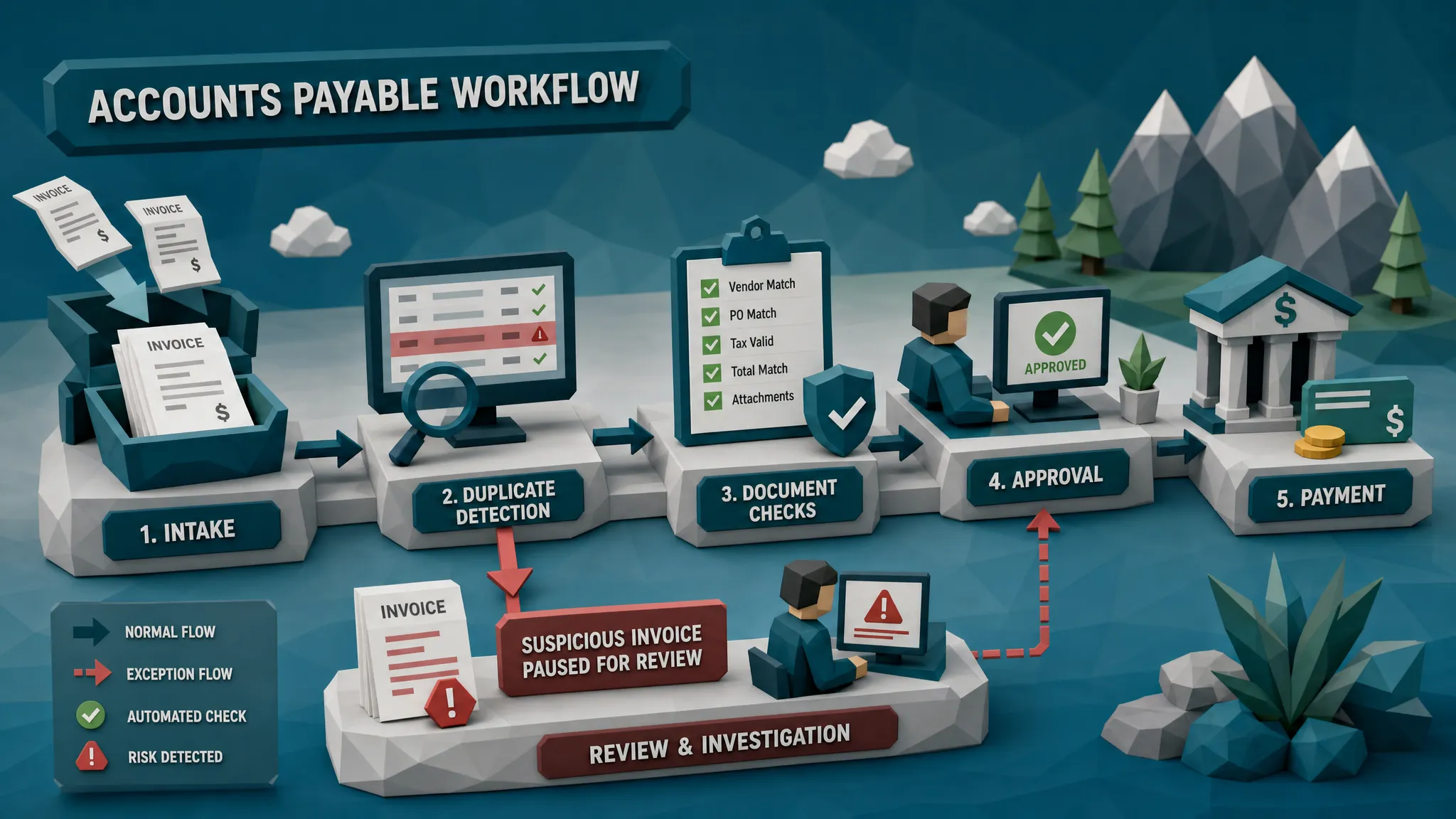
If I were designing duplicate invoice detection from scratch, I would place the first serious check immediately after intake and before business approval. The invoice can still go through OCR, PO matching, coding, and routing. But before a human approver gets the “please approve” task, the system should already know whether this document resembles something seen before.
That checkpoint should compare more than invoice number and amount. It should compare the document itself, the supplier or claimant, the payment destination, the extracted fields, and the history of similar submissions.
Here is the practical sequence I like.
First, preserve the original file. Do not rely only on the extracted fields. If a PDF, scan, or photo gets flattened, renamed, or converted too early, you may lose the very clues that show manipulation.
Second, check for exact duplicates across open, approved, paid, and rejected invoices. A rejected invoice coming back with a tiny edit is often more interesting than a paid invoice returning unchanged.
Third, check for near-duplicates. Compare visual layout, line items, amounts, service periods, vendor details, receipt images, and file traits. The goal is not to accuse anyone. The goal is to show the approver, “We have seen something very similar before.”
Fourth, connect the duplicate signal to payment context. Has the bank account changed? Is the remit-to address new? Is the submitter different? Does the invoice match a known vendor relationship, or did it arrive through a strange channel?
Finally, route the invoice with evidence. Clean invoices should keep moving. Questionable invoices should enter an evidence lane where the reviewer can see why the item was flagged, what previous document it resembles, and what payment or metadata clues are involved.
This is how you stop duplicate detection from becoming a noisy nuisance. You make it specific.
The fraud angle: duplicates are often a test run
Duplicate invoices are not always fraud. Let’s be adults about that. Suppliers resend invoices. Email inboxes eat attachments. AP portals misfire. People make honest mistakes, usually while apologizing profusely and attaching the same PDF three more times.
But in fraud work, duplicates are often a test run. Someone wants to know whether your process notices repetition. If a small duplicate slips through, a larger one may follow. If an altered invoice passes because the invoice number changed, the fraudster learns your system trusts fields more than documents.
The broader payment fraud environment is not exactly relaxing, either. The FBI’s 2023 Internet Crime Report reported $2.9 billion in business email compromise losses. The Association for Financial Professionals has also reported that payments fraud attempts remain widespread across organizations. Duplicate invoices are one part of that ecosystem, especially when they pair with vendor impersonation, bank-detail changes, or fake supplier communications.
My hot take is that duplicate detection should be treated as a fraud control, not just an AP cleanup control. Cleanup controls recover errors. Fraud controls interrupt behavior before money moves.
Why pre-approval detection helps approvers, not replaces them
Some finance teams worry that adding checks before approval will slow everything down. Fair concern. Nobody wants to turn AP into airport security for PDFs.
The trick is to avoid sending every invoice to manual review. The checkpoint should let low-risk invoices pass quickly and interrupt only the ones with meaningful evidence. If a monthly rent invoice looks similar to last month’s rent invoice, that is probably normal. If a repair invoice looks like one paid last quarter but the date, total, and bank details have shifted, that is worth pausing.
Good duplicate invoice detection should give approvers context before they click. It should not just say “risk score 82” and then wander off like a mysterious fortune cookie. It should show the prior matching document, the overlapping fields, the visual similarity, and any payment-context changes.
That evidence changes the approval conversation. Instead of asking a manager to remember whether they saw a similar invoice three months ago, we show them the match. Instead of relying on intuition, we give them something concrete.
Approvers do not need more work. They need better warnings.
The claims and expense version of the same problem
Although AP gets most of the duplicate invoice attention, insurers and expense teams deal with the same pattern.
In insurance claims, a repair invoice can be reused across multiple claims, edited to inflate a payout, or paired with manipulated photos. In health or warranty claims, the same supporting bill may appear with slightly different dates or claimant information. In employee expenses, duplicate receipts are a classic move because the amounts are often small enough to avoid scrutiny.
The workflow lesson is the same: screen before approval or payout authorization. Once a claims adjuster, expense manager, or AP approver signs off, the duplicate has momentum.
For insurers, this matters because document fraud is increasingly tied to digital manipulation. The FBI estimates insurance fraud costs the U.S. more than $40 billion per year, excluding health insurance, and adds hundreds of dollars to family premiums through higher costs, according to its insurance fraud overview. Duplicate and recycled invoices are not the whole fraud picture, but they are a very common piece of the paper trail.
The boring document is often where the exciting fraud hides. I wish that line were less true. It is not.
What “good” duplicate invoice detection looks like
A useful system should find exact duplicates, near-duplicates, and suspicious repeats across business units, vendors, projects, claims, and employees. It should work on the document as submitted, not only the fields extracted from it. It should understand that “same invoice, slightly edited” is often more important than “same invoice number.”
It should also reduce false positives by considering context. Recurring invoices, subscriptions, retainers, and staged project billing can look repetitive for legitimate reasons. The difference is in the details: service period, contract terms, line items, payment destination, submitter behavior, and whether the document file itself shows signs of editing.
Most importantly, the system should act early. If the first serious duplicate check happens after approval, you have already given the invoice credibility. If it happens before approval, the approver can make a better decision the first time.
That is the whole game.
Where Docklands AI fits
Docklands AI is built for the awkward middle ground where invoices and receipts look real enough to pass ordinary review, but still carry signals of manipulation, repetition, or payment risk.
For duplicate invoice detection, that means checking more than whether two fields match. Docklands AI analyzes invoices and receipts for signs of tampering, Photoshop-style edits, generated documents, metadata issues, mathematical irregularities, physical manipulation, and duplicate or near-duplicate patterns. It also uses payment information from the claim, expense, or payment workflow to build a deeper fraud picture.
That last part matters. A duplicate-looking document is more useful when we know what payment it is trying to trigger, who submitted it, and whether the payment details fit the history.
Docklands AI can integrate through APIs and webhooks, so teams can place document checks before approval without ripping out their existing AP, claims, or expense systems. The goal is simple: let clean documents keep moving, and pause suspicious ones with evidence before they become approved liabilities.
Frequently Asked Questions
What is duplicate invoice detection? Duplicate invoice detection is the process of identifying invoices or receipts that have already been submitted, approved, paid, rejected, or reused in another workflow. Modern detection should include exact matches, near-duplicates, document similarity, metadata, payment context, and vendor or claimant history.
Why should duplicate invoice detection happen before approval? Pre-approval detection gives approvers risk context before they authorize payment. Once an invoice is approved, it becomes harder to challenge because the workflow has already created trust around it.
Can OCR detect duplicate invoices? OCR can help by extracting invoice numbers, dates, amounts, and vendor names, but OCR alone is not enough. It can miss edited PDFs, changed invoice numbers, reused document images, altered payment blocks, and near-duplicates that look different in extracted fields but similar in the original file.
How do you avoid false positives with recurring invoices? The key is context. Monthly rent, subscription, and retainer invoices may look similar for legitimate reasons. A good review compares service periods, line items, payment details, file history, vendor behavior, and prior submissions before escalating.
Does duplicate invoice detection matter outside accounts payable? Yes. Insurance claims, warranty claims, health insurance bills, and employee expenses all face duplicate and recycled document risk. The same receipt or invoice can be reused, cropped, edited, or submitted under a different claim or employee profile.
Put the checkpoint where it belongs
If your duplicate invoice detection starts after approval, you are asking the last line of defense to do the first line’s job. That is unfair to AP, unfair to approvers, and very convenient for anyone testing your controls.
Docklands AI helps teams detect duplicate, altered, manipulated, and AI-generated invoices and receipts before approval or payout. If you want to see how document forensics and payment-context checks can fit into your workflow, request a demo with Docklands AI.
Request a Demo Today!
Book your demo below.


