


Fake Invoice Fraud Thrives When Teams Trust the PDF
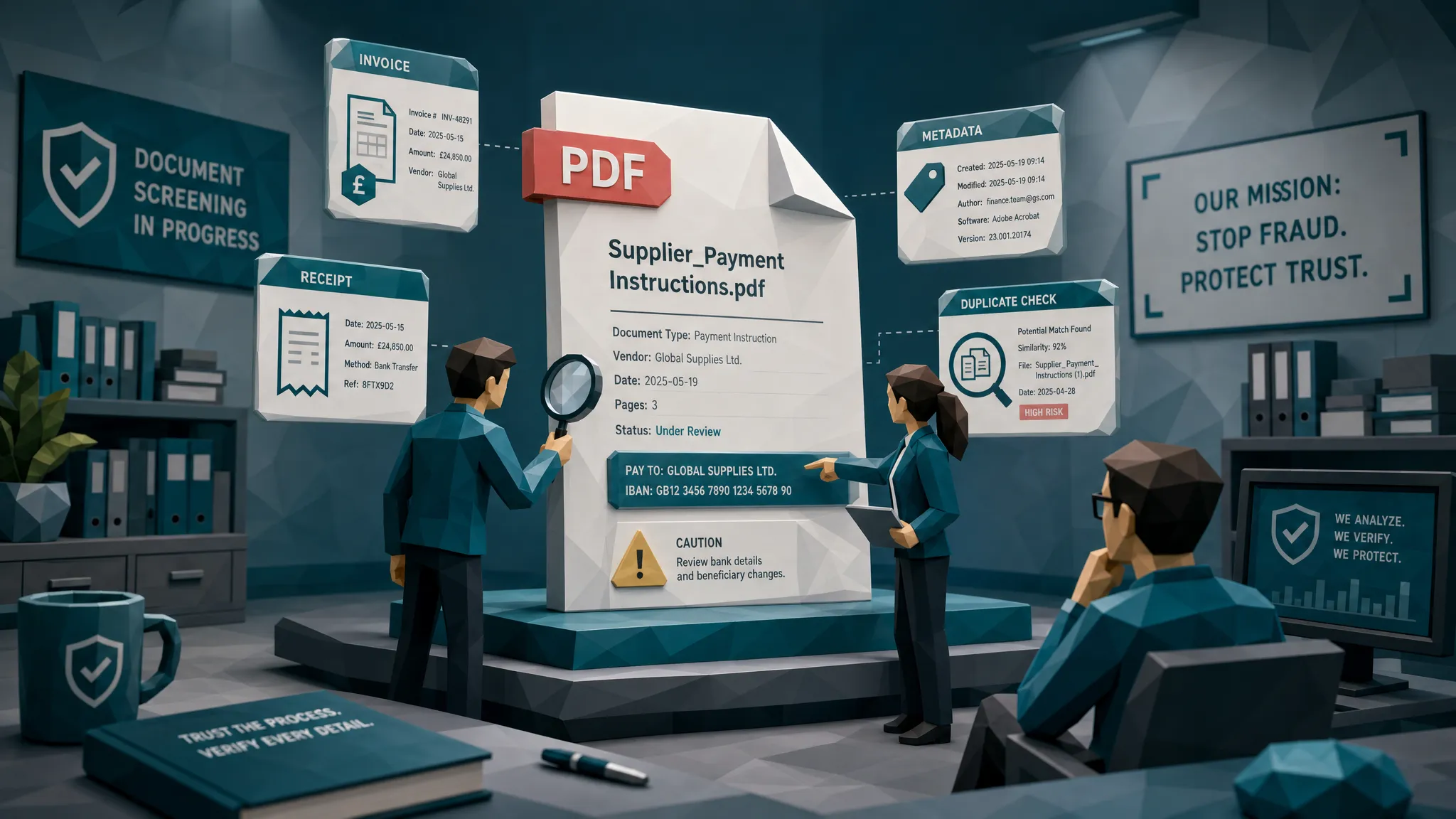

I have a confession from a decade of reviewing questionable invoices: I do not trust PDFs.
I respect them. I process them. I understand why teams love them. But trust them? No. A PDF is packaging. Sometimes it contains a genuine invoice. Sometimes it contains a well-dressed lie with a logo, a subtotal, and just enough confidence to stroll through accounts payable like it owns the place.
That is the uncomfortable truth behind fake invoice fraud. It thrives when finance, claims, and expense teams treat the PDF itself as proof. Fraudsters know this. They do not need to hack your ERP if they can hand your team a file that looks official during a busy Friday payment run.
Years ago, I reviewed a contractor invoice that had passed intake, matching, and a manager approval. The PDF looked boring, which is exactly what made it dangerous. The logo was fine. The layout was fine. The line items were dull enough to induce a nap. But the remittance box had been pasted over the original payment details. The fake part was not dramatic. It was a tiny rectangle of fraud in a very respectable suit.
Why PDFs feel safer than they are
The PDF has become the business world’s trust costume. It feels final. It feels locked. It feels like someone exported it from a system, which our brains translate into, “Probably legitimate.”
That feeling is a control weakness.
A PDF can be made from a real invoice, an edited screenshot, a scanned paper document, a phone photo, a fake template, or a generated document that never came from a vendor at all. By the time it lands in an AP inbox or claims portal, it often has the same file extension as every legitimate document in the queue.
And because PDFs are so common, reviewers often stop asking where the document came from. They ask whether the fields are readable. They ask whether the invoice number exists. They ask whether the approver recognizes the project. Those are useful questions, but they are not enough.
The better question is: what does this PDF prove, and what does it merely claim?
The fraudster’s favorite trick: make it look routine
Fake invoice fraud rarely announces itself with a cartoon villain laugh. The more effective version looks painfully ordinary.
A fraudulent invoice may borrow a real vendor’s branding, change the bank details, inflate a total, reuse an old invoice number with slight changes, or attach a receipt that has been edited just enough to fit a policy or claim. In insurance, the same pattern shows up as repair invoices, medical bills, hotel receipts, and replacement purchase documentation. In employee expenses, it shows up as clean meal receipts, rideshare receipts, and hotel folios that look like they came straight from the vendor.
The numbers make the complacency expensive. The FBI notes that insurance fraud imposes major costs on consumers and insurers, and business payment fraud remains a persistent problem for finance teams. The Association for Financial Professionals Payments Fraud and Control Survey has repeatedly shown how frequently organizations are targeted through payment-related schemes.
Here is my hot take: most teams are not under-trained. They are over-conditioned. They have been trained by workflow tools to believe that if a document is readable, matched, routed, and approved, then it is probably safe.
That is how fraud gets a badge.
OCR can read the lie perfectly
One of the most common traps I see is the belief that invoice scanning or OCR makes fraud less likely. It can help with data capture, absolutely. It can pull the vendor name, invoice number, date, total, and tax. It can speed up processing. I like speed as much as the next person who has watched an AP backlog grow teeth.
But OCR does not know whether the document is honest. It can extract fake data beautifully.
If a fraudster changes a bank account number in a PDF, OCR may capture the new number without complaint. If someone edits the total from $1,480 to $4,180, OCR can read the inflated amount just fine. If an invoice is entirely fabricated but formatted neatly, OCR may reward the fraudster with clean structured data.
That is why fake invoice fraud is not solved by reading the PDF faster. You need to challenge the document before the payment instruction becomes reality.
The PDF is evidence, but only if you preserve the clues
A document has a history. It may contain metadata, creation timestamps, software traces, edit patterns, image compression artifacts, and visual inconsistencies. A paper invoice photographed on a phone has different fingerprints than a digitally exported vendor invoice. A screenshot pasted into a PDF has different clues than an original file.
The problem is that many workflows accidentally erase those clues.
I have seen teams standardize every inbound file into a new PDF, strip metadata, compress images, and then ask fraud reviewers to determine authenticity from the cleaned-up version. That is like washing muddy shoes before checking whether someone walked through the crime scene. Tidy, yes. Helpful, no.
If your process transforms every document at intake, preserve the original file somewhere secure. For claims teams and AP teams, that one habit can make later review much more useful.
A legitimate PDF can still look “too digital”
We also need to be fair. Not every crisp, modern, digitally generated document is suspicious. A real provider can issue a simple digital receipt. A legitimate health service can produce invoices or reimbursement documentation from an online platform. For example, a member might submit documentation related to insurance-covered personal training and nutrition coaching that looks different from a traditional clinic invoice.
That is why I dislike lazy fraud rules like “looks too clean” or “PDF was created online.” Those rules punish legitimate digital businesses and frustrate good customers, vendors, and employees.
The answer is not to distrust every digital document. The answer is to compare the document to its context. Who submitted it? Who should be paid? Does the payment destination make sense? Does the timing match the claim, job, purchase order, or trip? Does the document behave like other documents from the same source?
A PDF is one witness. Never let it be the whole jury.
What I check before I care about the logo
When I review a suspicious invoice, the logo is usually the least interesting part. Logos are easy to copy. Templates are easy to mimic. What matters is whether the document, payment details, and surrounding story agree with each other.
These are the questions I want answered before money moves:
- Does the payee match the vendor, claimant, employee, policy, purchase order, or service history?
- Did bank details or remittance instructions change late in the process?
- Do totals, taxes, discounts, and line items reconcile without convenient rounding or strange arithmetic?
- Does the file history make sense for how the document was supposedly created?
- Have we seen the same or similar invoice, receipt, image, or template before?
That last question is underrated. Duplicate and near-duplicate documents are a quiet engine of payment leakage. The fraudster may change a date, crop a corner, alter a total, or submit the same underlying receipt across different claims or expense reports. A human reviewer staring at one PDF in isolation will often miss it.
Where teams accidentally create false confidence
Fake invoice fraud loves busy workflows. Month-end close, catastrophe claims spikes, system migrations, and high-volume expense periods all create the same condition: reviewers are pressured to move the queue.
In those moments, teams lean harder on approvals. The logic sounds reasonable: “The manager approved it,” or “The adjuster accepted the estimate,” or “The vendor is already in the master file.”
Approvals matter, but they are not forensic checks. A manager may know the project happened without knowing the invoice was altered. An adjuster may know the loss occurred without knowing the repair invoice was manipulated. A vendor may be legitimate while a single payment request is not.
The FBI’s 2023 IC3 report shows how costly business email compromise and payment diversion can be. Those schemes often work because the payment request looks familiar enough to avoid friction. In other words, fraud does not always need a fake vendor. Sometimes it only needs a real vendor’s name and a changed destination.
The “looks okay” review is dead
I know that sounds harsh. I have said “looks okay” myself. Usually while drinking bad office coffee and trying to clear a queue before a long weekend.
But as a control standard, “looks okay” is finished.
Fraud documents have become too easy to create, edit, and polish. A reviewer may catch a sloppy paste job, a bad font match, or an obvious arithmetic error. But the average reviewer should not be expected to spot pixel-level edits, metadata conflicts, hidden duplicates, or a synthetic receipt in five seconds between Slack messages.
The better model is evidence-led review. Clean documents should keep moving. Suspicious documents should be routed with specific reasons, not vague anxiety.
A useful alert should say something like: “Bank details differ from prior vendor invoices,” “metadata shows editing software after invoice creation,” “same receipt image appeared in another expense report,” or “subtotal and tax calculation do not reconcile.” That gives a reviewer something to investigate. A generic “high risk” score without evidence just creates arguments.
A better workflow for stopping fake invoice fraud
You do not need to turn AP or claims into a crime lab. You do need to stop treating document authenticity as an afterthought.
A practical workflow looks like this:
- Preserve the original file at intake: Keep the uploaded invoice, receipt, image, or PDF before conversion, compression, or OCR processing changes it.
- Screen documents before approval or payment: Check for digital manipulation, metadata anomalies, mathematical irregularities, duplicates, and physical alteration signs before the document gains workflow credibility.
- Compare findings to payment context: A suspicious edit matters more when it touches payee details, totals, dates, bank instructions, or claim reimbursement information.
- Route exceptions with evidence: Send reviewers the specific issue, the affected field or region, and the relevant payment or document history.
- Feed outcomes back into controls: If a fraud pattern repeats, update your intake rules, vendor verification steps, claims triage, or expense policies.
This is not about slowing every payment. It is about refusing to let a polished PDF skip the line.
What this means for AP, claims, and expense teams
For accounts payable, the biggest risk is often payment legitimacy. The invoice may reference a real project, a real vendor, or a real purchase order. The fraud lives in the remittance detail, the duplicate submission, the inflated amount, or the vendor impersonation.
For insurance claims, the risk is evidence legitimacy. A real loss can still contain an inflated invoice. A real treatment can still have altered billing support. A real repair can still be paired with a recycled or edited receipt. The claim being plausible does not make every document inside it clean.
For employee expenses, the danger is volume and social trust. Most employees are honest. Some are opportunistic. A few are creative in ways that would be impressive if they were not reimbursable. The ACFE Report to the Nations consistently reminds us that occupational fraud is costly and often continues longer than teams expect.
Across all three workflows, the mistake is the same: reviewing the PDF as a static image instead of a piece of evidence connected to money.
How Docklands AI approaches the problem
Docklands AI is built for the moment when a PDF looks normal but the underlying evidence deserves a harder look.
The platform analyzes invoices and receipts for signs of manipulation, including photoshopped edits, AI-generated documents, metadata issues, mathematical irregularities, physical manipulation, and duplicate patterns. More importantly, Docklands uses payment information from the claim, expense, or payment workflow to build a deeper fraud picture than a simple “does this image look real?” check.
That context matters. A visual edit near a footer is interesting. A visual edit near bank details or invoice totals is urgent. A duplicate receipt is suspicious. A duplicate receipt tied to a new claimant, employee, or payment destination is much more suspicious.
Docklands AI also supports API and webhook integration, reporting and analytics, executive dashboards, multiple users and projects, and security controls such as 2FA. The goal is not to replace your AP platform, claims system, or expense tool. The goal is to add a fraud detection layer where the document is still available, the payment has not gone out, and reviewers can act on specific evidence.
Frequently Asked Questions
What is fake invoice fraud? Fake invoice fraud happens when a person or group submits a fabricated, altered, duplicated, or impersonated invoice to trigger payment. It can involve fake vendors, changed bank details, inflated amounts, edited PDFs, reused invoices, or documents generated from templates.
Why are PDFs risky in invoice fraud? PDFs feel official, but they can be created from almost anything: screenshots, scans, edited images, templates, or generated files. If teams trust the format without checking authenticity, a convincing PDF can move through workflows like a legitimate invoice.
Can OCR detect fake invoice fraud? OCR can extract text from invoices, but it usually does not prove whether the document is genuine. It may accurately read a manipulated total, fake vendor name, or altered payment instruction. OCR helps with processing, but fraud detection requires document and payment-context checks.
What are common signs of a fake invoice PDF? Common signs include inconsistent fonts, pasted payment fields, metadata that conflicts with the document story, strange math, duplicated invoice layouts, late bank-detail changes, unusual submitter behavior, and mismatches between the payee and known vendor or claim history.
How can teams reduce false positives when reviewing suspicious PDFs? Avoid relying on one clue. A clean PDF is not proof of innocence, and a strange-looking PDF is not proof of fraud. Combine visual evidence, metadata, math checks, duplicate detection, and payment context so reviewers see a clear reason for escalation.
Stop letting the PDF do the talking
If there is one habit I would change tomorrow, it is this: stop asking whether the PDF looks official, and start asking whether the evidence holds together.
Fake invoice fraud succeeds when the file format creates comfort. Docklands AI helps teams break that habit by screening invoices and receipts for manipulation, synthetic documents, metadata problems, math issues, duplicates, and payment-context mismatches before money leaves the business.
If your AP, claims, or expense workflow still treats a polished PDF as enough proof, it may be time to add a fraud checkpoint. Explore Docklands AI and see how document-level fraud detection can fit into the systems your team already uses.
Request a Demo Today!
Book your demo below.


