


How Fraudulent Claims Use Altered Invoices and Receipts


Fraudsters rarely start by arguing with your policy terms. They start by “proving” a loss with paperwork.
In 2026, altered invoices and receipts have become one of the most scalable ways to monetize fraudulent claims, because a single edited document can change the outcome of coverage verification, damage assessment, and payment authorization. And with consumer-grade editing tools and generative AI, creating a believable invoice no longer requires design skills.
Industry estimates commonly place insurance fraud at 8 percent to 12 percent of claims, with hundreds of billions lost globally each year. A meaningful share of that risk is enabled by documents that look normal in a quick review, pass OCR capture, and match “reasonable” dollar ranges, while still being manipulated.
This article explains how fraudulent claims commonly use altered invoices and receipts, what patterns show up in the documents, and how claims and fraud teams can screen evidence at scale without slowing down clean claims.
Why invoices and receipts are high-leverage tools in fraudulent claims
Invoices and receipts sit at a privileged point in the claims lifecycle. They do three things that free-text explanations and photos of damage often cannot:
- They translate a story into a number (the reimbursable amount).
- They supply vendor identity (who did the work, who got paid).
- They imply timing (when the service happened, whether it fits the loss event).
If a fraudster can manipulate one document, they can often shift multiple downstream decisions: coverage validation, reserve setting, triage routing, and payment value.
What “altered” means in a claims context
In claims, “altered” usually falls into four buckets. The distinction matters because each requires different detection signals.
1) Digitally edited documents (Photoshop, PDF editors, mobile apps)
Common edits include changing totals, adding line items, swapping dates, replacing the vendor logo, or modifying tax and labor rates. Fraudsters often preserve the overall layout so the document feels familiar to an adjuster.
2) Physically manipulated paperwork (scan, print, re-scan)
A paper receipt can be changed with handwriting, correction tape, or reprinting sections, then photographed in a way that hides inconsistencies. This is common when the submission channel accepts images from mobile devices.
3) Synthetic or AI-generated invoices and receipts
These are created from scratch, often using templates and “realistic” business details. They may look clean, but they frequently lack the natural imperfections of real-world documents, or they repeat design motifs across unrelated claims.
4) Genuine documents used dishonestly
Sometimes the document is real, but the claim use is not. Examples include submitting an old receipt as if it were new, reusing a contractor invoice across multiple claims, or claiming reimbursement for non-covered items by re-labeling line items.
How fraudulent claims typically use altered invoices and receipts
Most document-driven claims fraud follows a predictable set of goals. Understanding these goals helps your team know what to look for.
Inflating the claim value without changing the overall narrative
A frequent pattern is “same story, bigger number.” The insured keeps the incident description consistent, but tweaks documentation to raise payout.
What gets changed most often:
- Total amount due
- Quantity and unit prices
- Labor hours or labor rate
- Parts replaced (especially high-margin items)
- “Emergency” or “after-hours” charges
The fraudster’s intent is to stay inside plausibility ranges while pushing the payout above what would have been reimbursed.
Backdating or forward-dating to fit coverage windows
Dates are powerful in claims decisions. A subtle change in the invoice date can:
- Make a loss appear to occur within the policy period
- Make a repair appear to occur after the incident (supporting causation)
- Create the appearance of urgency (justifying a premium contractor price)
Fraudsters often change only one date field and leave other time signals inconsistent, such as file creation time, photo timestamp, or sequence of invoice numbers.
Vendor impersonation to legitimize a made-up expense
Fraudsters commonly pick real vendors (or realistic-sounding ones) to reduce scrutiny. The document may display:
- A known logo and address
- A realistic phone number format
- Industry-standard terms and line items
But the payment destination or contact details do not match the real business, or the invoice format is subtly different from that vendor’s normal branding.
Reusing or “recycling” documentation across multiple claims
Duplicate and near-duplicate receipts appear in:
- Multi-claim events (storms, regional catastrophes)
- Warranty and service claims
- Networks where third parties file claims at scale
Fraudsters will reuse the same base receipt and make small edits to name, date, or total. This defeats manual spotting and simple “exact match” duplicate checks.
Claim splitting and bundling
Two opposite tactics are common:
- Splitting: one real receipt becomes multiple smaller receipts to stay under review thresholds.
- Bundling: multiple unrelated charges get consolidated into one invoice that looks like a single job.
Both tactics exploit operational rules more than policy language.
Why traditional document checks often fail
Many claims organizations still rely on combinations of:
- OCR extraction (read fields, compare values)
- Rules and thresholds (amount limits, merchant categories)
- Manual review and spot checks
- Predictive fraud models based on structured claim data
These controls can be valuable, but altered invoices and receipts exploit a gap: a document can be internally consistent as text while being inauthentic as evidence.
Typical failure modes include:
- OCR reads the changed total correctly, which makes the altered amount look “verified.”
- Rule thresholds catch only extreme values, not subtle inflation.
- Manual reviewers are time constrained and may only inspect a few cues.
- Predictive models may not see any risk if the claimant profile looks normal.
To close the gap, you need a document integrity layer that evaluates whether the file itself shows signs of manipulation.
The most common manipulation patterns in altered invoices and receipts
Below are patterns that show up repeatedly in claim documents. Individually they are not proof of fraud, but together they are strong triage signals.
Visual and layout inconsistencies
Alterations often leave behind small visual artifacts:
- Mixed font families or font rendering differences within the same line
- Misaligned baselines (one number sits slightly higher than neighbors)
- Inconsistent kerning or spacing around edited values
- Edges around text that look sharper or blurrier than the rest of the document
- Compression differences in a single region (a “patch” that re-encoded differently)
These are hard to spot reliably at speed, especially across millions of documents.
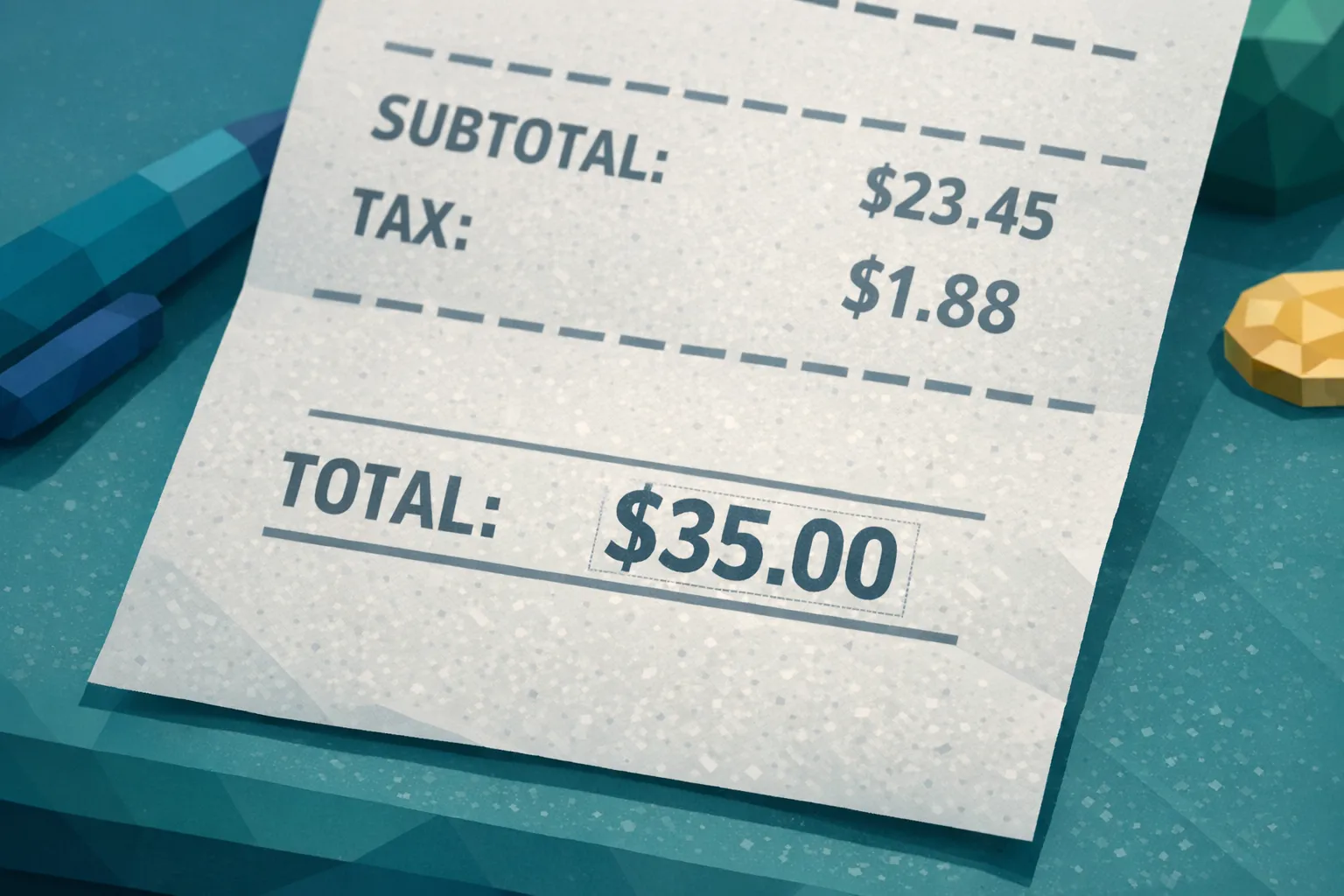
Mathematical irregularities
When someone edits a total, they often forget that invoices are math-heavy documents:
- Subtotals do not equal the sum of line items
- Tax does not match jurisdiction or implied tax rate n- Discounts apply inconsistently
- Labor hours multiplied by rate do not equal the labor line amount
Math checks are especially useful because they are content-agnostic and fast to compute.
Metadata and provenance anomalies
Invoices and receipts frequently come in as images and PDFs, both of which can carry metadata. Useful signals include:
- Evidence of editing software
- Creation timestamps that conflict with the claim timeline
- Missing metadata when the submission channel typically preserves it
- Device patterns that repeat across unrelated claimants
Metadata is not always present or trustworthy, but when it is available it can quickly raise or lower risk.
Physical manipulation signs in photos
When documents are photographed, physical clues matter:
- Unnatural shadows around altered areas
- Uneven lighting that makes one section look “pasted”
- Reflections or wrinkles that disappear near key fields
- Repeated background textures across supposedly different photos
These often indicate print-edit-rescan or “edit on screen then photograph” behaviors.
The critical step many teams miss: connecting documents to payment context
A manipulated invoice is rarely the whole story. The most effective claim fraud detection connects the document to how money would move.
High-signal questions include:
- Does the vendor identity on the invoice match the payment destination?
- Is the bank account or payout method linked to multiple claimants?
- Do multiple claims route funds to the same beneficiary?
- Does the claimant’s stated payment method align with the invoice terms?
This is where many “is this image real” checks fall short. The strongest approach combines document forensics with payment and entity context to build a deeper fraud picture and improve accuracy.
A practical workflow to reduce altered-document risk without slowing clean claims
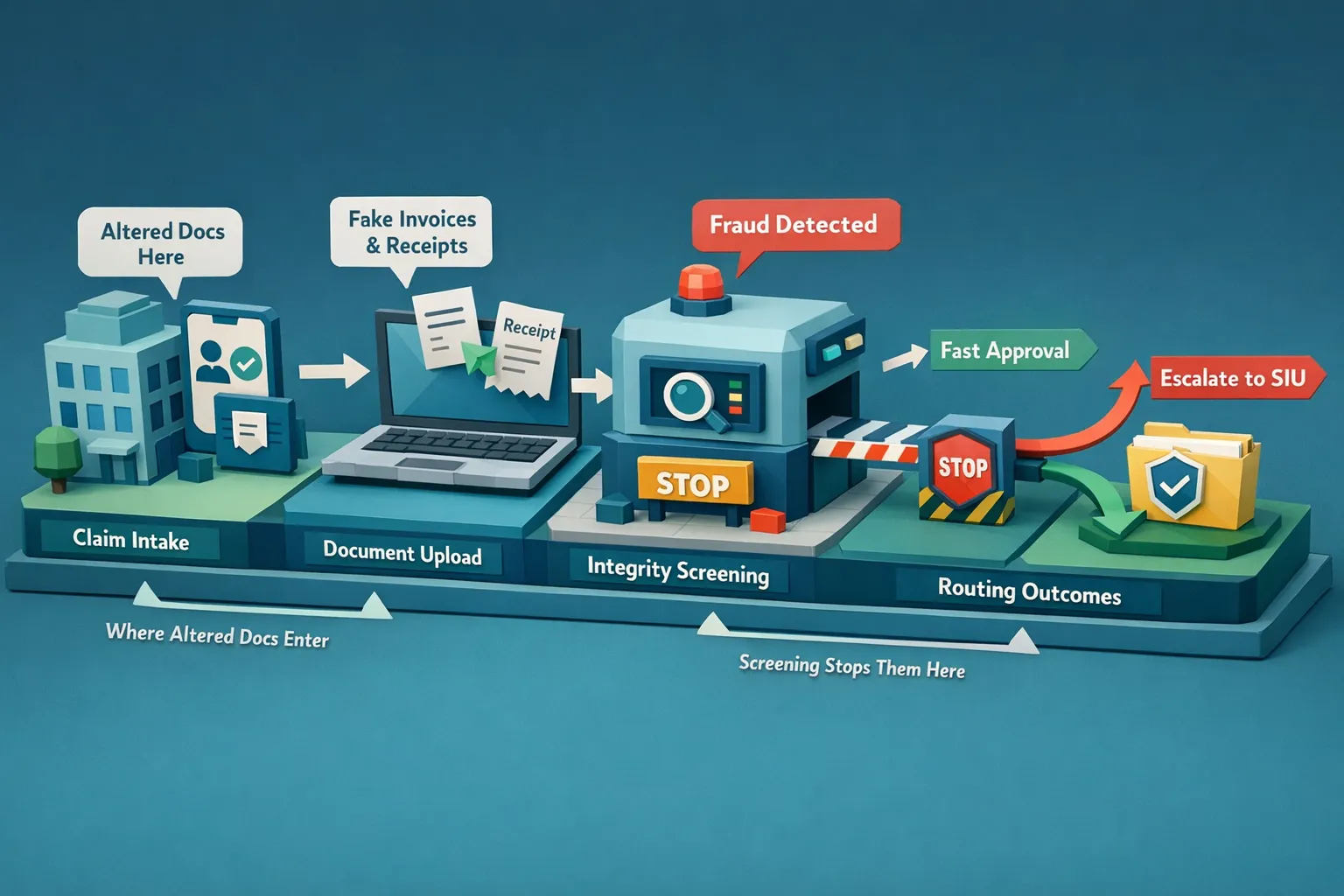
You do not need to turn every adjuster into a forensic analyst. You need a consistent workflow that screens every document, routes only the risky ones, and preserves evidence.
1) Screen invoices and receipts at intake, not after adjudication
Run document integrity checks as soon as supporting documents enter your claim system. Early screening prevents rework and stops questionable payments before reserves become commitments.
2) Use confidence-scored triage, not binary pass or fail
Alteration detection should produce evidence and a confidence score so you can:
- Fast-track low-risk claims
- Route high-confidence anomalies to SIU or a dedicated review queue
- Leave a paper trail for audit and dispute handling
3) Preserve the original files and evidence artifacts
Store the original upload plus any forensic evidence outputs. This improves repeatability in investigations and supports defensible decisioning.
4) Close the loop with training and consistent reviewer decisions
Even with automation, people make the final call. Training helps reviewers interpret evidence consistently.
One effective tactic is scenario-based practice that mirrors real claim interactions, including objections and escalation decisions. Tools like AI roleplay training can help claims, fraud, and contact center teams rehearse difficult conversations and standardize handling when documentation looks manipulated.
Where Docklands AI fits for fraudulent claim document screening
Docklands AI is designed to detect photoshopped, manipulated, and AI-generated invoices and receipts using AI and forensic analysis. It is built for workflows where you need speed, scale, and evidence.
Key capabilities that matter in claims operations include:
- AI-generated document detection to flag synthetic invoices and receipts
- Photoshop and tampering detection for common edit patterns
- Metadata forensics analysis to surface provenance and timeline anomalies
- Mathematical irregularity checks to catch edited totals and inconsistent calculations
- Physical manipulation detection for photographed paperwork
- Real-time reporting and analytics plus executive dashboards for oversight
- API and webhook integration to fit into existing claim intake and payment flows
- Multiple user and project support for teams, regions, and third-party administrators
- 2FA security for operational access control
Importantly for claims, Docklands can also use the payment information on a claim to build a deeper fraud picture, improving accuracy compared to document-only “real or fake” checks.
Common misconceptions that create blind spots
“Our adjusters would notice a fake receipt.”
Some will, sometimes. The operational reality is that high-volume environments reward speed, and modern manipulations are subtle. Fraudsters optimize for “good enough to pass in 30 seconds.”
“We already have OCR validation.”
OCR answers, “What does the document say?” not, “Was the document altered?” If the text was changed, OCR will faithfully extract the changed values.
“We only see this in rare cases.”
Altered documentation is often undercounted because it is hard to measure what you do not detect. Screening coverage is what turns anecdotes into visibility.
Frequently Asked Questions
What are the easiest invoice fields for fraudsters to alter in a claim? Totals, dates, and line items are the most common because they directly influence payout and can be edited without changing the entire layout.
Can a real invoice still be used for a fraudulent claim? Yes. Reuse, recycling across claims, or submitting a legitimate receipt for a non-covered purpose are common patterns. Authenticity and legitimacy are separate questions.
Do metadata checks always work? No. Metadata can be stripped or altered, and some systems remove it during upload. Metadata is best used as one signal within a broader forensic approach.
Why doesn’t OCR catch altered receipts and invoices? OCR is designed to extract text, not validate integrity. If the number was edited convincingly, OCR will extract the edited value correctly.
What should a claims team do when a document is flagged as manipulated? Quarantine the payment, preserve the original file, route the claim to a defined review path (adjuster lead or SIU), and document the specific evidence signals supporting the escalation.
Will screening every document slow down claim handling? It should not if the process is automated and used for triage. The goal is fast-pass for clean claims and focused effort on a smaller set of high-risk submissions.
Reduce altered-document risk before it becomes payment leakage
If altered invoices and receipts are enabling fraudulent claims in your portfolio, the highest-impact move is adding a document integrity checkpoint early in the workflow, before approval and payout.
Docklands AI helps claims, AP, and expense teams detect manipulated and AI-generated documents with pixel-level forensics, metadata analysis, and mathematical checks, and it can incorporate payment information to improve accuracy.
Explore Docklands AI at docklands.ai to see how document screening can fit into your current intake and payment process.
Request a Demo Today!
Book your demo below.


