


Invoice Workflow Software Has a Blind Spot for Tampering
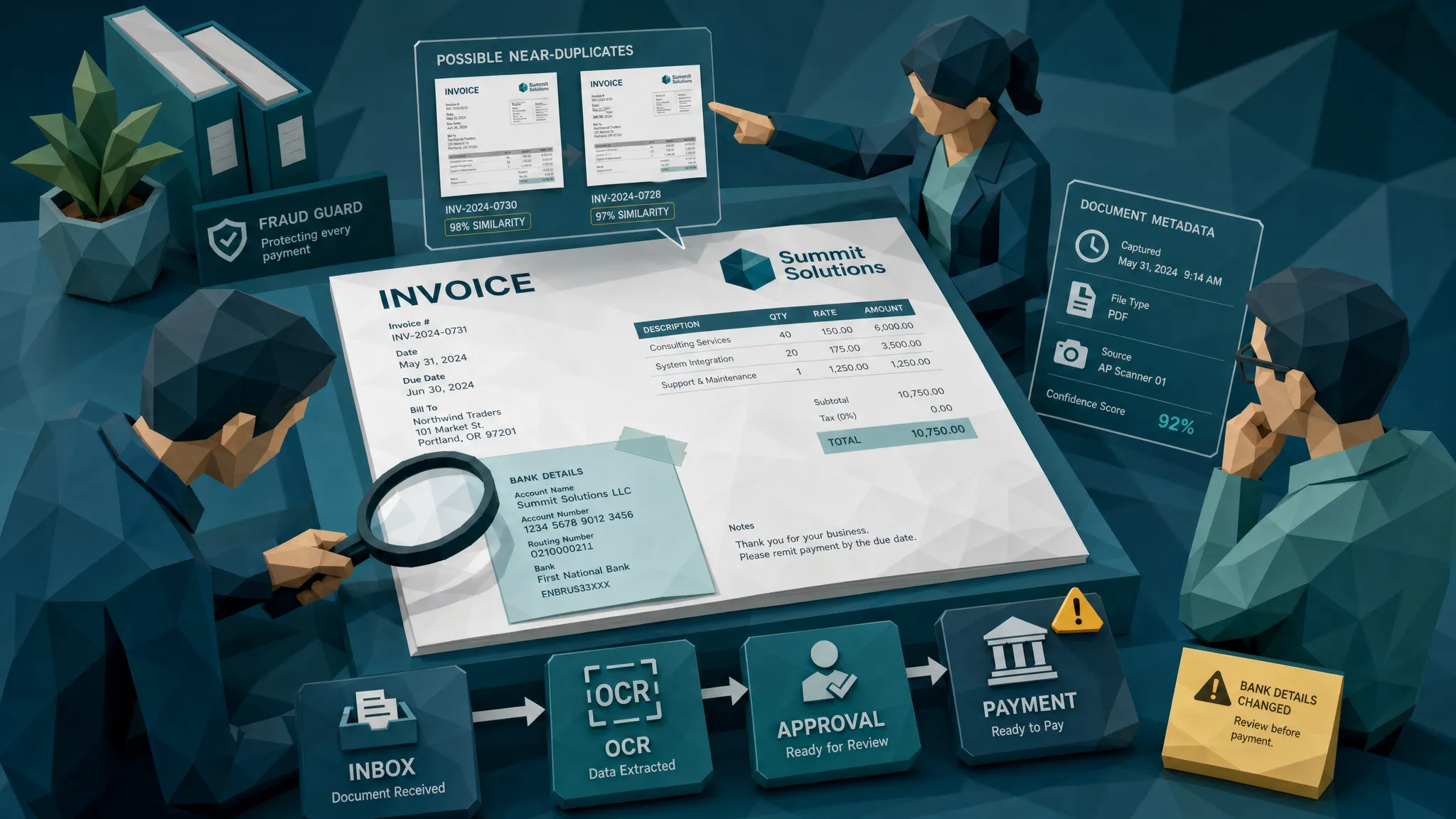

My hot take after a decade around fraud teams: most invoice workflow software is excellent at moving invoices and surprisingly bad at distrusting them.
That is not an insult. Workflow tools were built to get invoices out of inboxes, into approval queues, matched to purchase orders, and paid on time. Lovely. Necessary. Very corporate. But tampering does not politely announce itself in the approval trail. It hides in the original file, the pixels, the metadata, the math, the payment details, and sometimes in the quiet confidence of a PDF that looks a little too perfect.
The problem is simple: once a tampered invoice is converted into clean workflow data, the fraud has already been laundered into the system.
The workflow is usually doing exactly what you bought it to do
Invoice workflow software is meant to reduce chaos. It centralizes intake, extracts fields, routes approvals, tracks status, handles exceptions, and gives AP managers a fighting chance at month-end close without turning into a caffeine-powered raccoon.
I like these systems. I have seen them save teams from shared inbox purgatory. A good workflow tool makes it clear who approved what, when payment is due, whether a PO exists, and which invoices are stuck in limbo.
But here is the catch: workflow software usually treats the invoice as a business object. Fraud investigators treat it as evidence.
Those are very different mindsets.
A workflow asks, “Does this invoice have the right vendor, amount, approver, PO, and payment path?”
A fraud review asks, “Can we trust the document that produced those fields?”
That second question is where many AP, claims, and expense workflows get thin.
The blind spot: tampering happens before the workflow starts
Most invoice workflow software begins its job after a document has arrived. By then, the invoice may already have been edited, regenerated, photographed, compressed, renamed, flattened, or stripped of useful file history.
The workflow captures the total. It reads the invoice number. It assigns a coding category. It routes to a manager. Everyone sees a neat record.
Meanwhile, the original document may contain clues that never make it into the workflow record, such as mismatched fonts, pasted payment blocks, suspicious compression patterns, inconsistent timestamps, impossible tax math, or signs that the same receipt was reused with small edits.
I once reviewed a supplier invoice that had passed the normal approval chain. The vendor was real. The PO was real. The amount was believable. The approver recognized the project. The only problem was the bank account block, which had been pasted over the original remittance details. To a rushed approver, it looked like a normal vendor invoice. To a forensic review, it looked like a ransom note wearing a blazer.
The workflow had not failed at routing. It had failed at asking whether the routed document was intact.
Why OCR and approvals do not solve tampering
OCR is useful, but OCR is not a lie detector. It extracts text from a document. It does not reliably prove the document was not altered.
If someone changes a total from $4,800 to $8,400, OCR may read the new number perfectly. If someone swaps bank details, OCR may capture the new account cleanly. If someone generates a polished fake invoice, OCR may produce beautiful structured data from a completely false document.
Approvals have a similar limitation. Most approvers are checking business plausibility. They ask whether the work happened, whether the vendor is known, and whether the amount feels reasonable. They are not zooming into pixels, checking embedded timestamps, or comparing visual fingerprints against prior submissions.
And frankly, they should not have to. If your fraud control depends on a regional manager spotting a pasted bank field at 6:47 p.m. on a Friday, that is not a control. That is a prayer with an approval button.
The stakes are not theoretical. The FBI Internet Crime Complaint Center reported $2.9 billion in business email compromise losses in 2023, a category that often includes payment redirection and invoice-related fraud. The Association for Financial Professionals has also reported that most organizations continue to face payment fraud attempts. Fraudsters go where money moves, and invoice workflows move money very efficiently.
A clean workflow can make a dirty invoice look safer
This is the part that makes fraud teams twitch.
Once a suspicious invoice enters a smooth workflow, every successful step can create false comfort. The document was received through the normal channel. It matched a vendor. It was approved. It got coded. It appeared in the payment batch.
Each step feels like validation, but most of those steps validate process compliance, not document authenticity.
That is why I sometimes call invoice workflow software “the confidence machine.” It gives teams a tidy audit trail. But a tidy audit trail around a manipulated document still leads to the wrong bank account.
To be fair, workflow discipline matters. Regulated filing tools, for example, are designed around structured submission, validation, and secure transmission. If a business needs to file quarterly federal excise taxes, using an IRS-authorized e-file provider for Form 720 makes sense because the workflow is built around a specific compliance outcome. Invoice workflows need a similar respect for validation, but aimed at document integrity before payment.
What tampering actually looks like in invoice workflows
Tampering is rarely theatrical. The best fake invoices do not arrive with neon signs. They arrive looking boring, because boring gets paid.
In AP workflows, I most often see tampering fall into a few familiar patterns. A genuine invoice is edited to change the remittance details. A total is increased while line items are left mostly alone. A prior invoice is reused with a new date and invoice number. A fake supplier document is generated to look like a standard PDF. A receipt supporting an invoice is altered to inflate materials or labor. A photographed paper invoice has a physically changed total, then the photo is submitted as “proof.”
In insurance claims and warranty workflows, the same problem shows up through repair invoices, contractor receipts, replacement purchase documents, and reimbursement evidence. The claimant may have a legitimate loss, but the submitted paperwork is inflated, recycled, or edited. That nuance matters. Fraud is not always an entirely fake event. Sometimes it is a real event with a manipulated receipt attached.
That is exactly why document-level screening has to look beyond the fields.
The checks invoice workflow software should add
If I were advising an AP manager or claims operations lead, I would not tell them to rip out their workflow platform. That would be expensive, disruptive, and a great way to become unpopular before lunch.
I would add a tampering checkpoint that inspects the original document before the invoice becomes just another row in the payment queue.
A proper checkpoint should examine:
- Visual integrity, including signs of copied fields, inconsistent fonts, odd spacing, and image manipulation.
- Metadata and file history, including timestamps, software traces, device clues, and suspicious edits.
- Mathematical consistency, including subtotal, tax, discount, rate, and total logic.
- Duplicate and near-duplicate patterns, including recycled invoices or receipts with small changes.
- Payment context, including whether bank details, payees, claim details, or vendor behavior align with the document.
That last item is where many tools underperform. Looking at the image alone is useful, but payment context gives the signal teeth.
For example, a slightly odd PDF may not deserve escalation by itself. A slightly odd PDF with newly changed bank details, a first-time submitter, a vendor name that almost matches a known supplier, and an urgent payment request is a different creature entirely. That is the kind of bundle fraud teams care about.
Payment context is the missing layer
This is where Docklands AI has focused its approach. Docklands AI detects manipulated, photoshopped, and AI-generated invoices and receipts using forensic document analysis, but it also uses payment information from claims, expenses, or payments to build a deeper fraud picture.
That matters because fraud rarely lives in one field. It lives in the relationship between the document and the payment story.
A receipt can look acceptable until you compare the date to the claim timeline. An invoice can pass OCR until the bank details conflict with the vendor history. A contractor bill can seem ordinary until it matches a prior submission with only the total changed.
In my experience, the best fraud alerts are not the loudest. They are the most explainable. A reviewer should be able to see why something was flagged, what evidence supports the concern, and what action to take next. “High risk” is not enough. “Bank details changed, metadata indicates editing after submission date, and the invoice visually matches a prior document with a different total” is useful.
Where to place the checkpoint without slowing AP
The fear I hear from AP leaders is reasonable: “If we add more checks, will we slow down every invoice?”
You should not. A good tampering checkpoint should keep clean invoices moving and reserve human attention for the small percentage that deserve it.
The best placement is usually right after intake, while the original file is still available. That allows the system to preserve evidence before OCR, resizing, conversion, or workflow rendering strips away useful clues. A second check can be valuable before payment runs, especially when bank details, payee information, invoice amounts, or supporting documents have changed.
For claims and expense workflows, the same principle applies. Screen submitted receipts and invoices before reimbursement or payout, not after the money has left. Recovering funds later is possible in theory. In practice, it is slow, awkward, and about as fun as auditing a shoebox full of thermal receipts.
API and webhook integration matter here because the fraud checkpoint should fit inside the workflow you already use. Docklands AI is designed to integrate into existing workflows with API and webhook support, provide reporting and analytics, and give teams evidence-backed findings without forcing a wholesale process rebuild.
Questions to ask your invoice workflow software vendor
If you are evaluating invoice workflow software, ask fraud questions before you ask dashboard questions. Dashboards are lovely, but dashboards do not stop a doctored invoice from getting paid.
Ask whether the tool preserves the original file. Ask whether it analyzes the document image or only the extracted data. Ask whether it can detect metadata anomalies. Ask whether it compares near-duplicates, not only exact duplicates. Ask whether alerts include evidence a reviewer can understand. Ask whether payment details are part of the risk picture. Ask whether the system can pause only suspicious invoices while letting clean ones continue.
If the answer is “we use OCR and approval rules,” you have a workflow tool. You may not have a tampering control.
That distinction is the whole point.
Frequently Asked Questions
Can invoice workflow software detect tampered invoices? Some platforms can flag basic anomalies, but many focus on routing, OCR, approvals, and matching. Tampering detection requires document-level checks such as visual forensics, metadata analysis, math validation, duplicate detection, and payment-context review.
Why does OCR miss invoice fraud? OCR reads what is on the page. If a fraudster edits a total, bank account, date, or invoice number cleanly, OCR may extract the manipulated value without questioning whether the document was altered.
Where should tampering checks happen in the workflow? The strongest place is immediately after intake, before the original file is converted or flattened. A second check before payment is useful when payment details, vendor data, or supporting documents change.
Does adding fraud screening slow down invoice processing? It should not if the screening is risk-based. Clean invoices can continue through the normal workflow, while only evidence-backed exceptions are paused for review.
What is the biggest blind spot in invoice workflow software? The biggest blind spot is trusting extracted invoice data without verifying the integrity of the original document and the payment context surrounding it.
Build the workflow, then make it skeptical
Invoice workflow software is not the enemy. Speed is good. Visibility is good. Automated routing is good. But if your process moves a manipulated invoice faster, you have improved the wrong metric.
The practical fix is to add a fraud checkpoint that treats invoices and receipts as evidence before they become payment instructions. Preserve the original file. Inspect it for tampering. Compare it to payment context. Route exceptions with clear findings.
That is how we keep the workflow fast without letting it become gullible.
If your team wants to detect manipulated, photoshopped, or AI-generated invoices and receipts before payment, Docklands AI can help you add document forensics and payment-context screening into your existing AP, claims, or expense workflow.
Request a Demo Today!
Book your demo below.


