


Receipt Expense Fraud Patterns Finance Teams Miss


Expense reimbursements are designed for speed. The faster you close the month, the happier everyone is. Fraudsters know that, and they build receipt expense scams that look “normal” at a glance, pass policy rules, and sail through busy review queues.
Finance teams rarely miss the obvious fake. What they miss are the repeatable patterns that hide inside high volume: small, consistent overclaims, near-duplicate receipts, timing anomalies that only show up when you compare documents, and receipts that look perfect because they were generated or edited with modern tools.
Below are the receipt expense fraud patterns that commonly evade traditional OCR, rules, and spot audits, plus practical ways to detect them without slowing down legitimate reimbursements.
Why these receipt expense fraud patterns slip through
Most expense controls were built for a world where risk looked like a missing field or a receipt that failed OCR. Today’s fraud is more subtle and more scalable.
Common reasons teams miss patterns:
- Field-first validation hides document tampering. If the extracted total matches the claimed total, many systems treat the receipt as “verified,” even if the image was altered.
- Approvals validate authority, not authenticity. A manager’s approval proves someone clicked approve, not that the receipt is genuine.
- Sampling misses repeat offenders. If only a small percentage of expense reports are audited, consistent low-dollar fraud is statistically likely to avoid review.
- Remote work increases low-provenance receipts. Photos, screenshots, emailed PDFs, and compressed images reduce provenance and make manipulation easier.
- AI and editing tools reduce the skill barrier. It is easier than ever to generate a plausible receipt layout or modify a subtotal without leaving obvious artifacts.
For broader occupational fraud context, the Association of Certified Fraud Examiners (ACFE) consistently highlights expense reimbursement schemes as a common category of employee fraud, particularly where controls rely on trust and after-the-fact review.
10 receipt expense fraud patterns finance teams commonly miss
Each pattern below includes what it looks like in practice and what to check so you can turn it into a review rule, an analytic, or an automated alert.
1) Threshold splitting that stays “policy compliant”
Fraudsters often keep each receipt just under key thresholds (receipt required, manager approval required, per diem limit, hotel cap, client meal cap). The expense report looks clean because every line item complies.
What to check:
- Repeated amounts clustered just below thresholds (for example, multiple meals at $48 to stay under a $50 rule)
- Same merchant with multiple transactions on the same day that could plausibly be one purchase
- Similar descriptions that suggest a single event broken into parts
Operational fix: Track threshold-adjacent clustering by employee, merchant, and day, then route for review when the pattern repeats.
2) “Tip engineering” and tax manipulation on receipts
Tips and taxes are an easy place to inflate totals because reviewers often focus on the grand total, not the math.
Common variants:
- Tip percentage that is consistently high but not outrageous (for example, always 28% to 32%)
- Subtotal, tax, and total that do not mathematically reconcile
- Receipt shows one jurisdiction’s tax rate while the location suggests another
Operational fix: Add automated mathematical integrity checks for subtotal, tax, tip, rounding, and total. Route mismatches with evidence so reviewers do not have to recalculate manually.
3) Merchant spoofing that looks like a real vendor
A receipt can show a plausible brand name while the underlying details (address format, phone number style, tax ID placement) do not match that merchant’s typical receipt template. Some fraud relies on “close enough” branding.
What to check:
- Brand logo placement and typography inconsistent with known templates
- Address lines that do not match the city/state of the claimed travel
- Phone number formats that do not match the locale (or use placeholder patterns)
Operational fix: Combine document checks with payment context (merchant name, MCC, location from the card feed when available). A receipt that claims a specific merchant but maps to an unrelated merchant record is high signal.
4) Near-duplicate receipts with small edits (the “same receipt, new claim” loop)
Duplicates are rarely exact copies. Common evasion methods include:
- Cropping differently
- Resizing or rotating
- Adjusting brightness/contrast
- Editing only the total or date
- Printing and re-photographing
Why it gets missed: Many programs only detect literal duplicates (same filename or same total on the same day).
Operational fix: Use near-duplicate detection that compares visual similarity, not just extracted fields. This is especially important when employees submit screenshots or photos.
5) Synthetic receipts that are “too clean”
AI-generated or template-generated receipts often look perfect: crisp edges, consistent fonts, no natural camera noise, and very regular spacing. That perfection is a tell.
What to check:
- Uniform sharpness across the whole receipt with no depth or lighting variance
- Repeated font artifacts and spacing that look machine-placed
- Metadata patterns that do not match the claimed capture method (for example, a “photo” that has editing software signatures)
Operational fix: Screen for AI-generated document indicators and suspicious metadata, then cross-check against payment context.
6) Time travel: date, timezone, and travel-window mismatches
A receipt date can be edited to fit policy windows (end of month, trip dates, project dates). Even when the printed date looks plausible, metadata timestamps or timezone signals may contradict it.
What to check:
- Receipt date is inside the trip window, but the file capture or modification timestamps are far outside it
- Expenses that occur in two distant locations within an impossible time window
- Hotels, meals, and rides that do not align with itinerary reality
Operational fix: Treat “date” as a multi-signal field (printed date, extracted date, metadata timestamps, and related transaction date). Disagreements should increase risk.
7) Currency and locale inconsistencies that pass basic rules
International travel creates legitimate complexity, which fraud can hide behind.
What to check:
- Currency symbol does not match the country (or switches mid-receipt)
- VAT/GST formatting inconsistent with the locale
- Exchange rate claims that do not match the transaction date range (large deviations without explanation)
Operational fix: Add lightweight locale logic and route anomalies only when multiple signals disagree. Single-signal checks can create noise.
8) “Non-itemized” receipts used to bypass policy intent
Many policies require itemization for certain categories (meals, entertainment, hospitality). Fraudsters submit summaries that omit line items, then claim allowable items.
What to check:
- Receipt type is “merchant copy” or “order confirmation” with no purchased items
- Missing itemization on categories that should be itemized
- Generic descriptions repeated across reports (“team dinner,” “client lunch”) with minimal detail
Operational fix: Enforce itemization requirements by category and require higher scrutiny for summary-only documents.
9) Refund laundering (buy, submit, return)
An employee makes a legitimate purchase, submits the receipt, then returns the item later. The receipt is real, the expense is not.
What to check:
- Card transaction feed shows a refund after the expense was reimbursed
- Refunds cluster around specific merchants or employees
- High frequency of “changed mind” type purchases (electronics, apparel) submitted as business spend
Operational fix: Reconcile reimbursements to post-transaction events where possible (refunds, chargebacks). This is where tying receipts to payment data materially improves accuracy.
10) Approval patterns that mask risk (fast approvals, predictable approvers)
Fraud can be enabled by process behavior, not only by document manipulation.
What to check:
- Same approver approves one employee’s expenses unusually quickly or outside business hours
- Approver never rejects exceptions for a specific employee or team
- High-risk categories submitted right before payroll cutoffs and approved immediately
Operational fix: Add behavioral analytics to flag approval anomalies, then pair them with document integrity signals so you can prioritize the right cases.
A practical review model that catches patterns without slowing reimbursements
The goal is not to investigate more. It is to investigate better.
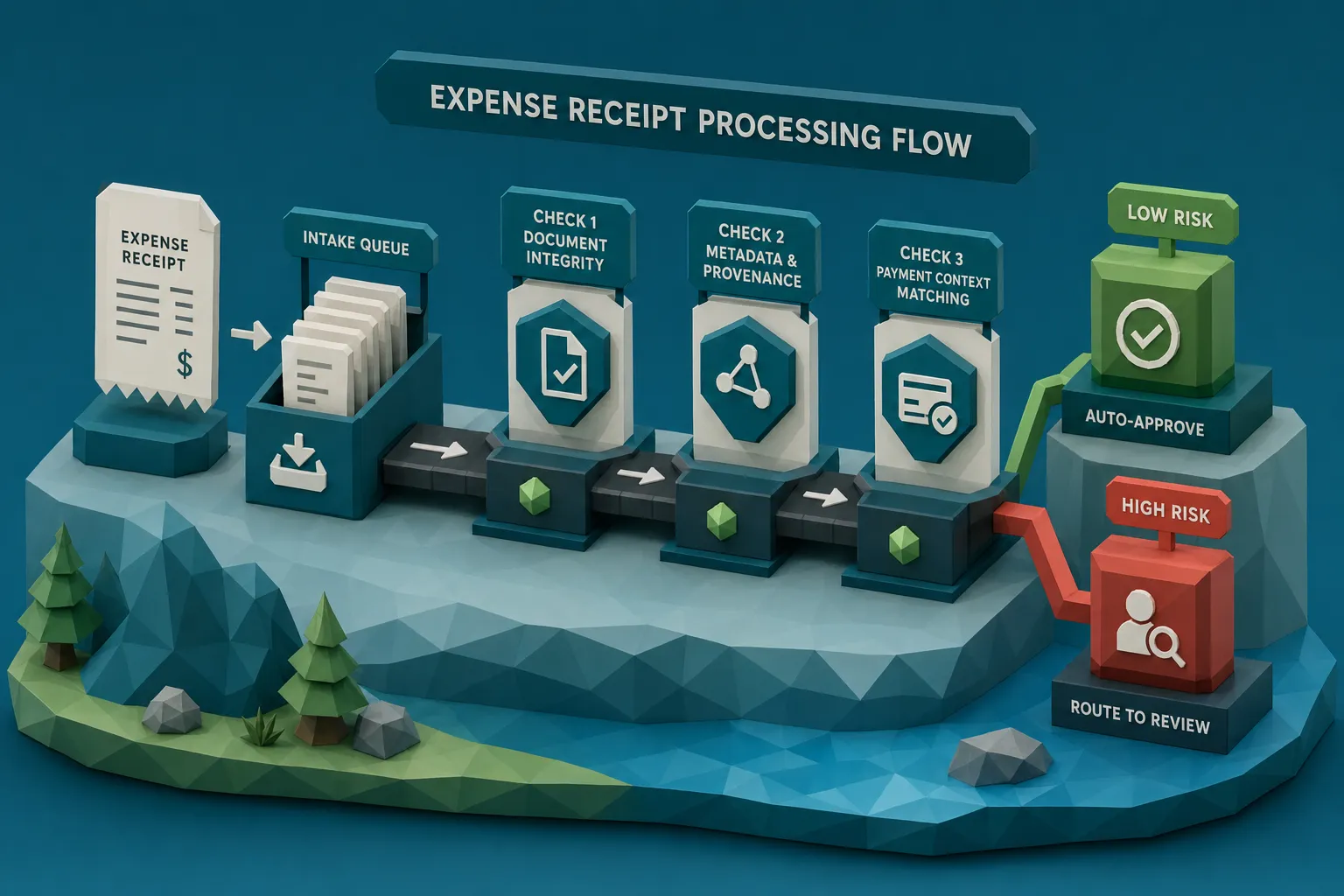
A scalable model for expense teams is a three-lane workflow:
Low risk: straight-through processing
Auto-approve clean receipts that pass document integrity checks and align with payment context and policy.
Medium risk: lightweight clarification
Request supporting context (itemized receipt, attendee list, business purpose detail) when signals are ambiguous rather than clearly fraudulent.
High risk: evidence-backed review
Route to finance leadership, internal audit, or fraud teams when you have multiple reinforcing signals (for example, near-duplicate plus math mismatch plus metadata anomaly).
This model works best when each flagged expense comes with specific evidence (what changed, what did not reconcile, what matched a prior receipt), so reviewers do not have to “hunt” for the issue.
Why payment context changes the game for receipt expense fraud
A receipt can be manipulated, but the surrounding context is harder to fake consistently at scale.
High-value context signals include:
- Merchant identity consistency (receipt merchant vs card merchant)
- Transaction timing (receipt date vs authorization/settlement date)
- Location plausibility (travel itinerary vs merchant location)
- Repeat patterns (employee, merchant, category, and amount clustering)
Docklands AI is designed around this principle: analyzing the document itself (pixel-level tampering, AI-generated document detection, metadata forensics, and mathematical checks) and enriching findings with payment information to build a more accurate fraud picture.
Training reviewers for modern receipt manipulation (without turning them into forensic analysts)
Most teams do not need every reviewer to become an expert in image forensics. They need reviewers to recognize when a receipt is worth escalating.
Two practical moves:
- Maintain a short internal playbook of “what good looks like” for your top merchants and expense categories.
- Run quarterly calibration using real examples you have seen (sanitized), then update rules and training based on what actually got through.
If you are updating internal training materials, it can help to keep a reference list of common online tooling categories (PDF editors, image optimizers, background removers) so your team understands how easy certain edits are. Sites like Online Tool Guides can be a useful starting point for mapping the types of tools non-technical users commonly find and use.
Frequently Asked Questions
What is the most common receipt expense fraud pattern? Duplicate and near-duplicate receipt reuse is one of the most common patterns because it scales and often bypasses field-based checks.
Why do OCR and policy rules miss receipt fraud? OCR and rules validate extracted fields, but many fraud signals live in the document image (tampering artifacts), metadata (edit history), and context (payment and timing).
How can finance teams detect AI-generated receipts? Look for a combination of signals: unnatural visual consistency, metadata that suggests generation or editing, and mismatches with payment context (merchant identity, timing, location).
How do you catch employees who buy items and then return them? Pair receipt submissions with card transaction feeds to detect refunds or chargebacks after reimbursement, then review repeat patterns by employee and merchant.
Should we audit more expense reports to reduce fraud? Increasing audits helps, but it can be expensive and still miss consistent low-dollar fraud. A better approach is screening 100% of receipts automatically and escalating only high-signal cases.
Reduce receipt expense fraud with document forensics and payment context
If your team is seeing more “clean-looking” receipts that still feel wrong, you are not alone. Modern expense fraud is designed to pass surface-level checks.
Docklands AI helps finance, AP, and claims teams detect photoshopped, manipulated, and AI-generated receipts and invoices using document forensics (visual integrity, metadata analysis, and math checks) and by linking findings to payment context for higher accuracy.
Learn more at Docklands AI and see how a lightweight screening layer can fit into your existing expense workflow.
Request a Demo Today!
Book your demo below.


