


What a Fake Invoice Generator Still Can't Fake Well

If you arrived here hoping I’ll explain how to use a fake invoice generator, I’m afraid I’m going to be a disappointment. If you’re here because one of those generated invoices just landed in your AP queue, claim file, or expense report, pull up a chair.
Here’s my hot take after a decade in fraud work: fake invoice tools have become excellent at making documents look boring. That is their superpower. A clean logo, tidy line items, plausible tax, a PDF name that sounds like it came from a supplier portal. Beautifully dull.
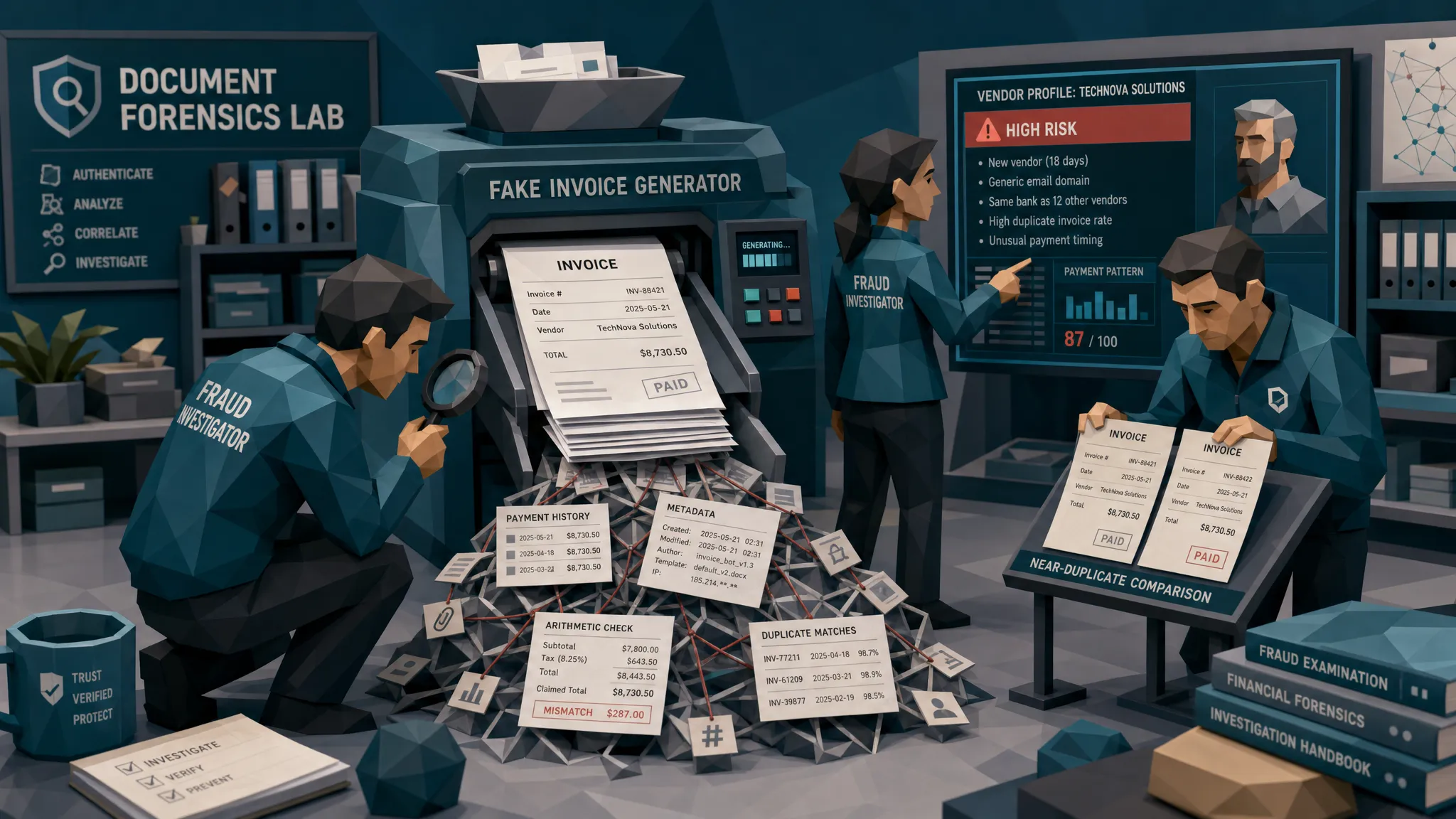
But fraud does not get paid because a document looks nice. Fraud gets paid when the document survives the messy reality around it: payment history, vendor behavior, metadata, math, claim timelines, employee context, and all the little details that real business processes leave behind like crumbs under a toaster.
That is where fake invoices still wobble.
And the stakes are not theoretical. The FBI estimates insurance fraud costs the U.S. more than $308 billion each year, while payment fraud continues to hit finance teams at scale. The Association for Financial Professionals has reported widespread targeting of organizations through payment fraud, including invoice-related schemes in its Payments Fraud and Control Survey. In plain English: this is no longer a “that would never happen to us” problem.
The fake invoice image is not the hard part anymore
A few years ago, a bad fake invoice often looked bad. The logo was fuzzy. The font changed halfway down the page. The total was pasted in like someone used scissors, glue, and optimism.
Now? A fake invoice generator can produce something that passes the squint test. Sometimes it passes the first reviewer test too, especially during month-end, after a storm surge of insurance claims, or when a sales team dumps 300 travel expenses into the system on a Friday afternoon.
I once reviewed an invoice tied to a property claim after a kitchen leak. At first glance, it looked completely normal: plumbing company, itemized labor, emergency callout fee, tax, total. The adjuster had no reason to hate it. But the invoice said the work happened on a Sunday morning, the file metadata showed it was created two weeks later on a phone, the listed contractor’s phone number belonged to a closed takeaway restaurant, and the tax math was off by 37 cents. Thirty-seven cents is not dramatic. It will never get its own crime documentary. But it was the thread that unraveled the sweater.
That is the problem with generators. They can fake the sweater. They struggle with the thread.
What a fake invoice generator still cannot fake well
A fake invoice generator can imitate layout. It can borrow the visual language of legitimate billing: invoice number, due date, remittance details, line items, subtotal, tax, balance due. Some tools can even create slick synthetic receipts and supporting documents.
What they still struggle with is coherence across the full fraud picture.
Payment context
Real invoices live near money. That sounds obvious, but it is where many fake invoices fall apart.
A genuine supplier invoice usually fits an existing payment pattern. The bank details match prior remittances. The vendor name matches the vendor master record. The PO history makes sense. The invoice date lines up with delivery, claim event, or expense activity. The payee is not suddenly different for no good reason.
Generated invoices often treat payment details as decoration. A bank account appears because the template needs one. A payee name is close but not identical. The remittance address is copied from an old document. The invoice says “paid by card,” but there is no card transaction. In insurance, the claimant submits a repair invoice from one company while asking payment to go to another. In employee expenses, a receipt shows a corporate card payment, but the expense system has no matching card feed.
That mismatch matters more than whether the invoice looks polished.
At Docklands AI, this is why we care about payment information alongside document integrity. A document-only check asks, “Does this file look real?” A better fraud review asks, “Does this document make sense given who is getting paid, why they are getting paid, and what we already know?”
Arithmetic that almost works
Fraudsters love round numbers. Real invoices are annoyingly specific.
A generated invoice might show line items that add up correctly at first glance, but the deeper math can get odd. Sales tax may be calculated on the wrong base. Discounts may apply before tax in a jurisdiction where they should apply after tax, or the reverse. Labor hours may multiply cleanly, while materials use inconsistent unit pricing. A “VAT included” invoice may still add VAT as if it were excluded.
I call these “near-right totals.” They are close enough for a tired reviewer, but not close enough for a calculator.
In AP, that could mean a subtotal that matches OCR extraction but not the line-item arithmetic. In warranty claims, it might be a repair estimate where parts and labor do not reconcile with the final total. In expenses, it could be a meal receipt where the tip, tax, and total have the emotional energy of a slot machine.
A fake invoice generator can produce numbers. It does not always understand the commercial logic behind them.
Metadata that tells the wrong story
Metadata is not magic. Sometimes legitimate files have sparse metadata because they were scanned, exported, compressed, or passed through a portal. I’ve seen perfectly honest invoices with barely any useful file history.
But when metadata is available, it can be wonderfully nosy.
A document may claim to be an original supplier PDF, but the file history suggests it was edited in image software. A receipt may show a purchase date of March 4, while the file was created months later. A claim invoice may be submitted as a photo of a paper bill, but the metadata suggests it began life as a freshly rendered digital image. A supposedly scanned document may have layers, edit traces, or compression patterns that do not fit the story.
The trick is not to treat missing or odd metadata as automatic guilt. That creates chaos and annoys everyone. The trick is to combine it with the rest of the evidence. Metadata plus math issue plus changed payee is a much louder signal than metadata alone.
The physics of images
This is where my inner fraud nerd gets too much coffee.
Real photographed documents have texture. They bend slightly. Shadows fall unevenly. Camera noise is not perfectly uniform. Fold lines, table surfaces, hand positioning, lens blur, and compression all create a physical fingerprint.
Edited and generated invoices can miss that. A total may be sharper than the surrounding text. A pasted bank detail may have different compression noise. A logo may sit perfectly flat on a photo where the paper is curved. A receipt may be “crumpled,” but the text remains suspiciously pristine. It is the digital equivalent of someone wearing muddy boots with a brand-new tuxedo.
For claims teams, this matters because fraudsters often submit invoices and receipts as photos, not clean PDFs. They know a phone photo feels more human and less corporate. But phone photos also create image evidence. If something has been physically manipulated, re-photographed, or digitally patched, the image often carries traces.
Vendor identity
Fake invoices often know what a supplier should look like. They are worse at proving that the supplier exists in the right relationship.
Does the vendor have a real business footprint? Has your organization paid them before? Do their bank details match prior records? Does their email domain match their trading name? Is the address a warehouse, a serviced office, a home, or a patch of grass next to a motorway? I have seen all four.
In insurance, a contractor invoice may look plausible until you compare it with the repair scope, local licensing records, prior claim patterns, or the claimant’s payment request. In AP, a shell vendor may submit a professional invoice that passes manual review because nobody wants to be the person who delays payment to a “critical supplier.”
This is why invoice fraud is often less about one fake document and more about a weak relationship map.
Duplicates and template fingerprints
Fraudsters reuse things. Not because they are cartoon villains, but because humans are efficient and lazy. Give someone a template that worked once and they will try it again with a different date, amount, or claimant.
A fake invoice generator can create many variations, but those variations may still share structure: spacing, layout, wording, invoice numbering style, line-item language, or image patterns. A duplicate check that only compares exact invoice numbers will miss this. A better review looks for near-duplicates and family resemblance.
In employee expenses, that might be the same meal receipt submitted by two employees with slightly different totals. In claims, it might be the same repair invoice template appearing across unrelated losses. In AP, it might be a series of invoices that look like different vendors but share formatting DNA.
If exact duplicates are the amateur hour, near-duplicates are where the adult fraud work begins.
The biggest mistake: treating OCR as fraud detection
I like OCR. It is useful. It extracts dates, totals, vendor names, invoice numbers, and line items so humans do not have to type until their souls leave their bodies.
But OCR is not a fraud control. It reads the document. It does not decide whether the document should be trusted.
That distinction matters. Once an invoice is converted into clean fields, a lot of the original evidence gets ignored. The workflow sees “vendor, amount, due date, PO number.” It may not see the pasted remittance box, the odd file history, the altered tax line, or the fact that this invoice looks suspiciously like another one from last quarter.
This is how automation can accidentally polish fraud. The fake document becomes clean data, and clean data moves fast.
For teams building or rolling out review tools, adoption also matters. If investigators do not understand or trust the evidence, they will work around the system. I’ve found resources like the AI Product Adoption Deck useful for thinking about where teams lose trust in AI-assisted workflows and how to design around those breakpoints.
A practical review sequence that catches more fakes
You do not need every reviewer to become a forensic image analyst. Please do not try that. You will create bottlenecks, arguments, and a Slack channel nobody wants to read.
What you need is a consistent sequence that preserves evidence and asks better questions before payment moves.
Start with the original file whenever possible. Screenshots and forwarded PDFs can strip away useful evidence, so keep the first submitted version. Then compare the document to payment context. Does the payee match the supplier, claimant, employee, bank account, or card record? Next, check whether the math behaves like a real invoice, including tax, discounts, deposits, and totals. Then look for document integrity issues: edits, metadata contradictions, image artifacts, physical manipulation, and near-duplicates.
The last step is the one teams often skip: route the case with specific evidence. “Looks fake” is not a good alert. “Bank details differ from vendor master, tax does not reconcile, and file metadata shows post-creation editing” gives AP, SIU, or internal audit something they can act on.
That evidence-led approach also helps reduce false positives. Nobody wants a system that screams fraud every time a supplier scans a wrinkled invoice on an old printer. A wrinkled invoice is not a crime. Sometimes it is just accounts receivable being accounts receivable.
How this looks in AP, claims, and expenses
In accounts payable, fake invoice generator output usually aims for payment diversion or unauthorized supplier payment. The invoice may look like it belongs in the normal queue, especially if it references a real project, real cost center, or real approver. The key is to connect document checks with vendor and payment controls, especially around new vendors, bank-detail changes, and invoices that bypass normal intake channels.
In insurance claims, fake invoices and receipts often support inflated losses. The document may be one piece of a larger story: photos, estimates, repair bills, proof of purchase, contractor details, and claimant communication. A fake invoice may fail because the timeline is too convenient, the vendor footprint is weak, or the payment request does not match the document trail. The BBC has reported that UK insurer Admiral saw a sharp rise in fraudulent claims linked to AI-generated images and deepfakes, which is a neat reminder that the supporting evidence around a claim now deserves more scrutiny.
In employee expenses, the amounts are smaller but the volume is brutal. A fake receipt or invoice may sit just below approval thresholds, use a familiar merchant, or mimic a legitimate trip pattern. The best controls compare receipts against card data, travel context, duplicate patterns, and document integrity signals before reimbursement.
Different workflows, same lesson: the document should never be reviewed in a vacuum.
Where Docklands AI fits
Docklands AI is built for the part of fraud review where fake invoices, receipts, and claim documents still give themselves away. We detect manipulated, photoshopped, and AI-generated documents using document forensics, metadata analysis, mathematical irregularity checks, physical manipulation detection, and payment-context signals.
That last part is important. We use payment information from a claim, expense, or payment to build a deeper fraud picture. A suspicious invoice is more meaningful when it is tied to a changed bank account, mismatched payee, odd claim timeline, duplicate submission, or inconsistent reimbursement trail.
The platform supports API and webhook integration, real-time reporting and analytics, executive dashboards, 2FA security, and multiple users and projects. In practice, that means teams can add fraud screening into existing AP, claims, or expense workflows without asking reviewers to inspect every pixel by hand.
My bias is simple: let clean documents move, but make suspicious ones explain themselves before money leaves.
Frequently Asked Questions
Can a fake invoice generator create invoices that pass manual review? Yes. Many generated invoices look plausible enough to pass a quick visual check, especially in high-volume workflows. The weakness is usually not the surface appearance, but the surrounding evidence: payment context, math, metadata, duplicates, vendor history, and timing.
What is the fastest way to spot a fake generated invoice? Start with the payment story. Check whether the payee, bank details, supplier identity, amount, date, and supporting records agree. Then inspect math, metadata, document integrity, and duplicate patterns. A pretty invoice with a bad payment story deserves attention.
Does missing metadata mean an invoice is fake? No. Metadata can be removed for legitimate reasons, including scanning, portal uploads, compression, and file conversion. Missing metadata becomes more meaningful when it appears alongside other issues, such as altered totals, changed payment details, or duplicate document patterns.
Why do OCR and AP automation tools miss fake invoices? Most OCR and AP automation tools are designed to extract and route data, not verify authenticity. They may capture the invoice number and total correctly while missing visual edits, file-history issues, near-duplicates, or mismatches with payment context.
Should every suspicious invoice be sent to investigation? No. That creates noise and slows operations. The better approach is evidence-based triage. Low-risk oddities can be resolved quickly, while invoices with multiple signals, such as tampering plus payment mismatch plus math inconsistency, should be escalated.
Stop trusting the invoice at face value
A fake invoice generator can make a document look professional. It cannot easily fake the messy web of evidence that surrounds real invoices, claims, and expenses.
If your team is still relying on visual review, OCR, or spot checks, you are asking busy people to notice what modern fraud is designed to hide. Docklands AI helps screen invoices and receipts for manipulation, AI generation, metadata issues, math irregularities, physical tampering, duplicates, and payment-context mismatches before payment.
If you want to see what your current process is missing, request a Docklands AI demo and bring a sample of the documents that make your team uneasy. Those are usually the interesting ones.
Request a Demo Today!
Book your demo below.


