


Why Accounts Payable Tracking Software Misses Fraud
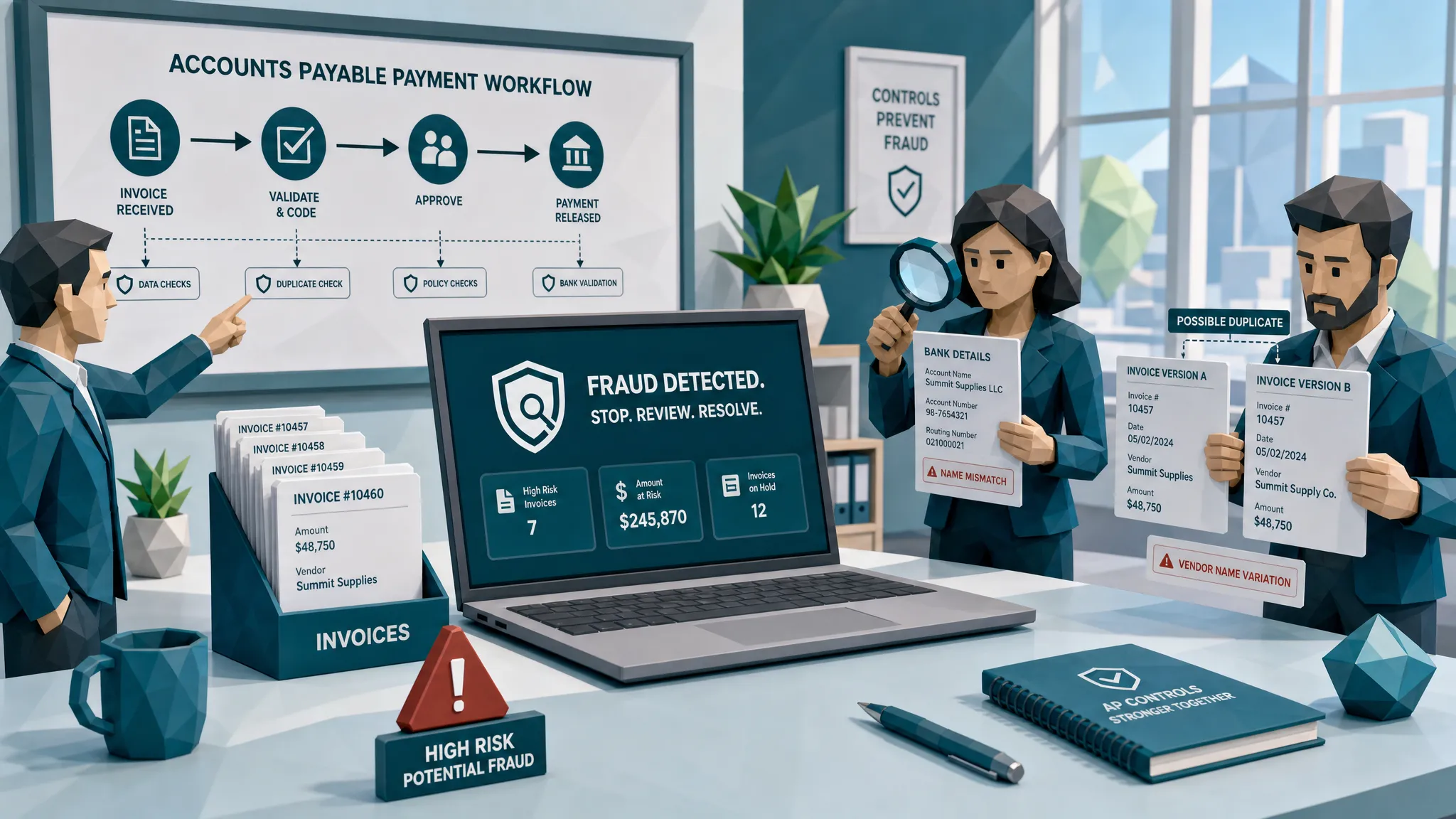

Most accounts payable tracking software is very good at telling you where an invoice is. Received. Coded. Matched. Approved. Scheduled. Paid.
Lovely. Neat. Comforting.
The problem is that fraud does not always care where your invoice is. Fraud cares whether anyone checked if the invoice is real, whether the payment details belong to the right party, and whether the document has been quietly edited before it ever reached your approval queue.
After 10 years around fraud reviews, I have developed a slightly unpopular opinion: a clean AP workflow can make a bad invoice look more trustworthy. Once a document has three approvals, a PO match, and a green status badge, people stop asking basic questions. The invoice becomes part of the scenery, like the office plant nobody waters but everyone assumes is fine.
The uncomfortable truth: tracking is not verification
Accounts payable tracking software answers an operational question: where is the invoice in the process?
Fraud review asks a different question: can we trust this document and the payment story behind it?
Those are not the same job.
I use a travel analogy with finance leaders because everyone gets it. A calendar entry saying airport pickup booked is tracking. A vetted driver, a live coordinator, and contingency planning from a specialist business chauffeur service is assurance. AP has the same distinction. A workflow status tells you movement happened. It does not prove the underlying service, supplier, bank account, and document evidence are legitimate.
That gap is where invoice fraud lives.
And the gap is getting expensive. The Association for Financial Professionals has reported that a large majority of organizations face payments fraud attempts, and the FBI’s 2023 IC3 report recorded more than $2.9 billion in reported business email compromise losses. A lot of those schemes touch AP because AP is where documents become money.
What accounts payable tracking software actually does well
To be clear, I am not here to throw AP tracking software into the sea. Finance teams need it. High-volume AP without tracking is just a shared inbox wearing a fake mustache.
Good tracking software helps teams control cycle time, assign ownership, avoid lost invoices, manage approvals, spot bottlenecks, and keep an audit trail. That matters. If you process thousands of invoices across entities, sites, projects, currencies, and approvers, you need structure.
The issue starts when tracking software gets treated like fraud detection.
A typical AP tracker is built around fields and workflow events. Vendor name. Invoice number. Amount. Due date. PO number. Approval status. Payment date. Exception reason. These are useful, but they are not enough to answer whether the submitted file has been photoshopped, whether the metadata contradicts the invoice date, whether a near-duplicate appeared under a slightly changed number, or whether the remittance block was pasted over the original.
In other words, the software may know the invoice is moving. It may not know the invoice is lying.
Why fraud slips through tidy AP workflows
The frauds that worry me most are not the cartoonishly bad ones. I rarely see an invoice with Comic Sans, a suspicious skull logo, and a bank account labeled please wire money here. If only.
The dangerous ones are boring. They look like normal invoices from normal vendors for normal amounts. They sit just under approval thresholds. They reference real projects. They arrive during month-end, system migration, staff turnover, or a big vendor cleanup. They know how to blend in.
Here is where accounts payable tracking software tends to miss them.
The original document gets reduced to tidy data
The first thing many AP systems do is extract information from the invoice. That is useful for processing, but fraud clues often live outside the extracted fields.
A manipulated PDF might have compression differences around a bank account. A scanned invoice might show physical alteration near a total. A receipt might have metadata showing it was edited days after the alleged purchase. A synthetic invoice might look visually plausible but contain odd layout patterns, inconsistent fonts, or mathematical quirks.
If the system only captures vendor, amount, date, invoice number, and tax, it may convert a suspicious document into clean data. That is a little like washing a crime scene and then proudly labeling the mop.
Approvals create social proof
This one hurts because it is so human.
An AP clerk sees that a department head approved the invoice. The controller sees that AP coded it properly. The payment run owner sees that the invoice passed matching. Everyone assumes someone else looked closely.
Years ago, I reviewed a case where the audit trail was pristine. The invoice had the right approver, the right cost center, and a plausible PO reference. On paper, it was a model citizen. The only oddity was a remittance line that looked slightly softer than the rest of the PDF. Not dramatic, just a little smudged. That line turned out to be the whole game.
The approver had approved the work. Nobody had verified the document.
That is the classic AP fraud trap. Approval often confirms business context, not document authenticity.
Duplicate checks are too literal
Many trackers can flag exact duplicates. Same vendor, same invoice number, same amount. Helpful, yes. Sufficient, no.
Fraudsters learned long ago that exact duplicates are easy to catch. So they create near-duplicates. They change the invoice number by one character. They adjust the date. They split an amount. They resubmit the same support with a different crop, angle, file name, or PDF version.
The human eye is bad at spotting near-duplicates across thousands of files. Basic rules are not much better. A tracker may say no duplicate found because the fields are not identical, while the document itself is effectively the same claim for money.
Vendor data is trusted too much
Vendor master controls matter, but they are not magical. A vendor can be real and still be impersonated. A bank account can be changed through a compromised email thread. A shell supplier can be onboarded with just enough paperwork to look reasonable. A legitimate invoice can be altered after leaving the supplier.
This is why payment context is so important. Who is asking to be paid? Has the bank account changed? Does the payment method match prior behavior? Does the invoice evidence support the requested payee? Did the invoice come through the usual channel?
Accounts payable tracking software often stores some of this information, but it does not always connect it to document integrity. Fraud detection improves when the payment story and the document evidence are reviewed together.
Dashboards reward speed, not skepticism
Many AP dashboards are built around throughput. How many invoices processed? What is the average cycle time? How many exceptions remain? How much early payment discount did we capture?
Those are legitimate metrics. But if every incentive says move faster, fraud review becomes a speed bump. And nobody likes a speed bump unless it saves the suspension.
This is how suspicious invoices get waved through. The amount is not huge. The vendor looks familiar. The approver is senior. The payment run closes in 40 minutes. The tracker says approved.
That is not fraud control. That is momentum.
The fraud types AP trackers miss most often
By 2026, the fraud landscape has become annoyingly convenient for bad actors. Fake invoices and edited receipts are easier to create, easier to polish, and easier to send at scale. But the recurring patterns are familiar.
The invoices that slip through tracking tools usually fall into a few buckets:
- Altered invoices where totals, bank details, dates, or line items have been changed.
- Near-duplicate invoices that avoid exact duplicate rules.
- AI-generated or synthetic invoices that look polished but have weak real-world support.
- Physically manipulated documents that are photographed or scanned to hide edits.
- Vendor impersonation invoices that use a real supplier’s identity with different payment details.
- Payment diversion attempts where the document and the bank account do not belong together.
None of these require the workflow to be broken. That is the part AP leaders sometimes hate hearing. Fraud can pass through a well-designed process when the process is checking completion rather than authenticity.
The ACFE Report to the Nations is a good reminder that occupational fraud and financial deception often persist because controls detect some behaviors but miss others. In AP, that usually means controls catch missing approvals and obvious policy violations, while subtle document manipulation keeps moving.
Why a green status can become dangerous
Here is my hot take: the green tick is the most dangerous symbol in AP when nobody knows what it actually means.
Does approved mean the goods were received? Does it mean the price was checked? Does it mean the invoice number was unique? Does it mean the bank account was verified? Does it mean the PDF was inspected for manipulation?
In many organizations, approved means some of those things, none of those things, or a different combination depending on the department. That ambiguity is a gift to fraudsters.
I once heard a finance manager say, with complete sincerity, the invoice cannot be fraudulent because it is fully approved. That is like saying a restaurant meal cannot be bad because the waiter brought it to the table quickly. Fast service is nice. It does not prove the fish is fresh.
AP tracking software can create false comfort because it documents the path, not the truth of the evidence. A perfect audit trail is valuable, but only if the underlying checks are meaningful.
What AP teams should add without slowing everything down
The answer is not to make AP teams manually inspect every pixel of every invoice. That would turn month-end into a hostage situation.
The better approach is to add a fraud checkpoint that reviews the original document and payment context automatically, then routes only the suspicious items for human review. Clean invoices keep moving. Risky invoices get evidence attached before someone has to make a decision.
A practical setup looks like this:
- Preserve the original file at intake, including the image or PDF before it is converted into fields.
- Screen documents before approval or before payment, not six weeks after funds leave.
- Check visual integrity, metadata, mathematical consistency, duplicates, and near-duplicates.
- Compare document evidence with payment context, including bank changes and payee details.
- Route exceptions with specific evidence, not vague warnings that say suspicious invoice.
That last point matters. Reviewers do not need another noisy queue. They need to know why something was flagged. Was the total edited? Did the metadata show post-submission changes? Does the same invoice appear under a different number? Did the payment account change from the supplier’s normal history?
Specific evidence makes fraud review faster and fairer. It also makes escalation cleaner if internal audit, legal, procurement, or a vendor relationship owner needs to get involved.
Where Docklands AI fits beside AP tracking software
Docklands AI is built for the gap that standard AP tracking tools leave open. It does not replace your AP tracker, ERP, or approval workflow. The point is to add a document fraud layer where the existing system is weakest.
Docklands AI checks invoices and receipts for signs of tampering, photoshopping, AI-generated documents, metadata irregularities, mathematical issues, physical manipulation, and suspicious duplication. Just as importantly, it uses payment information around the claim, expense, or payment to build a deeper fraud picture than a simple image-real-or-fake check.
That matters because invoice fraud is rarely contained in the PDF alone. The document might look fine until you compare it with the payment destination, vendor history, prior submissions, or surrounding workflow.
For AP teams, the ideal role for this kind of screening is simple: keep the tracker as the system of record for workflow, then add forensic checks before money leaves. API and webhook integration can help fraud screening fit into existing processes rather than forcing finance teams to rebuild their stack from scratch. Reporting and dashboards then give fraud managers, AP leaders, and executives a clearer view of what is being stopped, reviewed, and paid.
In plain English: keep the conveyor belt, but add a scale, camera, and guardrail before the expensive boxes fall off the dock.
What to ask your AP tracking vendor
If you are evaluating accounts payable tracking software, or reviewing the one you already have, ask questions that separate workflow visibility from fraud prevention.
Start with the original document. Does the system preserve it? Can it inspect the file itself, or only the extracted fields? Can it identify edits, file-history issues, and image inconsistencies?
Then ask about duplicates. Does it catch near-duplicates, or only exact matches? Can it compare document appearance as well as invoice number and amount?
Ask about payment context. Can the system flag late bank-detail changes, payee mismatches, unusual payment routes, or documents that do not support the requested payment?
Finally, ask about evidence. When something is flagged, does the reviewer see a clear reason, or just a score? A score without evidence is a horoscope with a finance degree. Interesting, maybe. Defensible, not always.
Frequently Asked Questions
Can accounts payable tracking software detect invoice fraud? It can detect some basic issues, such as missing approvals, exact duplicates, unusual routing, or incomplete fields. But most accounts payable tracking software is not designed to prove whether the original invoice was manipulated, AI-generated, physically altered, or tied to suspicious payment details.
Why do approved invoices still turn out to be fraudulent? Approval usually confirms that someone accepted the business reason for payment. It does not always mean the invoice file, metadata, bank details, or duplicate history were checked. Fraudsters exploit that difference.
What is the biggest blind spot in AP tracking tools? The biggest blind spot is document authenticity. Many systems turn invoices into structured data and then move that data through a workflow. Fraud clues often remain in the original file, the image quality, the metadata, the math, or the payment context.
Should AP teams replace their tracking software with fraud detection software? Usually, no. Tracking software is valuable for workflow control. A better approach is to add a fraud screening layer that works with the existing AP system and checks invoices before approval or payment.
Where should invoice fraud checks happen? The best points are at intake and before payment. Intake screening catches obvious document issues early. Pre-payment screening catches late bank changes, resubmissions, and risk signals that appear after approval.
The bottom line
Accounts payable tracking software helps AP teams stay organized. It does not automatically stop fraud.
If your tracker tells you where every invoice is, that is good. If it also lets manipulated invoices, synthetic documents, near-duplicates, and suspicious payment changes move through with a green badge, that is a control gap wearing a nice suit.
Docklands AI helps finance teams close that gap by screening invoices and receipts for document manipulation, metadata issues, mathematical irregularities, AI-generated content, and payment-context risk before funds leave the business.
If you want to see what your AP tracker may be missing, request a Docklands AI demo and test your real invoice samples against document-level fraud checks.
Request a Demo Today!
Book your demo below.


