


Why Automated Accounts Payable Systems Need Fraud Gates
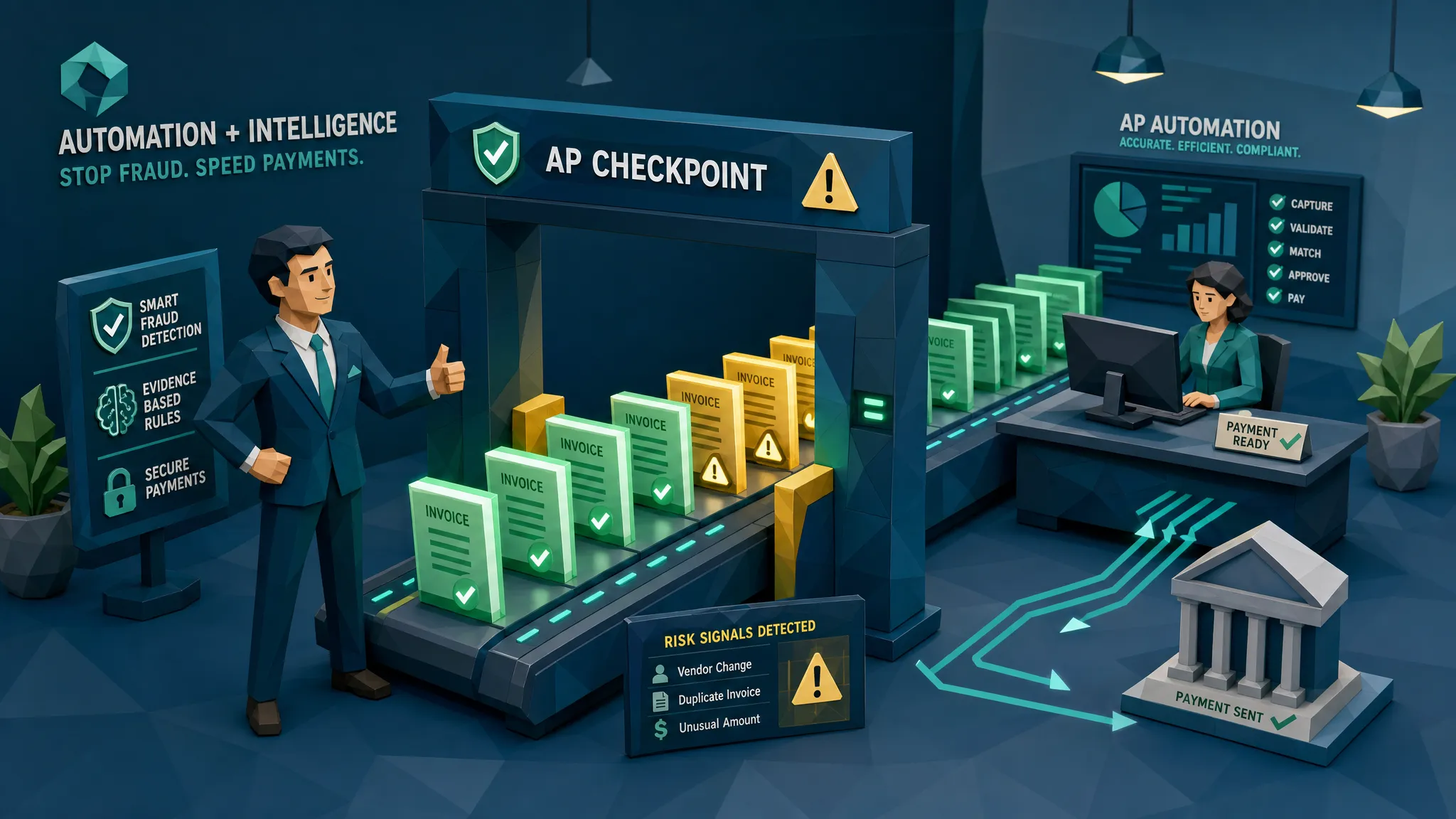

Here is my hot take after a decade around fraud, payments, and the occasional invoice that smelled funny before it looked funny: automation without a fraud gate is a faster way to trust the wrong thing.
Automated accounts payable systems are excellent at moving invoices through capture, matching, approvals, and payment. That is their job. They reduce manual data entry, clear backlogs, and stop AP teams from living inside spreadsheets like it is 2009.
But fraudsters love speed too. If a fake invoice can pass through the same fast lane as a legitimate one, automation becomes a conveyor belt with a bank account at the end.
That is why automated accounts payable systems need fraud gates. Not more bureaucracy. Not another person squinting at PDFs after lunch. A proper fraud gate is a targeted checkpoint that asks a simple question before money moves: does this document and payment request make sense as evidence?
The problem with AP automation is trust at scale
Most AP automation tools were built to solve an operational problem: too many invoices, too much manual entry, too many approvals stuck in inboxes. They capture invoice data, match it to purchase orders, route it to approvers, and help finance pay on time.
That is useful. I like useful. But these systems often treat the invoice as a data container, not as evidence.
Once OCR extracts the vendor name, invoice number, total, date, and bank details, the original document can become background noise. If the fields look plausible and the approver clicks yes, the invoice keeps moving.
Fraud lives in that gap.
A digitally altered invoice may extract perfectly. A synthetic invoice may have clean formatting. A reused invoice with a modified total may still match a familiar vendor. A bank detail change may look like a harmless update. The system says, “Great, I have the fields.” The fraudster says, “Great, I have your money.”
The scale of the problem is not theoretical. The Association for Financial Professionals has reported widespread payment fraud targeting organizations, and the FBI Internet Crime Complaint Center reported billions in business email compromise losses in 2023. Meanwhile, the ACFE Report to the Nations continues to estimate that organizations lose around 5% of revenue to fraud each year.
In plain English: fraud is already expensive. Automating the route to payment without checking document integrity can make it more expensive, faster.
What I mean by a fraud gate
A fraud gate is not a general approval step. Approval asks, “Do we owe this vendor?” A fraud gate asks, “Is this invoice what it claims to be?”
That distinction matters.
I once reviewed a case where an invoice looked painfully normal. Same vendor name, same logo, same address block, same amount range as prior invoices. Nothing screamed “heist movie.” The issue was a small change in the remittance section. The bank account line had been edited cleanly enough that a busy approver would never spot it. The invoice would have passed a basic workflow check because the invoice data was ordinary. The document, however, had fingerprints.
That is the point of a fraud gate. It slows only the suspicious traffic, not the whole highway.
A useful fraud gate usually makes one of three decisions. It lets clean invoices continue. It asks for clarification when the evidence is incomplete. It holds high-risk invoices before approval or payment.
The best version does this by looking at the original file, the document image, metadata, calculations, duplicates, vendor history, payment details, and workflow context together. A bad version is just a bigger rulebook with more false alarms and more grumpy approvers.
And no, I am not anti-automation. Far from it. Good automation has checkpoints built into the workflow. You see this in other parts of the business too. For example, AI-powered marketing workflows can create and execute campaigns quickly, but the useful systems still include approval moments before content goes live. AP deserves the same adult supervision, except the output is not an email campaign, it is cash leaving the business.
Why traditional AP controls miss invoice fraud
The uncomfortable truth is that most AP controls were designed for mistakes, not manipulation.
Three-way matching catches a lot of honest errors. Duplicate invoice checks catch exact repeats. Approval workflows create accountability. Vendor master controls reduce chaos. All good things.
But modern invoice fraud is built to look routine. It does not arrive wearing a striped shirt and carrying a bag marked “fraud.” It arrives as a PDF called Invoice_10482_Final.pdf at 4:47 p.m. on a Thursday.
OCR extracts data, but it can strip away evidence
OCR is great at reading text. It is not the same as proving authenticity.
When AP software extracts fields from a PDF or image, it can ignore the very details that reveal tampering: inconsistent fonts, pasted text blocks, compression changes, odd shadows, cut-and-paste artifacts, or mismatched file history.
I have seen invoices where the extracted amount was correct, the vendor existed, and the PO number was valid. The problem was that one section of the document had clearly been edited after the invoice was created. If your system only cares about fields, it may miss the crime scene.
Approvals are not forensic checks
Approval is often treated like a magic shield. It is not.
Approvers are usually validating business context. Did the work happen? Was the order expected? Is the amount reasonable? They are not trained to inspect image artifacts, metadata, PDF edit trails, or near-duplicate document patterns. Nor should they be. Your head of operations has better things to do than become a part-time document examiner.
A fraud gate gives approvers better evidence before they click.
Duplicate checks are too literal
Basic duplicate controls often compare invoice numbers, vendor names, dates, and totals. That catches exact duplicates, which is helpful.
Fraudsters, unfortunately, own keyboards. They change one digit in the invoice number, crop the document, rotate it, adjust the total, or resubmit a near-copy through a different channel. A literal duplicate check sees a new invoice. A document-aware gate may see the same underlying file, template, image pattern, or payment trail.
Payment changes are treated as admin, not risk
This one still makes me twitch.
A supplier bank detail change should be treated as a high-risk event until proven otherwise. Yet in many workflows, it is just another master data update, often triggered by an email that “looks right.”
A fraud gate should connect the document to the payment destination. If the invoice is visually normal but the payment details are new, mismatched, or shared with unrelated vendors, the risk picture changes.
The real job of a fraud gate is context
Here is where I differ from some vendors: I do not think the question should be “Does this document look fake?” That is too narrow.
The better question is: “Does this document, vendor, amount, bank account, submission channel, file history, approval path, and payment request make sense together?”
That is where automated accounts payable systems become safer. Not by replacing AP automation, but by adding a decision point that checks whether the evidence supports the payment.
A forged invoice can look clean in isolation. It becomes suspicious when the metadata shows recent editing, the remittance account is new, the invoice resembles a prior paid document, the tax math is slightly off, and the vendor usually submits through a portal but this one arrived by email.
One clue is interesting. Four clues are a meeting.
This is also why payment information matters. A document-only check may say, “This PDF seems plausible.” A fraud gate that considers payment context can say, “This PDF is plausible, but the bank account, vendor pattern, and file history are not.” That is a far better conversation for AP, internal audit, and fraud teams.
Where fraud gates belong in the AP workflow
You do not need to turn AP into an obstacle course. In fact, please do not. Everyone has suffered enough.
The trick is to place fraud gates where they catch risk before it becomes expensive.
Gate 1: right after invoice capture
The first gate should happen as soon as the invoice enters the workflow. This is the best time to preserve the original file, inspect the document, and detect obvious manipulation before the invoice gets normalized into fields.
At this stage, the system should check for tampering, synthetic document signals, metadata issues, physical manipulation clues, mathematical irregularities, and known duplicate or near-duplicate patterns.
Clean invoices move on. Suspicious ones get routed with evidence.
Gate 2: when payment details or vendor data change
A bank account update, address change, new remittance email, or unusual payment instruction should trigger a deeper look.
This is where many payment diversion schemes succeed. The invoice may be legitimate, but the payment destination is not. Or the invoice may be altered specifically to redirect payment. Either way, the risk is attached to money movement, not just document appearance.
Gate 3: before the payment run
A final pre-payment gate is the safety net. It catches late changes, duplicate submissions that appeared after initial intake, and invoices that became riskier because of new context.
I like pre-payment gates because they are brutally practical. Once funds leave, recovery gets messy. Before funds leave, you still have options.
What a good fraud gate should check
A fraud gate should not be a random pile of rules. It needs to inspect the invoice like evidence and connect that evidence to the payment request.
At a minimum, I would want it to check:
- Document tampering, including edited text, pasted regions, inconsistent layout, and image manipulation.
- AI-generated or synthetic invoice signals, especially where the document looks polished but lacks a credible file history.
- Metadata and file history, including creation time, editing tools, version changes, and missing or contradictory provenance.
- Mathematical consistency, including subtotals, tax, discounts, rounding, and totals that do not reconcile cleanly.
- Duplicate and near-duplicate patterns, including reused invoices with small edits.
- Payment-context conflicts, such as new bank details, mismatched payees, unusual submission channels, or repeated accounts across unrelated vendors.
Notice what is missing from that list: “Ask Barbara in procurement if it looks okay.” Barbara is busy, and frankly, Barbara deserves better tooling.
How to keep fraud gates from annoying everyone
The fastest way to kill a fraud program is to create noise. If every tenth invoice gets flagged for a vague reason, reviewers will learn to ignore the alerts. That is not fraud detection. That is a smoke alarm that goes off when someone makes toast.
A useful gate needs evidence-backed alerts. If an invoice is held, the AP reviewer should see why. Was there a metadata mismatch? A suspected edit near the bank details? A near-duplicate of a previously paid invoice? A tax calculation issue? A new payment destination?
Specific evidence changes the conversation. Instead of “the system says no,” the reviewer can say, “this invoice shows signs of editing in the remittance section and the bank account is new for this vendor.” That is actionable.
The gate also needs sensible thresholds. Low-risk invoices should pass through without drama. Medium-risk invoices may need clarification or secondary review. High-risk invoices should be held until resolved.
Finally, ownership matters. AP, fraud, internal audit, and vendor management should agree on who handles which type of exception. If nobody owns the alert queue, the queue becomes a digital attic where good intentions go to die.
What this means for AP leaders buying or improving automation
If you are evaluating automated accounts payable systems, do not only ask how fast invoices can be processed. Ask what happens when a bad invoice enters the same lane.
The buying conversation should include practical questions:
- Does the system preserve and analyze the original invoice file?
- Can it detect document tampering, synthetic invoices, and metadata anomalies?
- Does it compare near-duplicates, not just exact invoice numbers?
- Does it connect document risk to payment details and vendor context?
- Are alerts supported by visible evidence?
- Can it integrate into the existing AP workflow through APIs or webhooks?
- Can clean invoices continue without manual review?
That last question matters. Fraud gates should protect speed, not destroy it.
The goal is not to make every invoice suspicious. The goal is to stop trusting invoices blindly just because the workflow is efficient.
How Docklands AI fits into the fraud gate model
Docklands AI is built for exactly this gap: detecting manipulated, photoshopped, physically altered, and AI-generated invoices and receipts before they create losses.
Rather than treating a document as a set of extracted fields, Docklands AI analyzes the document itself and the surrounding payment information to build a deeper fraud picture. That includes tampering detection, metadata forensics, mathematical irregularity checks, physical manipulation detection, and AI-generated document detection.
For AP teams, that means Docklands AI can operate as a fraud gate alongside existing AP and ERP systems. It does not need to replace the workflow that already handles capture, routing, and payment. It adds a layer that asks whether the invoice and payment request are trustworthy enough to continue.
The practical value is simple: fewer fraudulent invoices reaching payment, fewer vague escalations for reviewers, and better evidence when something needs to be investigated.
Frequently Asked Questions
Do fraud gates slow down automated accounts payable systems? They should not slow down clean invoices. A well-designed fraud gate routes low-risk invoices forward and holds only items with meaningful evidence of risk. The point is targeted friction, not universal delay.
Is three-way matching enough to stop invoice fraud? Three-way matching is helpful, but it does not prove that a document is authentic. An altered invoice can still reference a real PO, vendor, and receipt. Fraud gates add document and payment-context checks that matching alone can miss.
Where should an AP fraud gate sit? The best places are immediately after invoice capture, whenever vendor or payment details change, and before the payment run. These points catch risk while there is still time to stop or investigate the payment.
Can fraud gates detect AI-generated invoices? Yes, if they inspect the document rather than relying only on extracted fields. Detection should look at visual consistency, metadata, math, duplicates, provenance, and payment context together.
What should AP do when an invoice is flagged? Preserve the original file, review the specific evidence, verify payment details through a trusted channel, and document the outcome. If the issue involves suspected manipulation or payment diversion, route it to fraud, internal audit, or the appropriate escalation team.
Put a gate before the money
AP automation is a good thing. I will happily defend it. But speed without verification is a risk, especially when fake invoices and altered payment details are easier to produce than ever.
If your automated AP workflow already moves fast, the next question is whether it knows when to stop.
Docklands AI helps AP teams add that missing fraud gate by checking invoice and receipt evidence before payment. If you want to see what your current workflow might be missing, visit Docklands AI and let’s put a smarter checkpoint in front of the payment run.
Request a Demo Today!
Book your demo below.


