Automated Accounts Payable Still Needs Fraud Gates
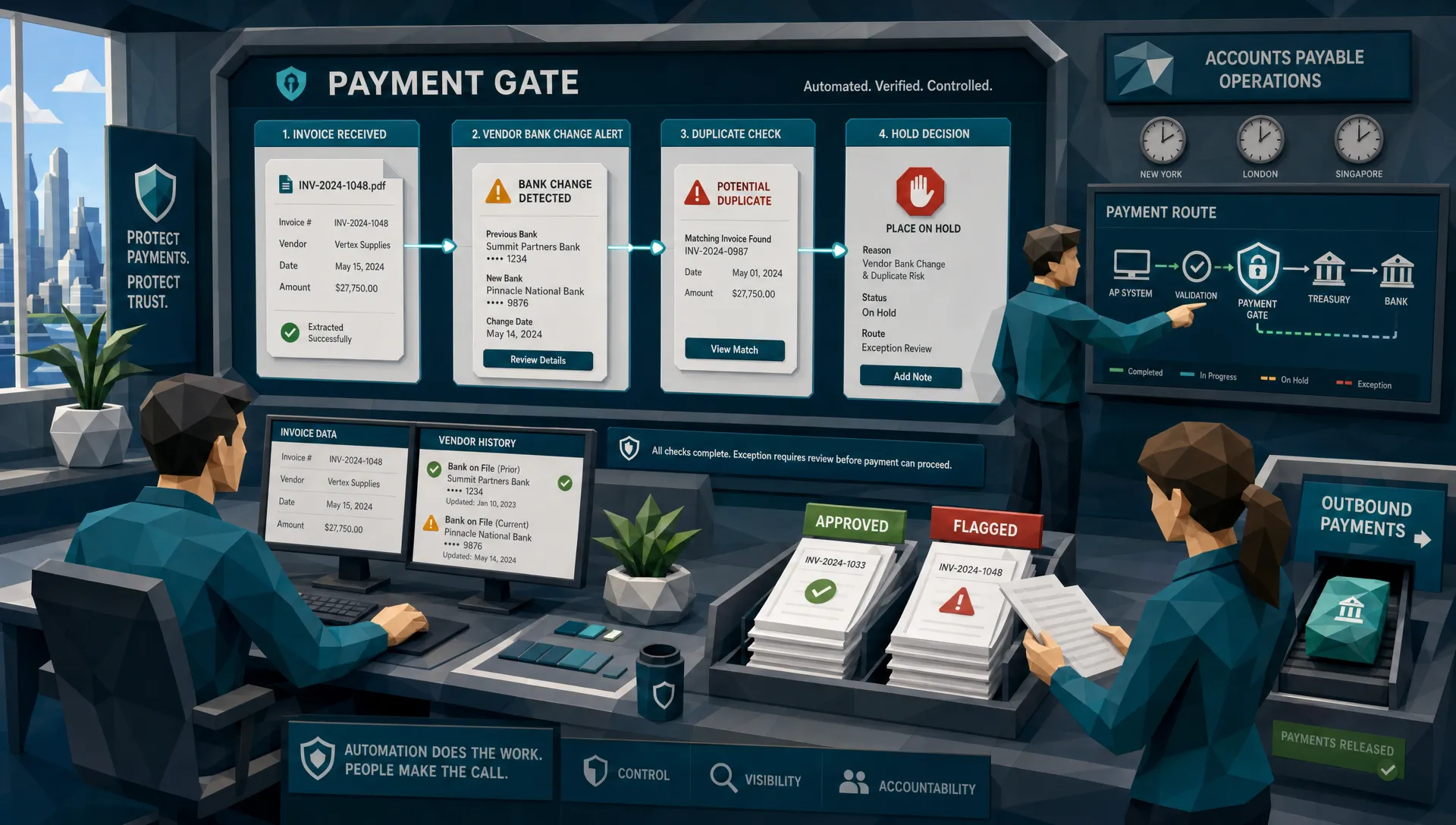

In accounts payable, speed is addictive. Once an invoice goes from inbox to approval queue without anyone typing line items into a spreadsheet, people start talking about “touchless processing” like it is a spa treatment for finance teams.
I get the appeal. I have spent enough time around AP teams to know that nobody misses chasing department heads for approvals, squinting at vendor names, or re-keying invoice totals after lunch. Automated accounts payable can be a genuine gift.
Here is my hot take, though: automation without fraud gates is just a faster way to pay a better-looking lie.
I once reviewed a case where every workflow control looked beautiful. The invoice was routed to the right approver. The amount matched the project range. The vendor name looked familiar. The payment file went out on time. The only problem was that the bank details had been changed on a document that looked perfectly ordinary at 9:30 on a Tuesday morning, which is exactly when bad invoices prefer to arrive.
The lesson was not “automation failed.” The automation did exactly what it was built to do. The lesson was that AP automation usually checks whether a process is complete. Fraud gates check whether the evidence deserves trust.
The control gap nobody likes to admit
Most automated accounts payable programs are designed around operational pain. They capture invoices, extract data, match purchase orders, route approvals, code expenses, and push payments forward. That is good plumbing.
Fraud, unfortunately, does not care about your plumbing.
A manipulated invoice can pass OCR. A fake invoice can fit an approval workflow. A duplicate invoice can be changed just enough to dodge a basic duplicate check. A vendor bank update can look like routine admin until the money lands somewhere very sunny and very unhelpful.
This is why I separate AP workflow controls from fraud gates. A workflow control asks, “Did the invoice follow the process?” A fraud gate asks, “Should this invoice be allowed into the process at all, and should this payment instruction be trusted?”
That distinction matters more in 2026 than it did five years ago. Fraudsters have better tools, better templates, and more patience than most people give them credit for. They do not need to hack your ERP if they can feed it convincing documents.
The Association for Financial Professionals has reported that a large majority of organizations face attempted or actual payments fraud. The FBI’s 2023 IC3 report also recorded billions in business email compromise losses, a category that often targets invoice and payment processes. In plain English, AP is where the money exits the building, so AP gets targeted.
Automated accounts payable changed the bottleneck
Before automation, the bottleneck was labor. AP teams could only process what humans could read, type, code, and chase. Fraud often got caught by accident because someone stared at a document long enough to notice that the logo looked odd or the subtotal did not quite add up.
That was not a strategy. It was luck wearing reading glasses.
Now the bottleneck has moved. The issue is no longer whether AP can process the invoice quickly. The issue is whether AP can stop the wrong invoice quickly enough.
That is a different design problem. If your system is optimized to reduce touches, then every manual review becomes politically suspicious. Someone will ask, “Why are we slowing this down?” That is a fair question. The answer should not be, “Because we are nervous.” The answer should be, “Because this document triggered a specific fraud gate.”
I like gates because they are specific. They do not ask AP staff to become forensic examiners. They create defined checkpoints where suspicious documents, payment details, or vendor changes are paused for review before funds move.
If your current tool mainly tracks whether invoices are received, approved, disputed, or paid, it is worth revisiting why accounts payable tracking software misses fraud. Status visibility is useful, but it is not the same as document integrity.
What a fraud gate should actually catch
A good fraud gate does not simply shout “fraud” at every messy invoice. Finance would revolt, and rightly so. The gate should look for patterns that a normal AP workflow is not designed to evaluate.
The first category is document tampering. This includes altered totals, pasted bank details, edited dates, replaced supplier names, cloned logos, or screenshots converted into PDFs to hide editing trails. A human reviewer might catch the ugly versions. The dangerous ones are the clean versions.
The second category is synthetic or AI-generated documents. These can look polished because they were never scanned, folded, emailed, stamped, or handled in the normal way. That does not automatically make them fraudulent, but it should raise questions when the supplier, payment route, and business context do not line up.
The third category is mathematical inconsistency. I have seen invoices where the tax calculation was wrong by a few dollars, not enough to attract a busy approver, but enough to suggest that the document had been reconstructed from a real invoice. Fraudsters are often good at design. They are less fond of arithmetic.
The fourth category is payment mismatch. This is the one that keeps me interested. A document may look real, but the payee name, bank account, address, email domain, and historical payment behavior may tell a stranger story. That is why fraud gates should use payment information, not just image checks.
The fifth category is near-duplicate behavior. Same invoice layout, similar amount, altered invoice number, slightly different vendor spelling. Basic duplicate detection may miss it. A fraud gate should be more curious.
We have covered the broader blind spots in how accounts payable automation software misses invoice fraud, but the short version is this: AP automation usually extracts what it needs to process a bill. Fraud screening examines what might prove the bill has been manipulated.
Put the gate before the payment run, not after the apology
The most expensive fraud reviews are the ones that happen after payment. At that point, the meeting has a different smell. People stop saying “control improvement” and start saying “legal,” “recovery,” and “who approved this?”
Fraud gates belong before money moves. In an automated accounts payable environment, I would place them at three points.
First, screen the invoice at intake. Before the document becomes a clean data object in your AP system, test whether the file, image, metadata, math, and visible fields show signs of manipulation. This is where many authenticity signals are still fresh.
Second, screen vendor and bank detail changes. I am more worried about a routine-looking bank update than I am about a weird invoice for office plants. Payment diversion fraud often rides on small administrative changes. A gate here can be the difference between “nice try” and “we need to call the bank immediately.”
Third, screen the payment batch. Even if individual invoices looked acceptable, the batch can reveal patterns. A new payee, unusual account geography, repeated round-dollar amounts, or a rush payment outside normal cycles can all deserve a pause.
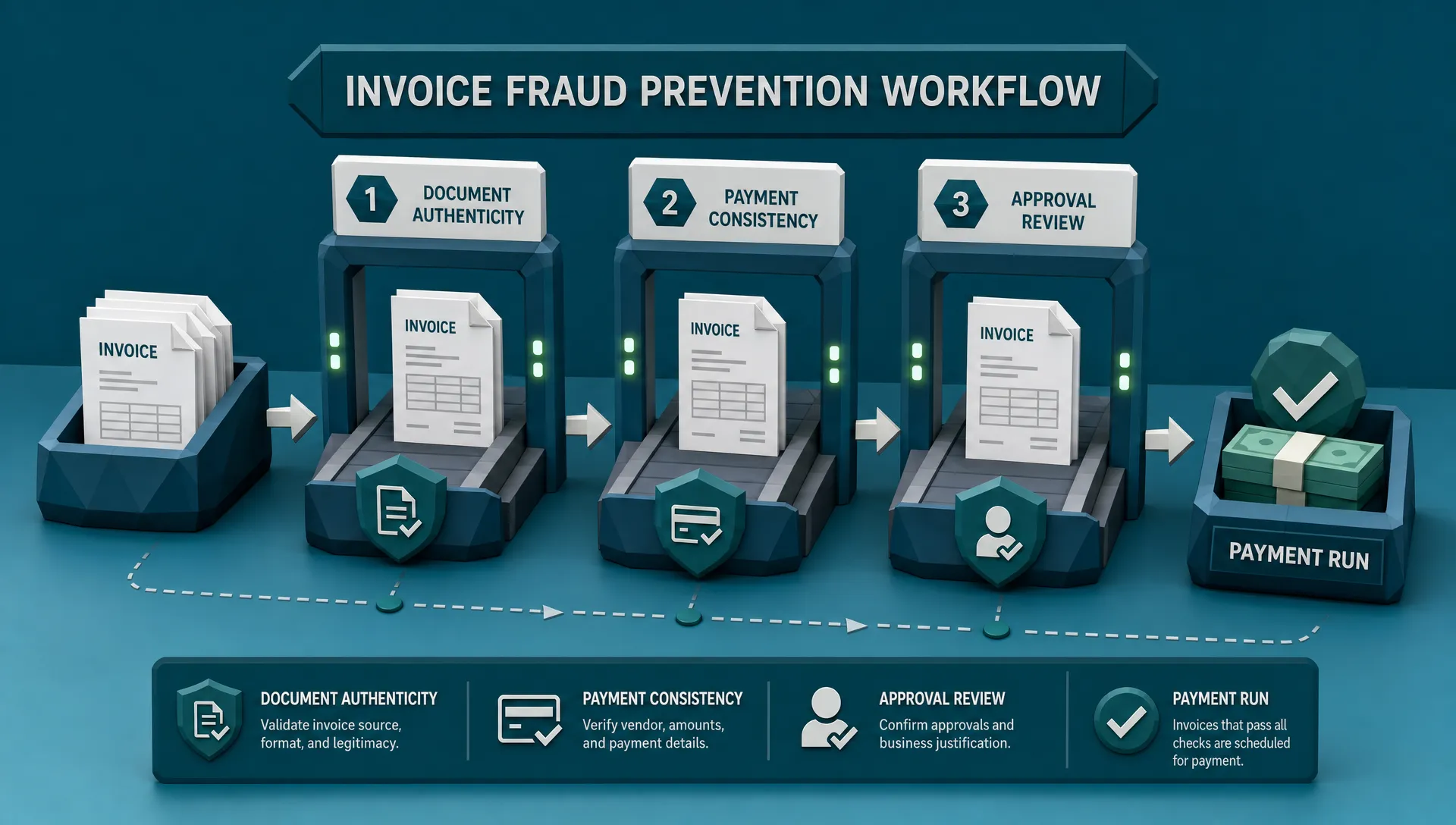
The point is not to trap every invoice in a compliance maze. The point is to stop treating all approved invoices as equally safe.
False positives are not a side issue
Here is where I get slightly unpopular with fellow fraud people: if your fraud gate creates too many false positives, it is not a control, it is a nuisance with a dashboard.
AP teams operate under real pressure. Vendors call. Project managers complain. Month-end arrives with the subtlety of a marching band. If a fraud tool blocks too much, people route around it. They create workarounds, special approvals, shared inbox exceptions, and all the little side doors that fraudsters eventually learn to love.
A useful gate should be risk-based. High-confidence manipulation should be stopped. Medium-risk cases should go to review with clear reasons. Low-risk oddities should be logged, monitored, and allowed through unless other signals stack up.
One caution I always give: do not confuse “unfamiliar” with “fraudulent.” A legitimate invoice can come from an unexpected category. A healthcare provider, wellness program, or benefits team might have a valid reason to buy or reimburse equipment from a supplier of compression and red light therapy devices. The fraud question is not “Does this vendor sound unusual to me?” The better question is “Do the document, payment instruction, business purpose, and approval history agree?”
That mindset saves teams from both extremes: blindly trusting clean documents and blindly rejecting anything they do not recognize.
The fraud gate should explain itself
One reason old-school rules-based controls annoy AP teams is that they often say no without saying why. “Exception generated” is not an explanation. It is a shrug with a timestamp.
A modern fraud gate should give reviewers something practical: what changed, what looks inconsistent, what historical pattern is being violated, and what needs confirmation. For example, “bank account differs from prior approved vendor record” is useful. “Risk score 82” is less useful unless someone knows what made it 82.
I once watched an AP analyst catch a fake invoice because the remittance email domain used a lowercase “rn” where the real vendor used an “m.” That is the kind of tiny detail humans can catch, but only when the system points them toward the right suspicion. Otherwise, asking people to inspect every letter in every invoice is how you create burnout, not security.
The ACFE Report to the Nations has long estimated that organizations lose around 5% of revenue to occupational fraud. Whether the fraud comes from outside vendors, internal collusion, or employees gaming expense processes, the practical lesson is the same: controls need to be visible, testable, and hard to bypass.
What I would measure if I owned the AP fraud program
If I were running AP fraud controls, I would not start with a grand speech about digital transformation. I would start with a few blunt measurements.
I would track how many invoices are stopped before approval, how many are stopped before payment, and how many turn out to be confirmed fraud or confirmed clean. I would also track dollars protected, reviewer time, vendor delay, and repeat issues by vendor, department, and payment type.
Then I would look for the awkward patterns. Are urgent payments creating more exceptions? Are certain business units approving more altered documents? Are new vendors producing more mismatches? Are reviewers overriding the same gate repeatedly because the rule is weak, or because the department is under pressure?
Good fraud measurement is not about proving the tool is clever. It is about improving the control environment without turning AP into a courtroom.
This is also where executive reporting matters. CFOs and controllers do not need every forensic detail. They need to know how much risk is being intercepted, where pressure is building, and whether automation is reducing manual work without increasing payment exposure.
Where Docklands AI fits
Docklands AI is built for the uncomfortable space between “the invoice looks fine” and “why did we pay that?” It helps organizations detect manipulated, photoshopped, and AI-generated invoices and receipts before they become losses.
For automated accounts payable teams, that means adding document-level fraud screening to the workflow rather than relying only on OCR, approvals, matching, or duplicate checks. Docklands AI uses forensic analysis, metadata review, mathematical irregularity checks, physical manipulation detection, and payment information to build a deeper fraud picture.
That last part matters. A generic “is this image real?” check is useful, but AP fraud is usually about money movement. The document, the vendor, and the payment route all need to make sense together.
With API and webhook integration, fraud screening can sit inside existing processes instead of becoming another inbox for people to ignore. Real-time reporting and analytics also help fraud, AP, and finance leaders see where risk is appearing across claims, expenses, and payments.
Frequently Asked Questions
Does automated accounts payable increase fraud risk? It can if fraud controls do not keep up with the speed of processing. Automation reduces manual effort, but it may also move manipulated invoices, fake vendor details, or altered payment instructions through the workflow faster.
What is a fraud gate in AP? A fraud gate is a checkpoint that evaluates invoice authenticity, payment consistency, and risk signals before approval or payment. It is designed to pause suspicious items while allowing normal invoices to keep moving.
Is three-way matching enough to stop invoice fraud? Three-way matching helps, especially for purchase-order-based spend, but it does not prove a document is authentic. A manipulated invoice can still match expected data if the fraudster understands your process.
Where should fraud screening happen in automated accounts payable? The strongest approach is to screen at invoice intake, vendor or bank-detail changes, and before the payment batch is released. These points catch different types of risk.
Will fraud gates slow down AP automation? Poorly designed gates will. Risk-based gates should only hold invoices with meaningful warning signs, which keeps most payments moving while giving reviewers clear reasons for exceptions.
Keep the speed, add the brakes
I am not anti-automation. Far from it. Automated accounts payable can remove drudgery, improve visibility, and help finance teams scale without hiring a small village.
But payment speed is only impressive when the right people get paid.
If your AP system is already moving invoices quickly, the next question is whether it is checking the right things before funds leave. Fraud gates are not a step backward. They are the brakes, sensors, and guardrails that let you drive faster without pretending the road is empty.
If you want to add document fraud detection to AP, claims, or expense workflows, take a closer look at Docklands AI. We help teams catch manipulated invoices and receipts before they become expensive lessons.
Request a Demo Today!
Book your demo below.