


Invoice Automation Software Needs More Than OCR
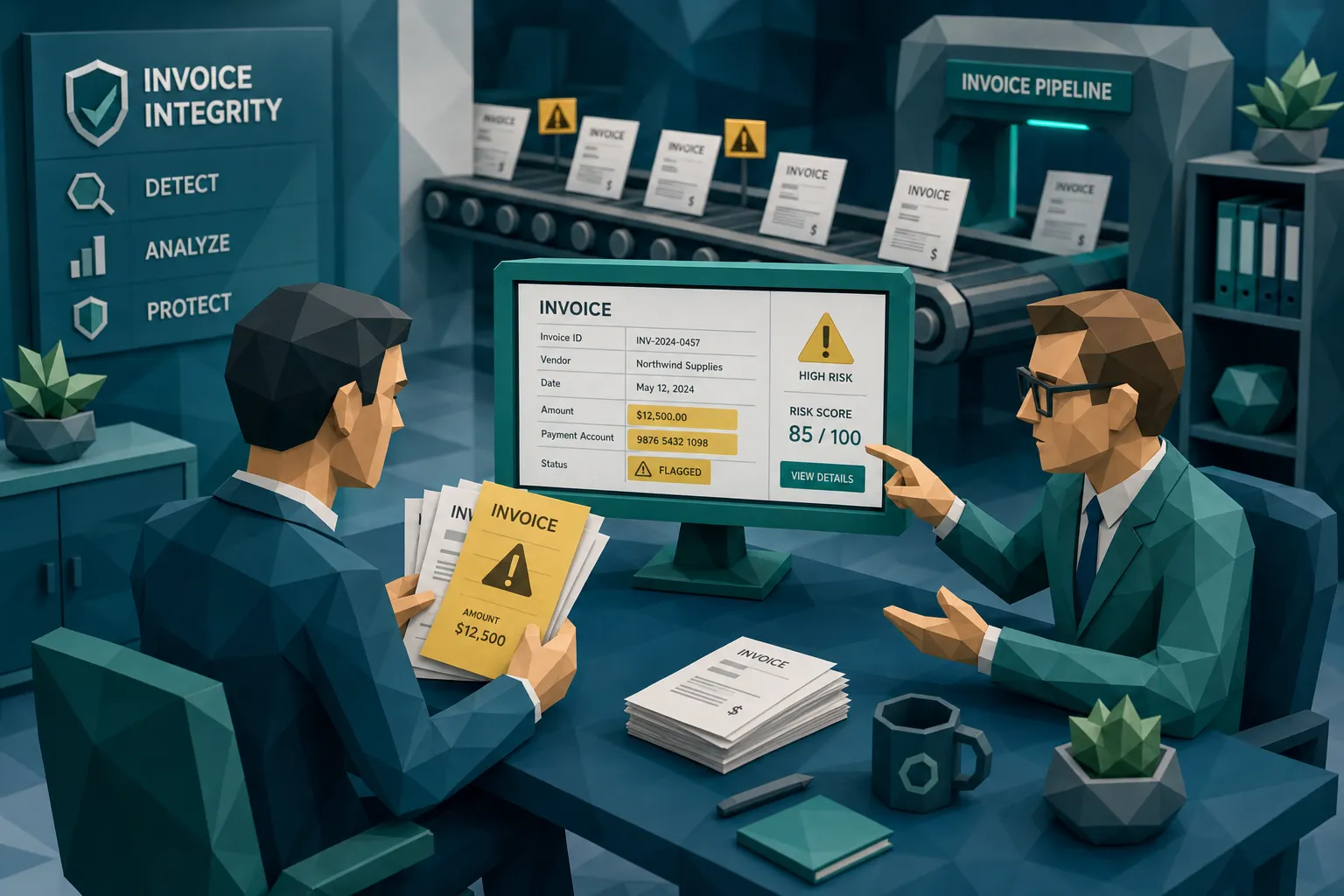

Here is my mildly spicy take after a decade around fraud teams: OCR made invoice processing faster, but it also made bad invoices travel first class.
Invoice automation software is excellent at reading invoices. It can pull out supplier names, invoice numbers, dates, totals, tax, line items, and purchase order references. That is useful. Nobody wants an AP analyst manually typing “Net 30” until retirement.
But reading an invoice is not the same as trusting it.
I once reviewed a case where the OCR performed beautifully. Supplier name, total, PO number, and due date were all captured correctly. The workflow routed the invoice to the right approver, the approval came back quickly, and the payment file was queued. On paper, the automation was a success story. The problem was that the remittance details had been edited on the PDF. The machine read the fraud perfectly.
That is the uncomfortable bit. A fraudster does not need to beat OCR. They need to give OCR a clean lie.
OCR is a clerk with good eyesight, not a fraud investigator
OCR solves a real problem: data capture. It turns a messy invoice image or PDF into structured fields your ERP, AP workflow, claims platform, or expense system can process.
That matters. High-volume finance teams need speed. Claims teams need fast cycle times. Expense managers need to stop reimbursement queues from becoming a swamp.
The issue starts when businesses treat OCR output as evidence of authenticity. It is not. OCR can tell you what text appears on a document. It cannot, by itself, tell you whether the invoice was altered, whether the receipt was reused, whether the image was generated from scratch, or whether the payee details make sense for this specific transaction.
That distinction sounds obvious until month-end pressure arrives and everyone wants the queue cleared.
Invoice automation software often gets judged on how many documents it can process without human touch. That is fine for efficiency. It is dangerous for fraud control if “no human touch” also means “no integrity check.”
Straight-through processing can become straight-through paying
I like automation. I really do. But I have also seen teams automate the wrong assumption.
A standard invoice automation workflow usually looks something like this: capture the document, extract the fields, match to PO or vendor record, route for approval, then send to payment. That flow is built around operational validity. Is this supplier known? Is there a PO? Does the amount match? Did the approver click yes?
Fraudsters know that. They do not always submit absurd invoices from “Totally Real Plumbing LLC.” They often work inside the expected shape of the process. They alter a genuine invoice. They change bank details. They submit a near-duplicate with a slightly different invoice number. They reuse a real receipt across several claims or expenses. They generate a clean-looking invoice that contains all the fields automation expects.
The scale of the problem is not theoretical. The Association for Financial Professionals has reported widespread targeting of organizations through payments fraud. The FBI Internet Crime Complaint Center 2023 report recorded roughly $2.9 billion in business email compromise losses, much of it aimed at payment workflows. And the ACFE Report to the Nations continues to estimate that occupational fraud costs organizations around 5% of revenue annually.
OCR is not the villain here. OCR is the helpful intern who can type 200 words per minute. The mistake is asking that intern to decide whether a document deserves payment.
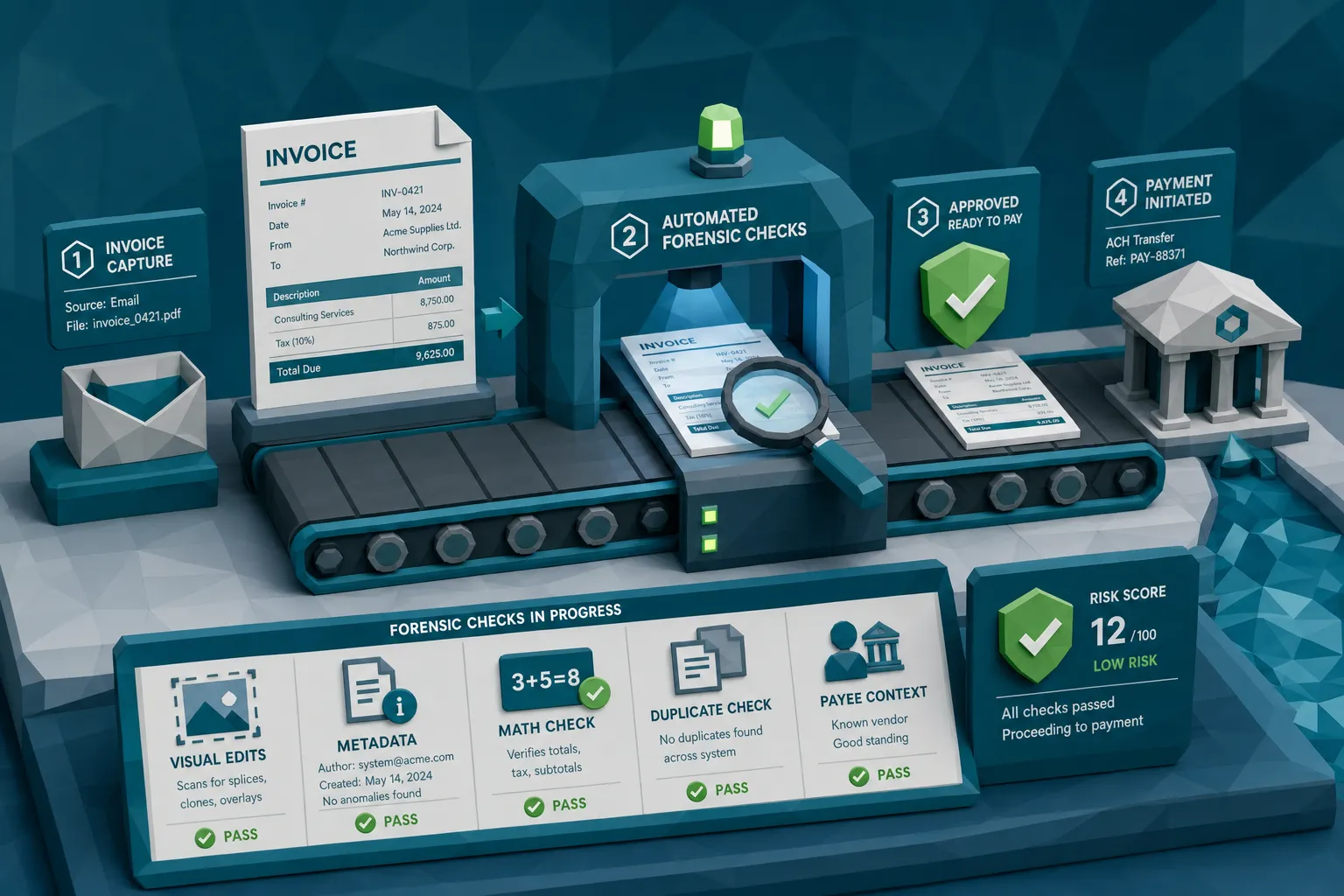
What invoice automation software needs beyond OCR
If fraud matters, and for AP, claims, and expense teams it absolutely does, then invoice automation software needs a control layer that checks the document before the money moves.
That layer should not replace OCR. It should sit beside it and ask different questions.
Document integrity checks
The first question is simple: has the document been manipulated?
That means looking for signs of digital tampering, pasted text, mismatched fonts, inconsistent compression, altered totals, edited bank details, cloned logos, suspicious backgrounds, and other visual clues that a normal field extraction tool will ignore.
A human reviewer may catch obvious edits. They will miss subtle ones, especially at volume. I have seen invoices where only one digit in the account number was changed. The rest of the document looked boring enough to put a reviewer to sleep, which is exactly the point.
Good fraud screening should inspect the invoice or receipt as evidence, not just as a data source.
Metadata and file history
Metadata is not magic, but it is useful. It can show when a file was created, what software touched it, whether timestamps make sense, and whether a document’s history conflicts with the story being told.
For example, a contractor invoice supposedly created six months ago but exported yesterday from an image editing tool deserves a second look. A receipt photo uploaded for a travel expense with odd device or timestamp patterns may need review. A claims invoice with missing or stripped metadata is not automatically fraudulent, but it is a signal worth combining with others.
The key phrase there is “combining with others.” Metadata alone rarely wins the case. Metadata plus visual edits plus payment anomalies can become very persuasive.
Mathematical consistency
Fraudsters are surprisingly bad at arithmetic. I say that with affection, because math errors have saved a lot of money over the years.
Invoice automation software should do more than extract the subtotal, tax, discount, and total. It should check whether they reconcile. That includes tax rates, rounding behavior, line-item extensions, quantity times unit price, and whether the final amount matches the document’s internal logic.
This matters in AP, but it also matters in insurance claims and warranty claims. A manipulated repair estimate may have a believable total, but the line items may not add up. A medical bill may include charges that appear normal until the supporting totals contradict each other.
OCR reads the number. Fraud screening asks whether the number behaves.
Duplicate and near-duplicate detection
Exact duplicate detection is helpful, but modern duplicate fraud often wears a fake mustache.
The same receipt may be submitted with a different date. The same supplier invoice may be regenerated with a new invoice number. A genuine document may be cropped, re-saved, or lightly edited to avoid a basic duplicate rule.
Near-duplicate detection looks for similarity at the document and image level, not only in the extracted fields. That is important because two documents can have different OCR values and still be the same underlying evidence.
This is especially relevant for employee expenses and claims. A restaurant receipt submitted by two employees, a repair invoice reused across multiple claims, or a supplier invoice resubmitted after a partial edit can all slip through basic checks.
Payment-context analysis
This is the part I think gets under-discussed.
The best question is not “does this invoice look real?” The better question is “does this document make sense for this payment, this payee, this claimant, this employee, and this moment?”
Payment context includes things like vendor history, bank details, claimant or employee behavior, prior submissions, payment destination, claim type, expected service location, invoice timing, and whether the document’s story matches the money movement.
A perfectly formatted invoice with a new bank account added two hours before payment is not comforting. A clean receipt submitted by an employee who has already claimed the same merchant pattern three times this month deserves attention. A claim invoice from a repair shop that does not match the claim geography should not glide through just because OCR liked the font.
This is where document checks become much stronger. A file may look passable in isolation. It may look ridiculous when placed next to the payment instruction.
The document is only half the fraud story
Here is another hot take: many invoice fraud programs are too document-obsessed in the wrong way.
They ask, “Is this PDF authentic?” That is useful, but incomplete. Fraud is usually a transaction problem. The document is the costume.
In AP, the real risk is paying the wrong supplier, the wrong amount, or the wrong bank account. In claims, the risk is paying a claim supported by manipulated evidence. In employee expenses, the risk is reimbursing something that never happened, happened at a lower value, or already got reimbursed.
That is why payment information matters. When a system connects invoice and receipt analysis to payment context, it can build a deeper fraud picture than a generic “is this image real?” check.
A fake invoice may be visually strong but fail on vendor history. An altered receipt may pass OCR but fail on duplicate patterns. A manipulated claim invoice may look plausible until the payee, timing, and document metadata start arguing with each other like relatives at Thanksgiving.
Where to place fraud screening in the workflow
The best place to catch invoice fraud is before approval and definitely before payment. After payment, everyone becomes a historian. Historians are lovely people, but they rarely recover funds quickly.
For AP teams, I like screening immediately after document intake and again before payment runs for higher-risk items. The intake screen catches obvious manipulation early. The pre-payment check catches late changes, new bank details, resubmissions, and anything that changed after approval.
For insurance claims, screening should happen when invoices, receipts, estimates, or proof-of-loss documents arrive. Clean documents can keep moving. Suspicious ones can route to SIU or a specialist review queue with evidence attached.
For expense teams, screening should happen before reimbursement. Once an employee has been paid, even a small recovery can become awkward. Nobody enjoys the “about that receipt from March” conversation.
The operational goal is not to review everything manually. That defeats the point of automation. The goal is to screen everything automatically, then send the risky few to people who know what they are looking at.
What to ask vendors before you buy
If you are evaluating invoice automation software and fraud is on your risk register, ask sharper questions than “Do you have OCR?” Everyone has OCR. My toaster may have OCR by 2027.
Ask questions that reveal whether the platform can preserve evidence, detect manipulation, and support investigators:
- Does the platform preserve the original invoice, receipt, or image for forensic review?
- Can it detect digital tampering, photoshopped edits, AI-generated documents, physical manipulation, and metadata anomalies?
- Does it check mathematical consistency across line items, tax, discounts, and totals?
- Can it identify near-duplicates, not only exact duplicate invoice numbers?
- Does it connect document signals with payment context, such as payee details, bank changes, employee history, claimant history, or vendor behavior?
- Do alerts include evidence a reviewer can understand, or only a score?
- Can it integrate through API or webhooks without forcing you to replace your ERP, AP automation tool, claims system, or expense platform?
That last point matters. Most teams do not need another giant transformation project. They need a fraud checkpoint that fits into the workflow they already use.
One unglamorous point: software also needs an owner. I have seen strong tools become expensive wallpaper because nobody owned the exception policy, training, and escalation path. If you are scaling finance, fraud operations, or executive leadership around automation programs, it can be worth working with specialist hiring partners like Optima Search Europe, especially when the role is business-critical and cross-functional. Tools find signals. People build the operating rhythm.
The alert quality matters more than the score
A fraud score by itself is not enough. A high-risk label without evidence just creates arguments.
Reviewers need to know why something was flagged. Was there a suspected edit near the payment details? Did the metadata show recent modification? Did the tax calculation fail? Has the same receipt appeared before? Is the payee new for this vendor or claim?
Evidence-backed alerts reduce wasted review time. They also help investigators explain decisions to vendors, claimants, employees, auditors, and executives.
This is where many automation projects stumble. They celebrate lower manual touch rates, then quietly create a second queue full of vague exceptions nobody trusts. That is not fraud prevention. That is queue gardening.
How Docklands AI fits alongside invoice automation software
Docklands AI is built for invoice and receipt fraud detection. The point is not to replace OCR, AP automation, ERPs, claims systems, or expense platforms. The point is to add the fraud layer those systems were not designed to provide.
Docklands checks invoices and receipts for manipulated, photoshopped, and AI-generated documents. It combines document-level analysis with metadata forensics, mathematical irregularity checks, physical manipulation detection, and payment-context signals. That context matters because an invoice is not risky in a vacuum. It is risky because of what it is being used to pay.
For AP teams, that means stronger screening before supplier payments go out. For insurance claims teams, it means checking invoices and receipts before claim payout. For expense managers, it means catching altered or duplicate receipts before reimbursement.
Docklands also supports API and webhook integration, real-time reporting and analytics, executive dashboards, 2FA security, and multiple user and project support. In plain English, it is designed to fit into existing workflows while giving fraud, finance, and claims teams better evidence before money leaves the building.
If you want a deeper checklist on what AP systems should catch before payment, we have also written about pre-payment accounts payable fraud flags.
Frequently Asked Questions
Is OCR enough for invoice automation software? No. OCR is useful for extracting fields, but it does not prove that an invoice or receipt is genuine. Fraud screening should also check document integrity, metadata, math, duplicates, and payment context.
Will fraud screening slow down invoice processing? It should not if implemented properly. The practical model is to screen every document automatically and route only higher-risk exceptions for review, while clean invoices continue through the normal workflow.
Can document forensics prove invoice fraud? Document forensics can provide strong evidence of manipulation, but a single signal should usually be reviewed in context. The strongest cases combine visual, metadata, mathematical, duplicate, and payment-related indicators.
What is payment context in invoice fraud detection? Payment context includes the payee, bank details, vendor or claimant history, employee behavior, payment timing, prior submissions, and whether the document matches the transaction being requested.
Do claims and expense teams need the same controls as AP? Yes. The documents may differ, but the fraud pattern is similar: altered invoices, reused receipts, synthetic documents, inflated totals, and suspicious payment instructions can all appear before payout or reimbursement.
Stop reading clean lies faster
If your invoice automation software is excellent at reading documents but weak at verifying them, you may be accelerating the wrong thing.
Docklands AI helps teams detect manipulated, photoshopped, and AI-generated invoices and receipts before payment. We combine document forensics with payment context so AP, claims, and expense teams can focus review time where it matters.
Request a Docklands AI demo and see what your current workflow may be missing.
Request a Demo Today!
Book your demo below.


