


Why Invoice Tracking Software Misses Tampering
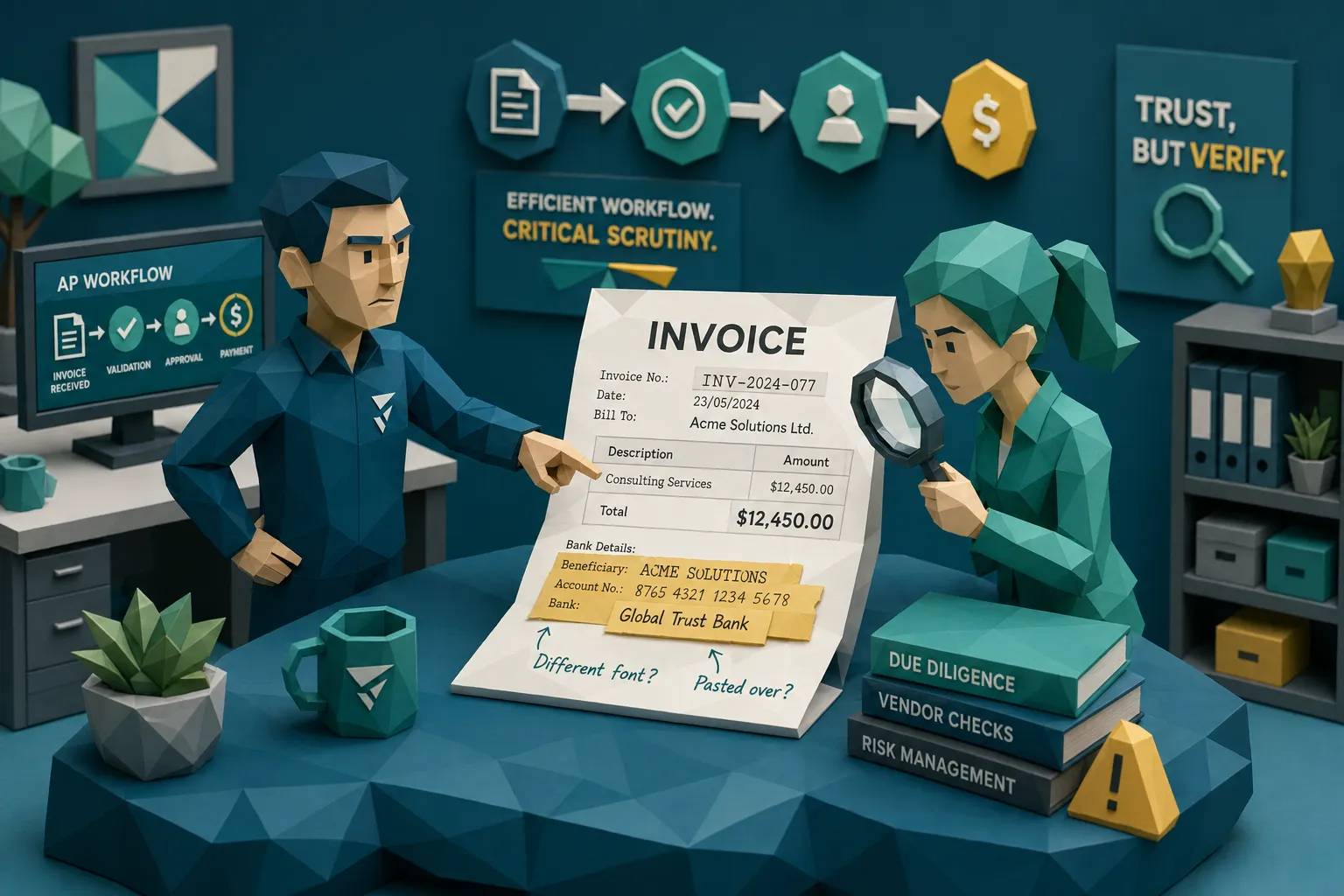

Here’s my hot take after a decade around fraud teams: invoice tracking software is often mistaken for an honesty machine. It is not. It is a traffic controller. A very useful one, by the way. It tells you where an invoice is, who touched it, whether it is approved, and whether payment is late. But it usually cannot tell you whether the PDF itself has been quietly edited by someone with ten minutes, a browser-based image tool, and questionable morals.
I learned this the irritating way years ago. An AP manager showed me an invoice that had sailed through the tracker. Green status. Valid vendor. Correct approval chain. Payment queued. The only problem was the bank detail on the document had been pasted over the original. The tracking system had done exactly what it was bought to do. It tracked the invoice beautifully, all the way toward the wrong bank account.
That is the uncomfortable gap. Invoice tracking software improves control over workflow, but tampering often lives inside the document, not inside the status field.
And the stakes are not theoretical. The AFP Payments Fraud and Control Survey has repeatedly shown that payments fraud targets a large majority of organizations. The FBI’s 2023 Internet Crime Complaint Center report put business email compromise losses at roughly $2.9 billion for that year. A lot of those losses do not start with a cinematic hacker in a hoodie. They start with a document that looks boring enough to approve.
What invoice tracking software is actually built to do
Most invoice tracking software is built around movement and accountability. It answers sensible operational questions: Did we receive the invoice? Has it been coded? Who approved it? Is it matched to a PO? Is it sitting in an exception queue? Has payment been scheduled?
That is valuable. If you run AP for a multi-entity business, a claims operation, a construction group, a healthcare network, or a fast-growing company with invoices arriving from six directions, you need that control. Without it, AP becomes a swamp. And I say that with affection. I have seen the swamp. It has shared mailboxes, duplicate PDFs, and someone called “the only person who knows how this vendor bills us.”
But tracking is not authentication. Workflow history is not forensic evidence. A clean audit trail can prove that your team followed the process. It does not prove the invoice was genuine when it entered the process.
That distinction matters because modern invoice tampering is designed to look process-friendly. Fraudsters do not want to trigger your tracker. They want to fit inside it.
Why tampering slips through a clean workflow
The common mistake is assuming that if an invoice was captured, matched, approved, and paid through the right system, it must be fine. That is like assuming a suitcase is safe because it made it onto the correct conveyor belt. The conveyor belt did its job. Nobody inspected the suitcase.
OCR extracts the text, then the crime scene disappears
Many invoice tracking tools rely on OCR or capture software to pull out vendor name, invoice number, date, amount, tax, PO number, and bank details. Once those fields are extracted, the workflow often treats the invoice as structured data.
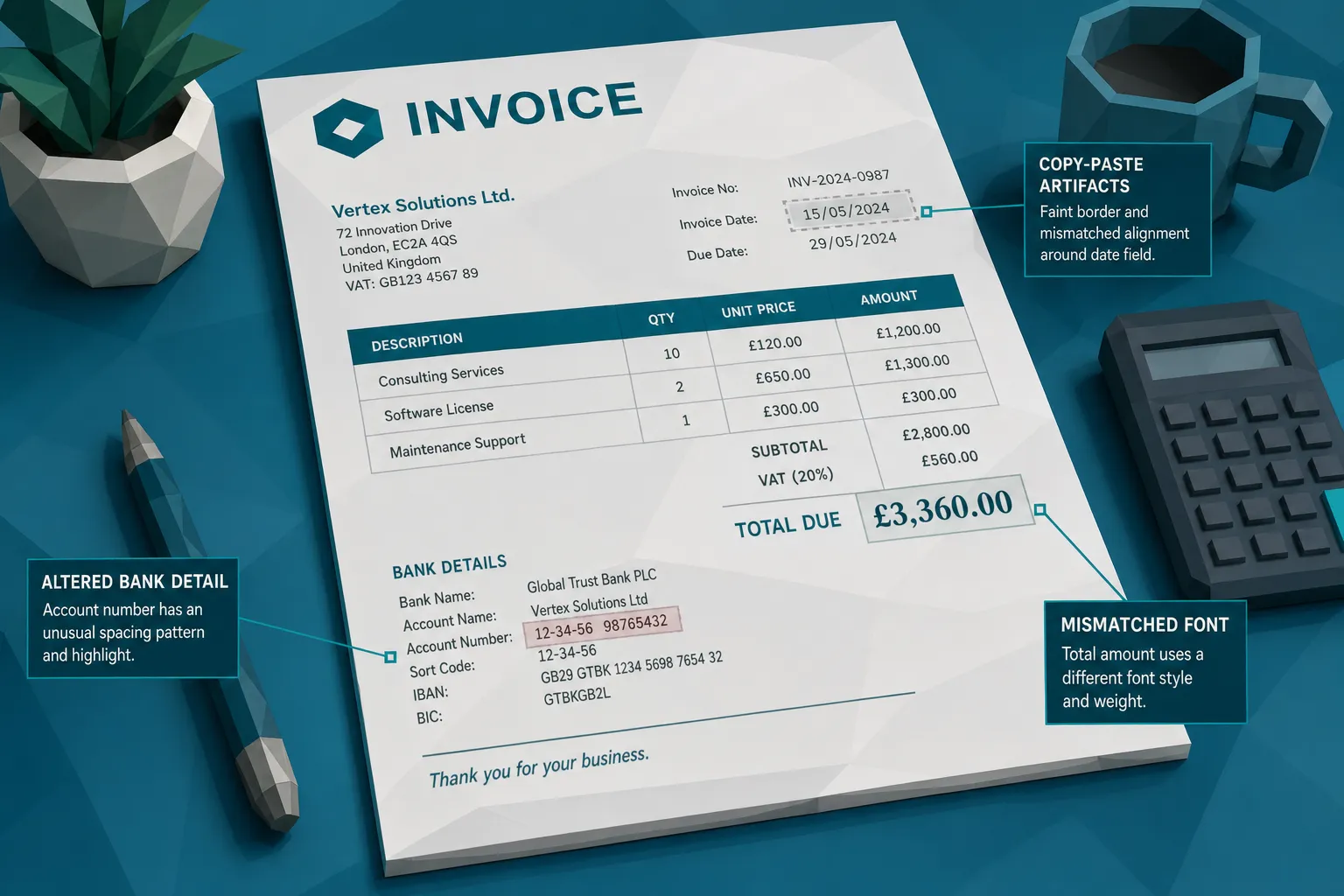
That is efficient, but it can be dangerous. Tampering clues often sit in the image layer: inconsistent fonts, copy-paste boxes, compression changes, lighting differences, odd spacing, or a total that was edited after the invoice was generated. If the system only cares that “Total: $18,420” was extracted correctly, it may ignore the fact that the number was pasted in from somewhere else.
I sometimes tell AP teams: OCR reads the ransom note. It does not dust it for fingerprints.
Approval workflows validate intent, not authenticity
A manager approving an invoice is usually confirming that the service was expected, the project exists, or the amount seems reasonable. They are not trained to inspect pixels. Nor should they be. A sales director approving a hotel expense or a site manager approving a contractor invoice is focused on business context, not whether the “8” in $8,900 has a different compression pattern than the surrounding text.
This is why approval chains can give a false sense of security. The invoice can be business-plausible and still manipulated.
In claims, the same problem appears when an adjuster sees a repair estimate or receipt that fits the story of loss. The claim narrative makes sense, so the document gets less scrutiny. But a plausible story can carry a doctored invoice very comfortably.
Three-way matching does not catch every edit
Three-way matching is useful. Purchase order, goods receipt, invoice. Lovely in theory, occasionally messy in real life. It helps catch unauthorized purchases and mismatched quantities. But it is weaker when invoices are PO-light, service-based, emergency-based, or tied to projects where exact quantities move around.
Even in a matched environment, tampering can target fields that do not break the match. A fraudster might alter remit-to details, inflate a freight charge, reuse a legitimate invoice with a new date, or submit a near-duplicate that looks different enough to avoid a simple duplicate rule.
In insurance and warranty claims, there often is no neat three-way match. You may have an invoice, a claimant story, a vendor name, photos, and a payment destination. That is exactly where document integrity becomes a major control point.
Duplicate detection is often too literal
Basic invoice tracking software may flag exact duplicate invoice numbers or identical vendor and amount combinations. That helps, but it misses the fun little tricks fraudsters use, and by “fun” I mean “the reason fraud managers drink strong coffee.”
A duplicate invoice can be resubmitted with a changed invoice number, a slightly altered date, a cropped image, a different file name, or a modified total. A receipt can be photographed again at a different angle. A genuine invoice can be reused for a different claim or cost center.
Literal matching catches identical twins. Fraud often sends cousins.
Metadata is stripped, ignored, or misunderstood
Invoice files often contain useful clues: creation dates, software used, edit history, device information, and sometimes location data for photographed receipts. But many tracking systems do not preserve or analyze that information. Some workflows convert files, compress them, or store only the extracted fields. By the time a reviewer asks whether the file was edited, the original evidence may be gone.
This matters because metadata is rarely proof on its own, but it is a strong supporting signal. If a repair invoice dated Monday was created in an editing tool on Thursday, or a receipt photo was generated by software rather than captured by a phone camera, you want to know that before payment.
For teams modernizing invoice operations, this is also where data architecture becomes part of fraud control. If your systems destroy original files, fragment payment context, or fail to preserve document history, detection gets harder. Organizations investing in broader digital transformation and reliable data pipelines, including firms such as Anwit SAS for data engineering and digital transformation, should treat evidence preservation as a design requirement, not an afterthought.
The signal is usually in the document plus the payment context
A document can look suspicious, but context tells you whether it is worth slowing down. That is why I am wary of tools that only answer “does this image look real?” Fraud decisions need more than a beauty contest for PDFs.
A better question is: does this invoice make sense with the payment, the claimant, the employee, the vendor, and the history around it?
Consider a supplier invoice where the visual layer suggests the bank details were edited. That is interesting. Now add the fact that the payment destination changed this month, the vendor email came from a lookalike domain, and the invoice number format differs from prior submissions. Suddenly you do not have a vague suspicion. You have a proper fraud picture.
The same logic applies to expense and claims documents. A receipt with odd typography might be innocent if it came from a tiny merchant with a terrible POS system. We have all seen receipts that look like they were printed during a thunderstorm. But if that receipt is submitted twice by different employees, has inconsistent tax math, and was created after the expense date, it deserves attention.
The strongest controls combine document-level evidence with payment-level context. That is where invoice tracking software usually needs help.
A simple example: the invoice that passes tracking but fails reality
Imagine a regional facilities company receives an invoice from a known HVAC contractor for $14,850. The invoice tracking software captures the fields. The vendor exists. The amount is within the project budget. The site manager approves it because the work was done. The due date is approaching, so AP schedules payment.
Everything looks normal in the tracker.
But the document itself tells a different story. The bank account line has a slightly different font weight. The PDF metadata shows editing software used after the invoice date. The subtotal and tax do not add cleanly to the final amount. The invoice number is close to a prior invoice, but not quite the same. The payment details differ from the vendor’s historical pattern.
None of those signals requires a dramatic forgery. That is the point. Most invoice fraud is not trying to win an art prize. It is trying to be dull enough to pass.
I once saw a questionable receipt where the fraudster had changed the date but forgot the day of the week printed beside it. The receipt claimed “Monday,” but the date was a Thursday. That is not Ocean’s Eleven. That is calendar fraud. And it still would have passed a system that only extracted the date and amount.
How to close the gap without replacing your tracker
The answer is not to throw out invoice tracking software. Please do not replace a useful workflow tool because it failed at a job it was never designed to do. The smarter move is to add document integrity checks at the points where fraud can still be stopped.
First, preserve the original file at intake. Do not rely only on converted PDFs, thumbnails, or extracted text. If you ever need to investigate, the original document is your best evidence.
Second, screen invoices and receipts before approval or before payment, ideally both for higher-risk workflows. Pre-payment screening matters because recovery is painful. Once money leaves, you are in the world of clawbacks, disputes, and awkward meetings with legal.
Third, connect the document to the payment context. A tampered invoice is more concerning when it also involves a new bank account, a rushed payment request, a changed vendor contact, or a claimant with repeated document anomalies.
Fourth, route exceptions with evidence. Telling a reviewer “this is high risk” is less useful than showing them why: altered area around totals, metadata mismatch, duplicate similarity, irregular tax calculation, suspicious payment change. Reviewers need facts, not vibes in a dashboard.
If you want a deeper look at this problem inside AP automation specifically, Docklands has also covered how AP automation tools miss edited invoices and why OCR is not fraud detection.
What to ask before trusting your invoice tracking software with fraud risk
If your team is evaluating invoice tracking software, or reviewing the one you already have, ask a few blunt questions. I like blunt questions. They save budget and embarrassment.
- Does the system inspect the original invoice image or only extracted fields?
- Can it detect signs of Photoshop edits, pasted text, physical manipulation, or AI-generated documents?
- Does it analyze metadata and preserve the original file for investigation?
- Can it identify near-duplicates, not only exact duplicate invoice numbers?
- Does it check mathematical consistency across totals, tax, discounts, and line items?
- Does it connect document signals to payment details, vendor history, claim context, or employee behavior?
- Can alerts show evidence clearly enough for AP, claims, fraud, or audit teams to act?
If the answer to most of those is “no,” then your tracker may still be excellent for workflow. But it is not your tampering control.
Where Docklands AI fits
Docklands AI is built for the part invoice tracking software tends to miss: the integrity of invoices and receipts themselves. It looks for manipulated, photoshopped, physically altered, and AI-generated documents before they become paid losses.
The important bit is that Docklands does not treat the document as an isolated image floating in space. It uses payment information from the claim, expense, or AP process to build a deeper fraud picture. That context matters because the same visual anomaly can mean different things depending on the vendor, payee, claim history, or reimbursement pattern.
For AP teams, that means stronger screening for supplier invoice fraud, duplicate submissions, altered payment details, and suspicious invoice math. For insurance claims teams, it means better evidence when invoices, estimates, and receipts are used to inflate or fabricate losses. For expense teams, it means less reliance on managers spotting receipt edits with the naked eye, which is a cruel thing to ask of anyone before coffee.
The practical goal is simple: keep the tracking system that moves work efficiently, then add a fraud detection layer that can see what the tracker cannot.
Frequently Asked Questions
Does invoice tracking software detect fraud? Sometimes it detects workflow-related issues, such as missing approvals, duplicate invoice numbers, or mismatched fields. But most invoice tracking software is not designed to detect document tampering, photoshopped invoices, AI-generated receipts, metadata anomalies, or subtle visual edits.
Why can a tampered invoice still pass approval? Approval usually confirms that the purchase, claim, or expense seems legitimate from a business perspective. It rarely confirms that the document image has not been edited. A manager may approve a real service while missing a changed bank account or inflated total on the invoice.
Is OCR enough to catch invoice manipulation? No. OCR extracts text from a document, which is useful for processing. But tampering often appears in visual artifacts, metadata, duplicate patterns, and mathematical inconsistencies that OCR alone may not evaluate.
Where should document fraud screening happen? The best place is early in the workflow, at intake or before approval, with another check before payment for high-risk invoices. The goal is to catch suspicious documents while there is still time to stop payment.
Should we replace our invoice tracking software? Usually, no. A good tracker is valuable for workflow visibility and accountability. The better approach is to add document-level fraud detection alongside it, especially for AP, insurance claims, warranty claims, and employee expenses.
The bottom line
Invoice tracking software helps you move invoices through the business. Fraud detection helps you decide whether those invoices deserve to move at all.
That is the difference many organizations discover only after a bad payment. My advice is to discover it before then.
If your team wants to catch manipulated invoices, altered receipts, and AI-generated documents before payment, take a closer look at Docklands AI. We help finance, claims, and expense teams add document-level fraud detection to the workflows they already use, without pretending the tracker was built to be a forensic examiner.
Request a Demo Today!
Book your demo below.


