Photoshop Receipt Edits Are Often Easy to Overlook


I have reviewed enough suspicious receipts to know this: the dangerous ones rarely look like movie props. They do not arrive with a villainous watermark or a suspiciously dramatic font. They usually look ordinary, slightly blurry, and painfully boring.
That is exactly why Photoshop receipt edits are often easy to overlook.
A few years ago, I saw an employee expense receipt where the meal total had been bumped from $47.80 to $147.80. Nothing flashy. The restaurant name was real, the date made sense, and the photo had that familiar phone-camera wobble. The reviewer approved it because the receipt was attached, the amount was under a manager threshold, and month-end was breathing down everyone’s neck. I do not blame the reviewer. I blame the process.
Here is my hot take after a decade around fraud teams: a photoshop receipt problem is usually not a graphics problem. It is a workflow problem wearing a graphics costume. Fraudsters do not need to beat a forensic lab. They need to beat a tired reviewer at 4:53 p.m. on a Thursday.
Why good reviewers miss a photoshop receipt
Most claims, AP, and expense teams are not careless. They are overloaded. That matters because a manipulated receipt does not need to be perfect. It only needs to be plausible enough to survive a quick glance.
In insurance, adjusters are balancing customer experience, leakage control, and cycle time. In accounts payable, teams are trying to keep vendors paid and close the books without drama. In employee expenses, reviewers often face hundreds of low-value claims where the emotional cost of challenging someone can feel higher than the financial value of the receipt.
Fraud thrives in that gap.
The FBI notes that non-health insurance fraud costs more than $40 billion per year, excluding health insurance, and that those costs ultimately show up in higher premiums. On the corporate side, the ACFE Report to the Nations continues to show how expensive occupational fraud can become when small schemes run long enough. The lesson is annoyingly consistent: small-looking documents can create large losses when nobody connects the dots.
And receipt manipulation is getting more comfortable for casual fraudsters. Verisk’s 2025 Fraud Report highlights that insurers are seeing more sophisticated claims manipulation, including digitally altered evidence. That is not a future problem. It is already sitting in inboxes, portals, and expense queues.
The edits that slide through are usually boring
When people hear Photoshop, they imagine elaborate image editing. In reality, most receipt edits I see are mundane. A total gets nudged upward. A date gets adjusted to fall inside a policy window. A merchant name gets cleaned up so it looks reimbursable. A tip line grows quietly. A damaged item receipt gets reused for a newer claim. A payment line gets blurred because the card details would contradict the claimant’s story.
The amateur nature of these edits is part of the trap. We expect fraud to look clever. Often, it looks lazy. But lazy can work when the process is lazy too.
One warranty claim sticks in my memory. The claimant submitted a home improvement receipt for a replacement part. At first glance, the document looked fine. The issue was the date. It had been edited to fall just inside the warranty period. The font match was close, not perfect, but close enough. What gave it away was context: the payment card transaction happened three weeks later than the receipt date. The image alone was debatable. The document plus the payment story was not.
That is the theme I keep coming back to. If you only inspect the receipt as an image, you are reviewing the fraudster’s strongest evidence on their preferred terms.
The three traps that make edited receipts feel legitimate
Image quality hides sins
Most receipts arrive as phone photos, screenshots, scanned PDFs, email attachments, or images compressed by an app. Compression is a wonderful little accomplice. It softens edges, crushes detail, and makes copied text look less obvious. A poorly lit receipt can make a manipulated total look like a camera artifact.
I have heard reviewers say, it is too blurry to tell, so I will approve it. I understand the instinct. But blurriness should not lower scrutiny. It should change the type of scrutiny. When the pixels are messy, the surrounding facts need to do more work.
Familiar formats lower our guard
Receipts are repetitive by design. Merchant name, date, items, tax, total, payment method. The more familiar the format, the faster the brain fills in the blanks. Reviewers stop reading and start recognizing. That is efficient, but it is also dangerous.
Polish can create the same effect. A clean logo, a credible merchant name, or a tidy PDF can make a reviewer relax too early. To be clear, polish itself is not suspicious. Plenty of legitimate companies invest in professional digital experiences. A real scale-up might work with a specialist Webflow and Framer agency like BeBranded to build a high-converting website in a few weeks. My point is narrower: a slick website, a crisp brand, or a professional-looking document should never be treated as proof that a receipt is legitimate.
Single-document review is a gift to fraudsters
The biggest blind spot is reviewing the receipt by itself. A receipt is only one version of the story. The payment record, claim narrative, employee history, vendor profile, policy rules, invoice history, and duplicate patterns all matter.
This is where many manual reviews break down. A reviewer asks, does the receipt look real? A better question is, does this receipt behave like it belongs here?
What I check before I zoom in
When I train teams, I tell them not to start with the font. Start with the story.
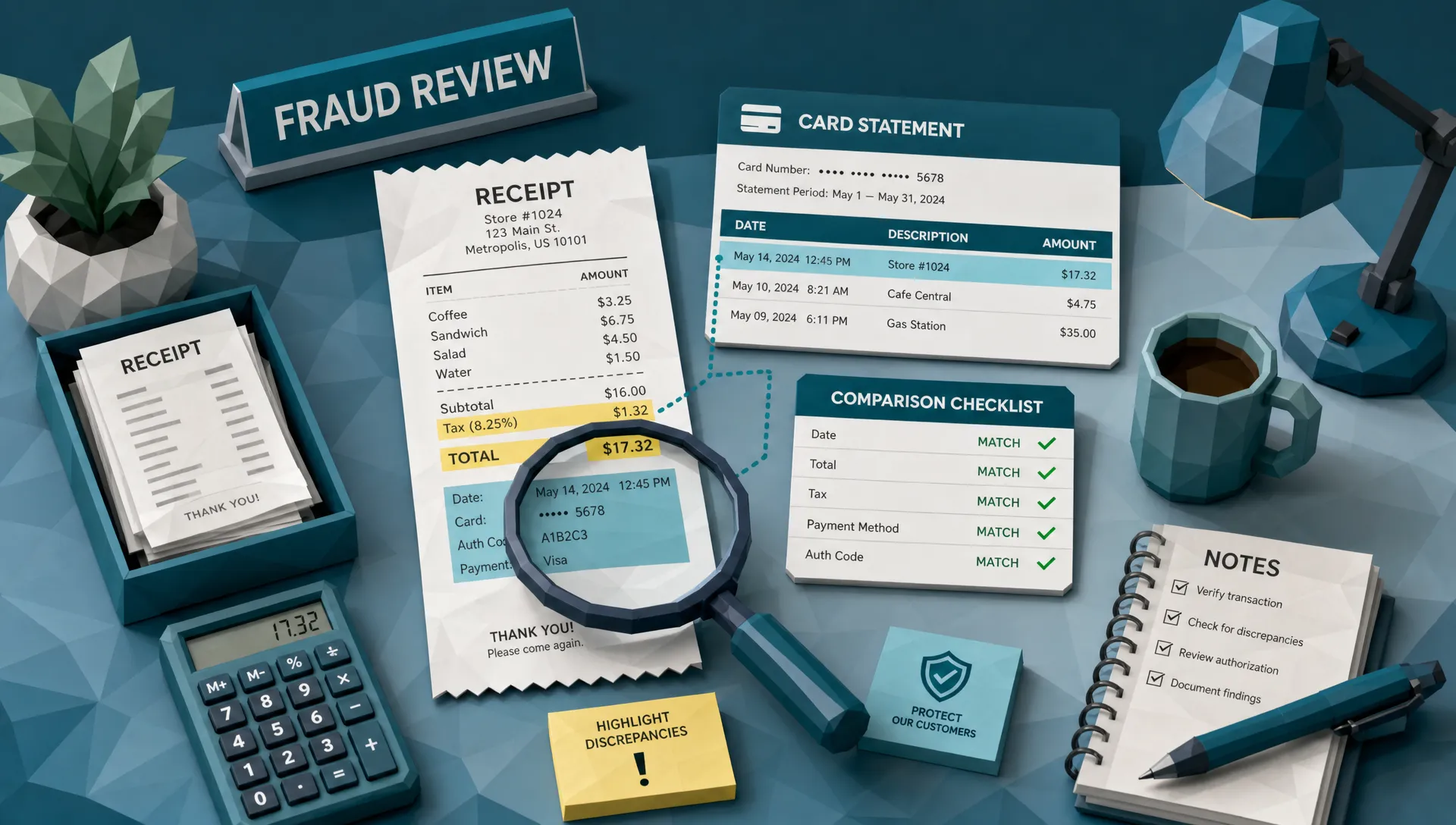
Does the payment method match what the claimant says happened? Does the date fit the travel itinerary, loss event, purchase order, or warranty period? Does the tax calculation make sense for the jurisdiction? Is the total suspiciously close to an approval threshold? Has this merchant appeared before in questionable claims? Are there near-duplicates across employees, vendors, branches, or policyholders?
Those questions are not glamorous, but they catch the edits that eyes miss. Docklands has written more on this in the context of receipt expense fraud patterns finance teams miss, especially where threshold splitting, duplicate submissions, and merchant spoofing create a pattern that no single receipt reveals.
For me, the receipt is a clue. The payment context is the witness statement. If the two disagree, I keep digging.
The visual clues still matter, but they need context
I am not saying image forensics are unimportant. They are very important. I am saying they are strongest when paired with payment and business context.
The classic visual clues are still worth watching. Text that is sharper than the surrounding area. Digits that sit slightly above or below the baseline. A total line with different noise patterns than the rest of the receipt. Repeated smudges that suggest cloning. Metadata that says the image was edited after the claimed purchase date. Mathematical inconsistencies between subtotal, tax, discount, tip, and final total.
A deeper visual walkthrough is available in Docklands’ guide to how receipt Photoshop leaves clues reviewers can still catch. The short version is simple: bad edits often leave fingerprints, but reviewers need the time and tools to see them.
The problem is that human review does not scale neatly. A person may catch a strange font on one receipt, then miss the same issue 40 receipts later. That is not a character flaw. That is fatigue. Fraud control should not depend on someone having perfect attention all day.
Different teams overlook different things
Insurance teams often focus on whether the claimed loss is covered, whether the amount is reasonable, and whether the customer story is consistent. That is sensible. But receipt edits can hide inside sympathetic narratives. A homeowner with a burst pipe, a traveler with lost luggage, or a policyholder replacing stolen goods may submit documents that feel emotionally credible. Fraudsters know empathy is part of the claims process.
AP teams face a different problem. Invoice and receipt manipulation often blends with vendor complexity. Multi-site businesses, construction companies, care groups, franchise networks, and fast-growing companies can have messy purchasing realities. When purchase orders are inconsistent or absent, a polished invoice and matching receipt can move faster than they should. The AFP Payments Fraud and Control Survey has repeatedly shown that payment fraud attempts remain a common pressure on organizations, and AP is often where that pressure lands.
Expense teams deal with social friction. Challenging a receipt means challenging a colleague. Nobody wants to become the receipt police over a cab fare or a client dinner. I once watched a finance team approve a string of weekend meal receipts because each one was small. Only later did they realize the same receipt template had been reused with different totals. Individually, each claim was boring. Together, they were a pattern with a neon sign.
The approval threshold is not a fraud strategy
One of the most common control mistakes is leaning too hard on thresholds. Anything under $100 gets light review. Anything under $500 skips manager approval. Anything under a certain AP value moves automatically.
Fraudsters learn thresholds quickly. Employees learn them from policy documents. Vendors learn them from payment behavior. Claimants learn them from experience. Once people know where the tripwire is, some will simply step around it.
A photoshop receipt edit is often designed to sit comfortably below a threshold. That is why I care less about whether an amount is large and more about whether it is convenient. Convenient amounts deserve attention. So do round numbers, repeated near-threshold totals, and claims that always land just inside policy limits.
A good fraud process asks, why this amount, from this person, at this time, through this payment method?
What a better review process looks like in 2026
In 2026, receipt review needs to be more than a checklist. The volume is too high, the tools for manipulation are too accessible, and the documents are too varied. We need layered review.
That means routine documents should be screened consistently. Higher-risk documents should receive deeper checks. Questionable receipts should be compared against payment information, metadata, math, image-level signals, duplicate patterns, and historical behavior. Reviewers should not have to manually remember every red flag while also chasing approvals and answering Slack messages.
This is where automation earns its keep, provided it supports investigators rather than burying them in noise. A useful system should help answer practical questions: Has this image been manipulated? Do the totals add up? Does the metadata fit the claimed event? Does the payment trail support the receipt? Have we seen this merchant, template, or image before?
Docklands AI was built around that kind of review. It analyzes invoices and receipts for manipulation, Photoshop edits, metadata anomalies, mathematical irregularities, physical tampering, and AI-generated document risk. Just as importantly, Docklands uses payment information from a claim, expense, or payment to build a deeper fraud picture than a simple real-or-fake image check.
That last part matters. I have seen beautiful-looking receipts fail because the payment context was wrong. I have also seen ugly, crumpled, badly photographed receipts turn out to be perfectly legitimate. The image is evidence. It is not the whole case.
Frequently Asked Questions
What is a photoshop receipt? A photoshop receipt is a receipt that has been digitally altered, often to change the date, amount, merchant name, payment details, tax, tip, or item description. The edit may be made in Photoshop or another image-editing tool, but the fraud risk is the same.
Are Photoshop receipt edits always easy to spot? No. Some are obvious, but many are subtle enough to survive a quick manual review, especially when the receipt is blurry, compressed, or reviewed in isolation. The best detection combines visual inspection with payment, metadata, math, and behavior checks.
Why do small receipt edits matter? Small edits can become expensive when repeated across employees, vendors, claims, or locations. Fraud schemes often start below approval thresholds because those claims receive less scrutiny.
Should reviewers reject every blurry receipt? No. A blurry receipt is not automatically fraudulent. But poor image quality should trigger a different review approach, especially if payment details, dates, totals, or claim context do not line up.
How can claims and finance teams reduce missed receipt manipulation? Teams should avoid relying on visual review alone. Compare receipts against payment data, policy rules, duplicate patterns, metadata, math, and claimant or vendor history. Automated forensic screening can help prioritize the documents that deserve human attention.
Stop treating receipts like harmless attachments
The humble receipt has become a surprisingly effective fraud vehicle. Not because every fraudster is a design wizard, but because too many review processes still treat receipts as administrative paperwork rather than evidence.
If your team reviews insurance claims, AP invoices, or employee expenses at scale, the answer is not to distrust every document. The answer is to verify faster, more consistently, and with more context.
Docklands AI helps teams detect manipulated, photoshopped, and AI-generated invoices and receipts before they turn into losses. If your reviewers are still relying on tired eyes and approval thresholds, it may be time to give them better backup.
Request a Demo Today!
Book your demo below.