


Receipt Photoshop Leaves Clues Reviewers Can Still Catch
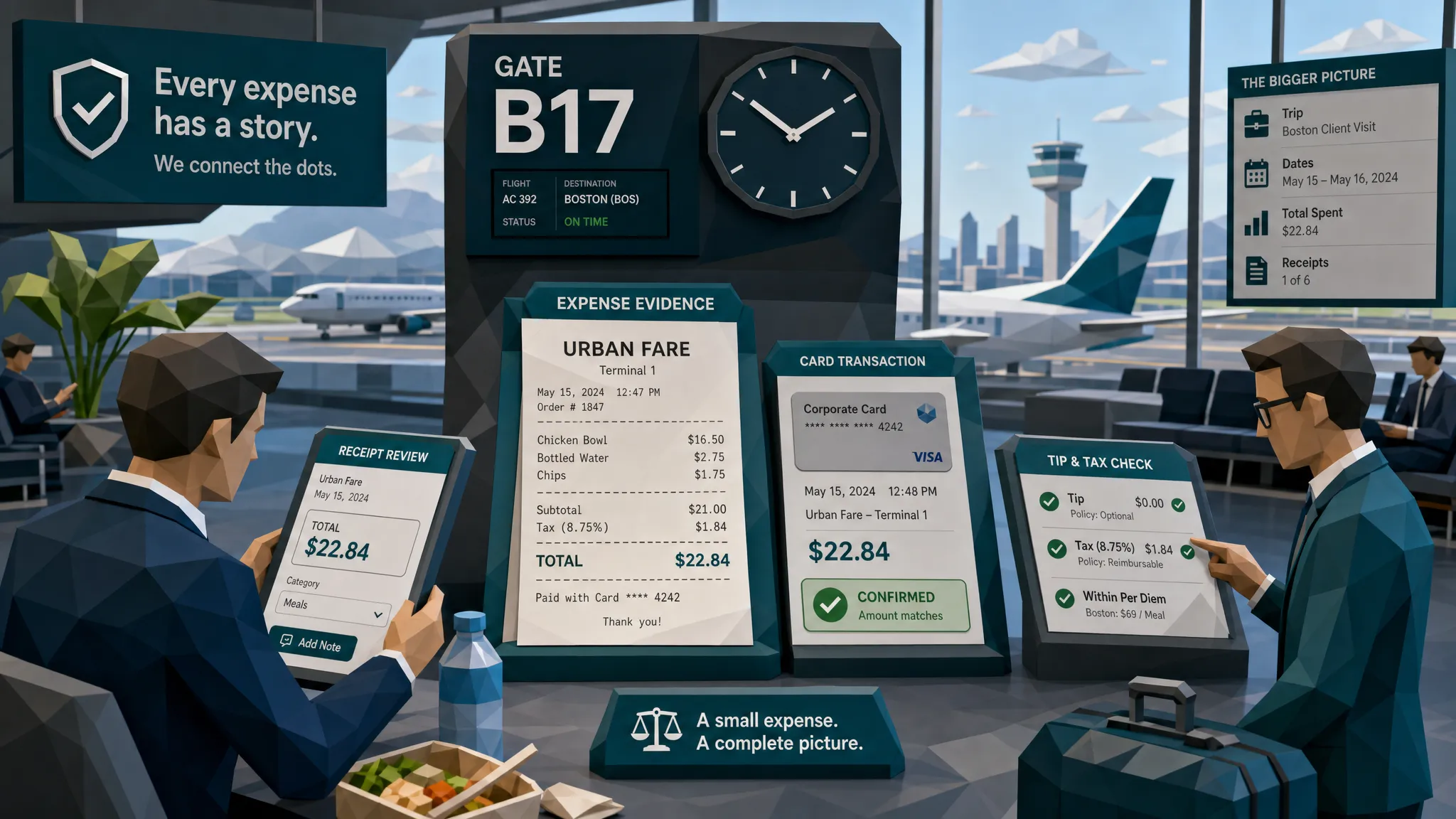

When I hear someone say receipt Photoshop, I do not picture a mastermind in a dark room surrounded by six monitors. I picture a tired salesperson in an airport lounge trying to turn a $48 dinner into a $148 dinner before boarding group C gets called.
That may sound flippant, but after a decade around claims, expenses, and payment reviews, here is my hot take: most manipulated receipts are not caught because the edit looks terrible. They are caught because the edit fails to agree with the rest of the story.
The pixels matter, of course. A receipt that has been altered in Photoshop often leaves visual scars. But the strongest review process treats the receipt as three things at once: a document, a photograph, and evidence of a transaction. Fraudsters can tamper with one layer. They usually forget the other two.
And the stakes are no longer pocket change. The FBI estimates insurance fraud costs the United States more than $300 billion a year, with ordinary families paying more through higher premiums. In finance teams, the Association of Certified Fraud Examiners has long estimated that organizations lose around 5% of revenue to occupational fraud, according to its Report to the Nations. Receipts are small documents, but they sit inside very expensive workflows.
Why photoshopped receipts still give themselves away
A receipt is annoying to fake well because it is boring. That is its superpower.
Real receipts are full of tiny, unglamorous regularities: thermal paper grain, printer alignment, item spacing, merchant abbreviations, tax logic, tip formatting, terminal IDs, time stamps, card authorization codes, and the strange typography that only point-of-sale systems seem to love.
When someone edits a receipt, they usually focus on the obvious target. They change the total, date, merchant name, or line item. That single change has to blend with everything around it. It has to match the blur, lighting, compression, paper texture, font weight, spacing, perspective, and math. If it does not, the document starts whispering.
I once reviewed a restaurant receipt where the total had been changed from $63.20 to $163.20. At first glance, it was clean. The font matched well enough. But the added digit sat a hair too high, and the surrounding paper texture looked like it had been ironed. The better clue, though, was the tip. The employee had left the original $12.64 tip in place, accidentally turning a normal 20% tip into a suspiciously precise 7.7% tip. Fraud sometimes wears a fake mustache and forgets to change its shoes.
That is why I do not want reviewers staring only at whether the receipt looks real. I want them asking whether the receipt behaves like a real receipt.
The first clue is usually around the edited field
Most receipt Photoshop jobs cluster around predictable fields. The total is the star of the show, followed by the date, merchant name, item description, tax, tip, and card details.
Start by zooming into the area that would benefit the claimant or employee most. If the claim is for a higher reimbursement, look at the grand total and line items. If the policy excludes alcohol, look at item descriptions and voided lines. If a warranty claim depends on purchase timing, look at the date and store location.
The edited area often has a different texture from the rest of the receipt. Real photographed paper has noise, shadows, creases, and compression artifacts that behave consistently across the image. A pasted number may look slightly sharper, smoother, darker, or cleaner than its neighbors. Sometimes the edit creates a small rectangular patch where the background is flatter than the surrounding paper.
You do not need to be a forensic image analyst to notice this. If one part of a crumpled receipt looks like it was printed yesterday while the rest looks like it survived a washing machine, pause.
Professional editors understand this instinctively. When you look at legitimate creative work from someone like filmmaker and editor Ami Bornstein, the lighting, color, and texture choices are deliberate across the whole frame. Fraudulent receipt edits usually do the opposite. They obsess over one tiny area and neglect the full scene.
Fonts, spacing, and alignment are painfully honest
Point-of-sale systems are consistent in ways humans are not. They align decimals. They repeat font weights. They use predictable spacing between item names, quantities, prices, and totals.
A manipulated receipt often breaks that rhythm. The added digit is too close to the dollar sign. The decimal point is slightly off baseline. A date has one character that looks heavier than the others. The merchant name has spacing that does not match the store address underneath it.
This is especially common when someone edits a screenshot or a photo using a mobile app. The app may offer text tools, but it rarely recreates the exact receipt font, print bleed, and thermal fading. The result can be good enough for a casual glance and bad enough for a trained reviewer.
Here are the places I check first when a receipt feels a little too convenient:
- The first digit of the total, especially if the amount crossed a reimbursement threshold.
- The date and time, especially when they support coverage, warranty, or policy eligibility.
- The tax line, because fraudsters change totals but forget taxable logic.
- The tip line, because tips expose altered meal totals quickly.
- The last four digits of the card, especially when the payment method conflicts with the claimant or employee record.
- The merchant address, because location edits often leave mismatched spacing or blurry patches.
- Repeated background patterns, which may show cloning or copy-paste repair.
I have a soft spot for decimal points. They are tiny, but they betray a lot. On real receipts, decimal points tend to align like soldiers. In amateur edits, they wander like tourists.
Compression and blur can expose pasted edits
Photoshopped receipts often pass a thumbnail review because the image is small, blurry, and probably uploaded from a phone. But that same blur can betray the edit.
A real photo has blur that follows the camera, lens, and motion. If the receipt was photographed at an angle, the text farther from the lens may be slightly softer. If the hand shook, the motion blur affects the whole image in a consistent direction. If the file was compressed by a messaging app, compression blocks usually appear across the image, not just around one number.
Edited text may not follow those rules. It can look too crisp, or it can have a different blur direction. Around a pasted total, you may see halos, odd pixel blocks, or a background that suddenly lacks the grain present elsewhere.
This matters for claims and expense teams because fraudsters increasingly use screenshots, scans, and forwarded images rather than original files. Each conversion adds noise. A good reviewer asks whether the suspicious field degraded in the same way as the rest of the document.

Metadata is helpful, but do not worship it
Metadata can be useful. It may show when a file was created, modified, exported, or processed through software. It may also show device information, image dimensions, GPS data, or editing traces.
But metadata is not a magic gavel. Plenty of legitimate workflows strip it. Employees submit receipts through apps. Customers forward photos from email. Insurers receive documents through portals. AP teams get PDFs generated by vendor systems. Absence of metadata is not proof of fraud.
The better question is whether metadata supports or contradicts the story. If a receipt was supposedly photographed at the time of purchase, but the file history suggests it was created days later in editing software, that is interesting. If a PDF invoice claims to be a vendor export but appears to be assembled from image layers, that deserves a second look.
I once saw a travel expense receipt where the employee claimed the original had been photographed immediately after dinner. The file, however, had been exported from an editing tool the morning after the reimbursement deadline. Was that enough to decline it outright? No. Was it enough to ask for the original card charge or merchant copy? Absolutely.
Metadata should raise questions, not replace judgment.
Math catches what pixels miss
If I had to choose between a magnifying glass and a calculator, I would take the calculator more often than people expect.
Fraudsters are surprisingly bad at math under pressure. They change a subtotal but forget the tax. They alter the tip but not the final charge. They inflate one line item while leaving discount logic intact. They add a service fee that the merchant format does not normally use.
In insurance claims, the math problem may be subtler. A claimant might submit a repair receipt where parts, labor, tax, and deductible handling do not reconcile. In AP, a manipulated invoice may show a total that does not match quantity times unit price. In employee expenses, a meal receipt may include a tip that no longer makes sense after the total was changed.
This is where receipt review becomes less about art and more about accounting hygiene. The cleanest-looking fake can collapse when the numbers are forced to explain themselves.
Docklands has written more broadly about the usual manipulation categories in Receipt Frauds Explained: The 7 Most Common Manipulations, but the short version is simple: doctored receipts often fail because the fraudster edits the answer and forgets the working.
Payment context is the clue too many teams ignore
Here is the part I care about most: the receipt is not the transaction.
A receipt says a payment happened. The payment record proves what happened, or at least gives you a stronger version of the truth. That means the amount, date, merchant, card details, bank feed, claim record, purchase order, policy limits, vendor history, and reimbursement behavior all matter.
A photoshopped dinner receipt for $186 looks different when the corporate card feed shows $86. A home repair receipt looks weaker when the contractor has no matching invoice history and the bank transfer went to a different name. A warranty receipt becomes suspicious when the product model, purchase date, and merchant SKU do not line up.
This is also why standalone image checks are not enough. A tool can tell you an image may have been manipulated, but finance and claims teams need to know whether that manipulation creates payment risk. The practical question is not simply, does this image look edited? The question is, should we pay this claim, reimburse this employee, or release this vendor payment?
That is the deeper fraud picture. The document and the payment context should be reviewed together, especially when the amount is high, the claimant has prior anomalies, or the receipt arrives at a suspiciously convenient moment.
Different workflows, same bad habits
Receipt Photoshop shows up differently depending on the workflow.
In insurance claims, I usually see edits around dates, repair totals, replacement costs, and proof-of-ownership documents. The goal is often eligibility. The claimant wants the receipt to show the item existed, the repair happened, or the purchase falls inside the policy window. With property and casualty claims, the receipt may sit beside photos, estimates, and contractor invoices, so cross-document consistency matters.
In employee expenses, the classic moves are inflated meal totals, altered tips, duplicate submissions, changed merchant names, and personal purchases disguised as business expenses. The pattern often matters more than any single receipt. One questionable meal may be explainable. A monthly rhythm of near-limit receipts from the same employee is not a vibe, it is a control problem. If that sounds familiar, our article on receipt expense fraud patterns finance teams miss digs into the behavioral side.
In accounts payable, edited receipts and invoices can be part of larger vendor fraud. The Association for Financial Professionals has reported that payment fraud attempts remain widespread, with many organizations targeted each year in its payments fraud research. AP teams need to care about altered documents, but also about vendor master changes, duplicate invoices, shell vendors, and business email compromise.
Different doorway, same house.
The reviewer habit that prevents embarrassment
My favorite reviewer habit is painfully simple: compare the suspicious receipt to a clean example from the same merchant.
Not a random receipt from the internet. A real historical receipt from your own files, ideally from the same vendor, store, region, or time period. Compare layout, tax labels, date format, authorization wording, receipt footer, return policy, SKU style, and line spacing.
Fraudsters often know what a receipt should generally look like. They rarely know the exact formatting habits of a specific merchant terminal. A grocery receipt from one chain may use store numbers in a predictable place. A hotel folio may label taxes in a specific order. A repair shop may always include invoice numbers with a certain prefix.
When reviewers build this pattern memory, they catch more. When teams store and compare examples systematically, they catch even more. This is one reason fake receipt tools still leave clues, as we explain in How Fake Receipt Maker Tools Leave Telltale Clues. A generated or edited receipt can look plausible in isolation and still look wrong next to the real thing.
When to escalate instead of playing detective
Manual review has limits. I say that as someone who enjoys this work more than is probably healthy.
If your team reviews a few dozen receipts a week, human judgment can go a long way. If you review thousands, fatigue wins. People miss things at 4:50 p.m. on a Friday. They also overcorrect, flagging legitimate customers or employees because one harmless artifact looked odd.
Escalation should be based on risk, not drama. A slightly blurry coffee receipt is not worth a full investigation. A high-value claim with an edited repair invoice, mismatched payment details, and a claimant history deserves a deeper look.
A sensible escalation process considers visual clues, metadata, math, duplicates, merchant history, payment confirmation, and the person or vendor behind the document. If several weak signals point in the same direction, you have something stronger than a hunch.
This is the space where Docklands AI helps teams move faster. The platform is built to detect manipulated, photoshopped, and AI-generated invoices and receipts using forensic document analysis, while also using payment information to build a stronger fraud picture. For teams handling claims, AP, or employee expenses at scale, that context matters more than another yes-or-no image score.
Frequently Asked Questions
Can a photoshopped receipt really be detected? Yes, often. The most common clues are inconsistent fonts, strange spacing, mismatched blur, flattened background texture, incorrect math, suspicious metadata, and payment details that do not match the receipt.
What is the easiest receipt Photoshop clue for a human reviewer to catch? Start with the area that benefits the submitter most, usually the total, date, tip, or merchant name. Then compare font weight, alignment, background texture, and math against the rest of the receipt.
Is metadata enough to prove receipt fraud? Usually not by itself. Metadata can show signs of editing or file conversion, but legitimate submission workflows can also strip or change metadata. Treat it as a signal to investigate further.
Should reviewers reject every receipt that looks edited? No. Some legitimate receipts are cropped, compressed, scanned, or re-saved. The safer approach is to combine visual review with payment records, merchant history, policy rules, and claimant or employee behavior.
How are AI-generated receipts different from photoshopped receipts? A photoshopped receipt usually starts with a real document that has been altered. An AI-generated or fake receipt may be built from scratch. Both can leave clues, but generated receipts often fail on layout logic, merchant details, math, and transaction context.
Catch the clue before the payment leaves
Receipt Photoshop is not going away. The tools are easier, the attempts are faster, and reviewers are under more pressure than ever.
But the clues are still there. They are in the pixels, the paper texture, the math, the metadata, and the payment story around the receipt. The winning move is to stop treating receipts like isolated images and start treating them like evidence.
If your team wants to detect manipulated invoices and receipts before they become paid losses, Docklands AI can help you review documents with forensic analysis and payment-aware fraud detection built for claims, AP, and expense workflows.
Request a Demo Today!
Book your demo below.


