


Tippex Invoice Fraud Leaves More Traces Than You Think
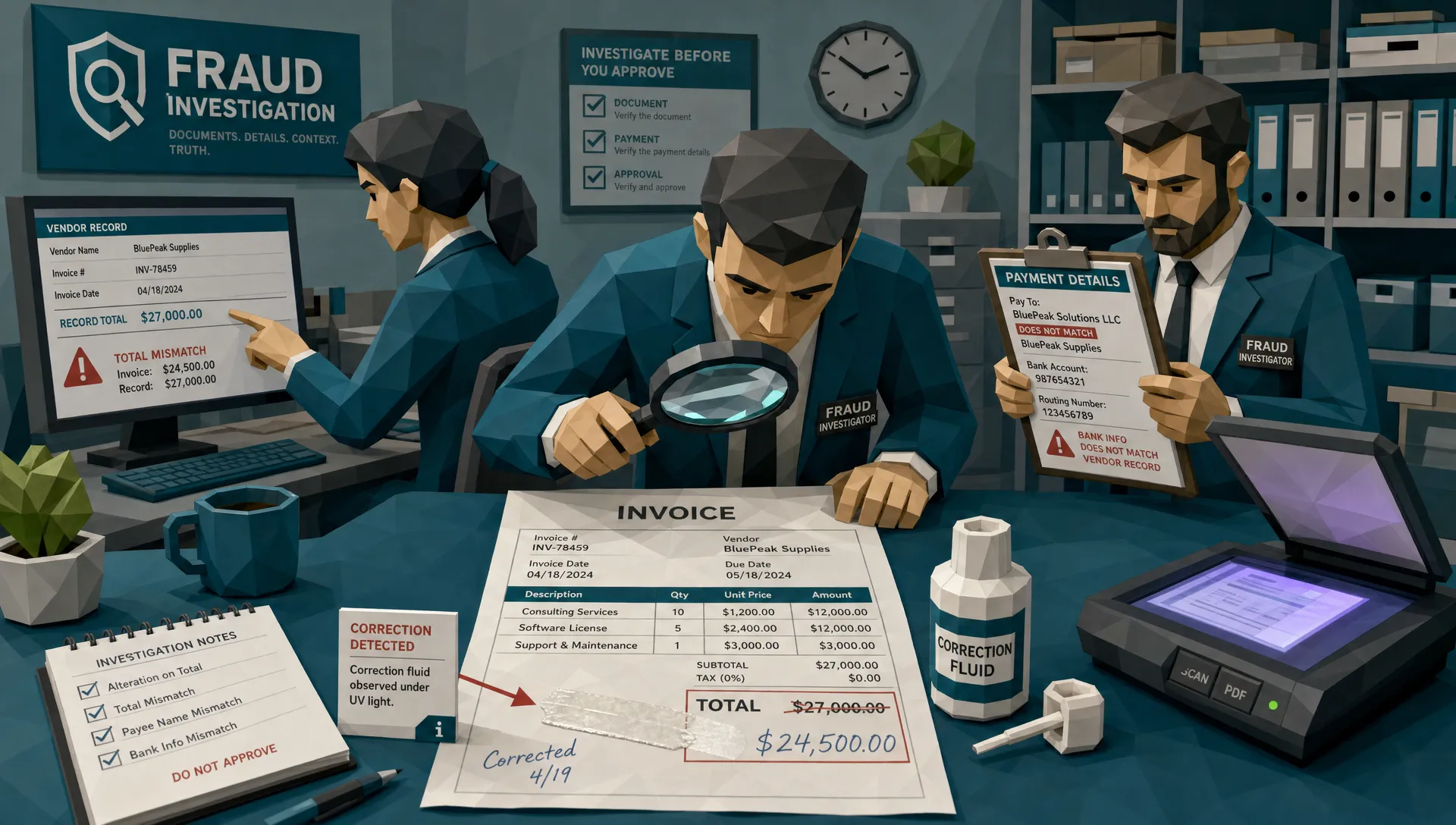

Tippex invoice fraud sounds like something from a filing cabinet era, the sort of thing that should have died alongside fax toner and beige accounting software. I wish it had. After roughly a decade around claims, AP, and expense fraud, I can tell you the old white-out trick still turns up in very modern workflows.
Here is my hot take: correction fluid is often easier to catch than a clean fake PDF, if you know where to look. The fraudster thinks they are hiding a number, a supplier name, or a bank account. In reality, they are creating a small crime scene on paper, then photographing or scanning it into a digital system that happily preserves the evidence.
That does not mean every corrected invoice is fraudulent. People make messy admin mistakes. A plumber may scribble over a job reference. A claimant may scan a crumpled receipt from the glove box. But when Tippex appears near totals, dates, payee details, claim references, or payment instructions, we should lean forward in our chairs.
And preferably put the coffee down.
Why Tippex Still Shows Up in Invoice Fraud
Correction fluid works because many finance and claims processes still begin with a document image. A PDF lands in an AP inbox. A claimant uploads a repair invoice. An employee submits a receipt photo through an expense tool. The system extracts a few fields, the approver gives it a quick glance, and everyone moves on.
That speed is exactly what fraudsters exploit. A £480 repair becomes £980. A vendor’s account number changes. A paid receipt gets repurposed for a second claim. A garage estimate gets nudged just enough to sit below an approval threshold.
One of the first manipulated invoices I reviewed years ago was almost comically low-tech. The total had been covered with correction fluid, rewritten, photocopied, then photographed on a kitchen table. The number looked fine at first glance. The giveaway was the VAT calculation, which still matched the original lower amount. The document was wearing a fake mustache, but it had forgotten to change its shoes.
This is why I get twitchy when teams rely only on workflow controls. OCR, invoice routing, and approval trails are useful, but they often treat the document as if it is telling the truth. As we have written before, invoice tracking software misses tampering when it focuses on process metadata and ignores the physical evidence inside the file.
The Paper Leaves Clues Before the Pixels Do
Tippex changes the surface of a document. Even after scanning, that change often survives. It may appear as a slightly different texture, a dull rectangular patch, a raised edge, a shadow line, or an area where the paper grain suddenly disappears.
On receipts, the effect can be even stranger. Thermal paper reacts badly to scraping, chemicals, heat, and pressure. A corrected line can look too clean compared with the surrounding faded print. On invoices printed on ordinary office paper, correction fluid may create a tiny ridge that catches light during a phone photo. If the image was taken at an angle, the patch may cast a shadow that should not exist on a flat printed page.
Then there is ink behavior. Handwritten digits added after correction fluid often sit on top of the page rather than blending into the original print. Printed text added later may have a different toner density, sharper edge, or alignment drift. If someone covers a bank account and types a new one over the patch, the new characters rarely share the same baseline, spacing, and compression as the original invoice template.
A human reviewer may miss this because the brain wants to read the amount, not inspect the paper. Fraud review is a little like airport security. You are not looking for “a suitcase.” You are looking for the one zipper pull, weight distribution, or nervous pattern that does not belong.
Digital Copies Preserve the Mess
Once the altered document is scanned, emailed, compressed, converted to PDF, or uploaded into a portal, the mess does not vanish. It changes form.
A corrected area may have a different pixel noise pattern from the rest of the page. The background behind the edited number may be too smooth. Compression blocks may cluster around one field while the rest of the document looks stable. A pasted number can be fractionally sharper than its neighbors because it came from a different source image.
Metadata can also give the story away. A phone photo may have been taken days after the claimed transaction. A file may show signs of being generated by an editing app rather than a scanner. A PDF may contain layered objects where a flat scan should not. None of these signals prove fraud alone, but they tell you where to look next.
This is the pattern I see again and again: the fraudster changes one part of the document, but the surrounding document refuses to cooperate. That is why a tampered invoice rarely fails in one place. It fails in clusters. If you want a deeper breakdown of that idea, our piece on why a tampered invoice rarely fails in just one place is worth keeping close to your fraud desk.

The Numbers Usually Snitch
Fraudsters love editing totals because totals get paid. Unfortunately for them, invoices are mathematical documents. Change one number and several others should change too.
I once saw a contractor invoice where the “amount due” had clearly been increased. The subtotal had not. The tax had not. The line items had not. The payment request email, naturally, was very urgent. Fraudsters do love urgency. It is the glitter of bad paperwork.
This is where AP and claims teams should slow down. If a corrected field appears near a total, ask whether the math still behaves. Do the line items roll up correctly? Does sales tax or VAT match the jurisdiction and the taxable amount? Does the deductible make sense? Does the deposit already paid reconcile with the balance due?
In insurance claims, the same logic applies to repair estimates, medical invoices, accommodation receipts, vehicle documents, and replacement goods. The FBI notes that insurance fraud costs the United States more than $308 billion each year, which is a rather expensive reminder that “small” document edits are not small at scale.
In AP, the stakes are just as real. The Association for Financial Professionals has repeatedly reported widespread payments fraud attempts, and invoice-related manipulation often sits beside business email compromise, vendor impersonation, and payment diversion. A Tippex edit to a bank field may look quaint, but if it redirects a six-figure supplier payment, no one in treasury will find it charming.
Payment Details Are the Part I Care About Most
If I could make every fraud reviewer obsess over one area, it would be payment information. Totals matter, but payment details tell us who benefits.
A corrected invoice total may indicate padding. A corrected bank account may indicate diversion. A corrected payee name may indicate a fake vendor. A corrected address may indicate shell-company behavior. A corrected invoice number may indicate duplicate submission.
This is where document review should connect with context. Does the bank account match prior payments to that vendor? Has the claimant used this account before? Is the payee name consistent with the invoice header, tax registration, policyholder, employee, or contractor record? Has the same receipt image appeared under a different claim or expense report?
A few years back, I reviewed a facilities invoice where the visible edit was tiny. A bank account line had been covered and retyped. The invoice passed a basic approver check because the amount matched the purchase request. But the payment details pointed to an account never used by that supplier, and the invoice email came from a lookalike domain. The correction fluid was not the fraud. It was the breadcrumb.
For claims teams, this same principle applies when the document is part of a larger paper trail. If a vehicle claim includes supporting paperwork, for instance, it is often better to verify the source document through an official route, such as an official EU-recognized Certificate of Conformity online, rather than relying on a scanned copy that has passed through unknown hands.
Why Manual Review Misses Tippex Invoice Fraud
Manual review fails for understandable reasons. People are busy. Documents arrive in batches. Approvers are trained to confirm business plausibility, not to perform forensic analysis. A manager checking twenty expenses before a flight is not going to zoom into the edge of a corrected taxi receipt.
There is also a social factor. Nobody wants to accuse a claimant, employee, vendor, or contractor of fraud based on a funny-looking patch. So reviewers rationalize it. Bad scanner. Old paper. Weird lighting. Supplier template issue. Maybe all true. Maybe not.
The better approach is not to turn every AP analyst into a courtroom document examiner. The better approach is to triage intelligently. When a document has signs of physical manipulation, inconsistent metadata, odd math, changed payment details, or prior duplicates, it deserves more scrutiny before money leaves the building.
For insurance organizations, the principle is especially important because fraud rarely arrives as a cartoon villain with a suitcase of fake receipts. It arrives as ordinary paperwork. That is why detecting insurance fraud starts with the paper trail, long before a claim becomes a full investigation.
How I Would Review a Suspected White-Out Invoice
If a document looks corrected, I do not start by shouting “fraud.” I start by preserving the file and asking boring questions. Boring questions catch expensive problems.
First, keep the original submission exactly as received. Do not print, rescan, crop, or compress it again if you can avoid it. Every extra transformation makes the evidence muddier.
Second, compare it with known-good documents. Prior invoices from the same vendor, earlier receipts from the same merchant, past claim documents from the same provider, or previous expense submissions can reveal whether the layout, fonts, tax behavior, and payment details are normal.
Third, verify through trusted channels. Call the vendor using a number already in your master data, not the number on the suspicious invoice. For claims, contact the repairer, clinic, contractor, or supplier directly through a verified source. For expenses, ask for the original receipt or card transaction record.
Fourth, look beyond the visible patch. The correction fluid may be the most obvious clue, but the strongest evidence may be elsewhere: a duplicate image, an impossible date, a mismatched account, a broken tax calculation, or a file history that does not fit the story.
Finally, document your reasoning. Fraud decisions need an audit trail. If you decline, hold, escalate, or request more evidence, make the reason specific and fair. “Suspicious invoice” is weak. “Payment account altered, tax total inconsistent with revised amount, metadata indicates editing after submission request” is much stronger.
Controls That Actually Help
The best controls combine document inspection with payment context. If you only inspect the image, you may miss the beneficiary. If you only inspect the payment data, you may miss the physical tampering. Tippex invoice fraud sits right in the gap between those two worlds.
For AP teams, that means pairing invoice approval with vendor master checks, bank account history, duplicate detection, and document-level review. For claims teams, it means connecting invoices and receipts to policy details, claimant history, repair timelines, supplier legitimacy, and payment destination. For expense teams, it means checking receipt images against card feeds, merchant patterns, employee behavior, and duplicate submissions.
This is also where automation earns its keep. Not by replacing judgment, but by doing the tedious inspection that humans are bad at repeating thousands of times a month. Pixel-level review, metadata forensics, math checks, physical manipulation detection, and payment context can flag the cases that deserve human attention.
The goal is not to catch every smudge. The goal is to stop paying documents that were altered in ways that change the financial outcome.
Frequently Asked Questions
What is Tippex invoice fraud? Tippex invoice fraud is the use of correction fluid, white-out, or similar physical alteration to change invoice details such as totals, dates, bank accounts, vendor names, or invoice numbers before the document is scanned or photographed for submission.
Does correction fluid always mean an invoice is fraudulent? No. Some corrections are innocent admin mistakes. The risk rises when the corrected area affects payment, claim value, approval thresholds, tax calculations, or identity details, especially when other inconsistencies appear in the same document.
Can scanned invoices still show white-out tampering? Yes. Scans and phone photos often preserve texture changes, shadows, edge halos, inconsistent backgrounds, altered pixel patterns, and font mismatches. A digital copy can still carry evidence of physical manipulation.
What should AP teams do if they suspect a Tippex-altered invoice? Preserve the original file, compare it with previous vendor invoices, verify payment details through trusted records, check the math, and contact the vendor using known contact information rather than details printed on the suspicious invoice.
Why is payment context important in invoice fraud detection? Payment context shows who benefits from the edit. A changed bank account, payee name, or remittance address can turn a small-looking document alteration into a serious payment diversion risk.
Stop Treating White-Out Like a Minor Admin Quirk
Tippex invoice fraud may look old-fashioned, but the losses are painfully current. The trick works when teams treat scanned documents as neutral evidence instead of objects that can be physically and digitally manipulated.
At Docklands AI, we help organizations detect manipulated, photoshopped, and AI-generated invoices and receipts before they turn into paid losses. We look at the document, the metadata, the math, the physical manipulation signs, and the payment context together, because that is where the real fraud picture emerges.
If your claims, AP, or expense process still depends on quick visual review, now is a good time to strengthen the net. Learn more about Docklands AI and how deeper invoice and receipt fraud detection can help your team stop altered documents before they cost real money.
Request a Demo Today!
Book your demo below.


