


How Automated Payables Work Better With Fraud Screening
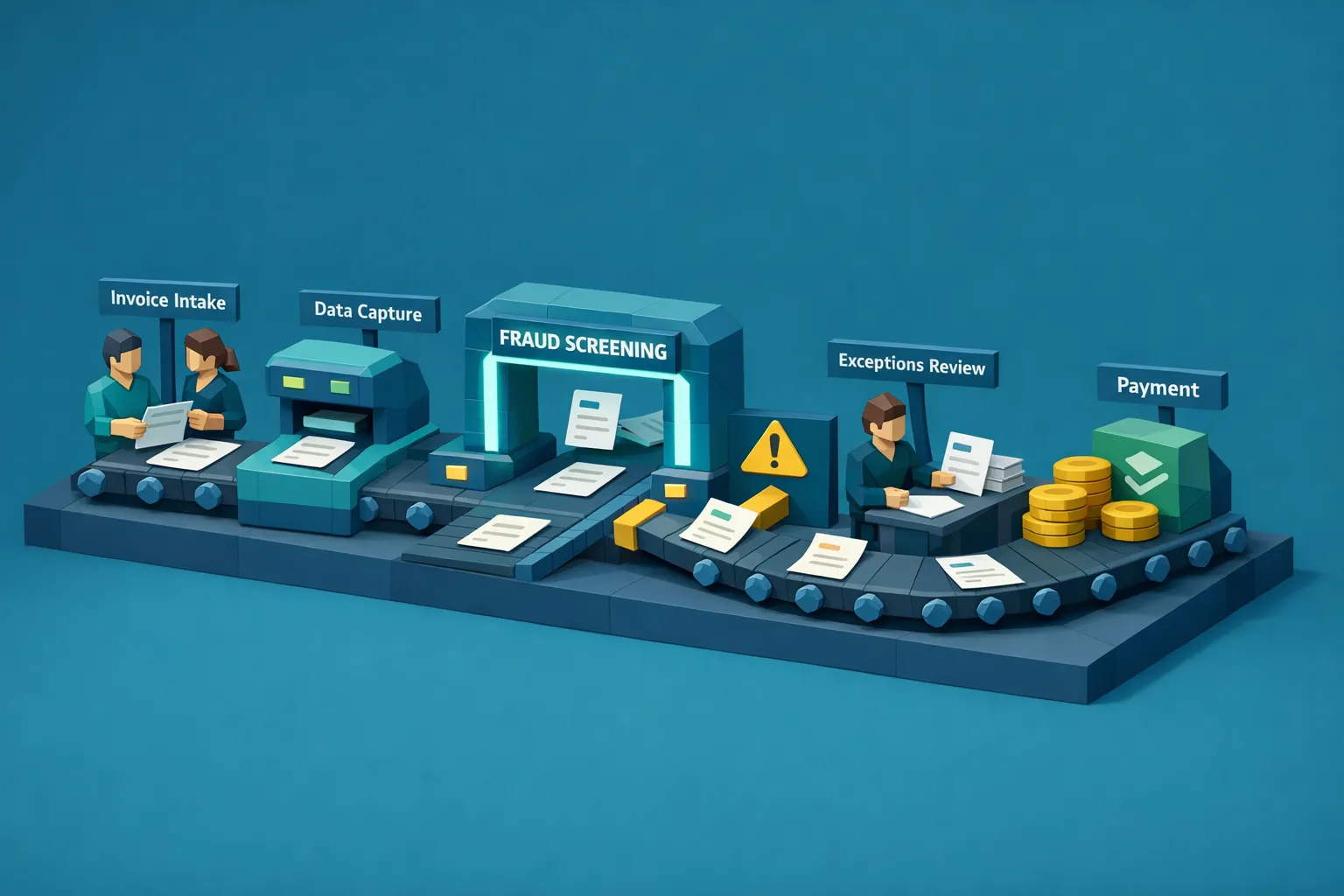

Automated payables can be a major win for finance teams. Faster cycle times, fewer manual touches, consistent coding, cleaner audit trails. The problem is that automation also increases throughput, and throughput can amplify fraud when the workflow is not checking whether an invoice image or PDF is authentic.
If your AP stack can ingest, extract, route, approve, and pay in hours, a manipulated or AI-generated invoice can move just as fast. The most resilient teams add fraud screening as a dedicated control layer inside automated payables so straight-through processing stays fast, while risky documents are stopped early with evidence.
What “automated payables” usually includes (and what it does not)
Most automated payables programs combine a few capabilities:
- Invoice capture (email ingestion, supplier portal uploads, EDI, PDF OCR)
- Data extraction and validation (vendor name, totals, tax, bank details)
- Workflow routing (approvals, cost center coding, exceptions)
- ERP sync (posting, payment proposal creation)
- Payment execution (ACH, wire, checks, virtual cards)
- Monitoring (dashboards, queue management, audit logs)
These systems are designed to move structured fields through a process efficiently.
What they typically do not do well is answer a different question:
Is this document genuine, or has someone altered it (digitally or physically) to get paid?
That gap matters more in 2026 than it did a few years ago because invoice manipulation has gotten easier. Basic image editing is common, and AI-generated documents are now accessible to non-technical users.
Why automation can increase AP fraud exposure
Automation reduces friction. Fraudsters benefit from reduced friction too.
Common failure modes in automated payables tend to cluster around a few points.
Intake is “clean,” but the document is not
OCR can extract believable fields from a fake invoice because OCR is not an authenticity check. A synthetic invoice can look coherent, have realistic line items, and still be fraudulent.
Approval rules can be bypassed with small edits
If approvals depend on thresholds, cost centers, or vendor categories, small manipulations can route an invoice to a lower-friction path.
Examples include:
- Changing the total to slip under an approval threshold
- Editing remittance details while keeping the rest of the invoice familiar
- Swapping a vendor identity (impersonation) while preserving layout cues
Exception queues become a hiding place
Automated payables often creates a smaller “exceptions team” that handles mismatches. Those queues can become overloaded, which increases the chance of rubber-stamping invoices to clear backlog.
PO-less or weak-PO environments are structurally higher risk
Many organizations cannot enforce strong PO processes (construction, multi-site operations, multi-entity rollups, fast-growing companies, legacy systems). In those environments, invoice authenticity matters even more because 2-way or 3-way match coverage is incomplete.
Industry experience varies, but Docklands AI commonly sees meaningful fraud and leakage in PO-light environments, including manipulated invoices that pass field-level checks.
Fraud screening: the control layer automated payables is missing
Fraud screening (done well) is not “more rules.” It is document integrity verification.
A modern fraud screening layer should evaluate the invoice or receipt itself, not only the extracted text fields. That usually means combining several methods:
- Photoshop and tampering detection (pixel-level forensic signals)
- AI-generated document detection (synthetic patterns, generative artifacts)
- Metadata forensics analysis (edit history clues, device/software fingerprints when available)
- Mathematical irregularity checks (line items, taxes, totals, rounding logic)
- Physical manipulation detection (re-photographed prints, cut-and-paste artifacts)
- Duplicate and near-duplicate detection (reused invoices with light edits)
This is where automated payables gets better: you keep the speed benefits of automation while adding an authenticity gate that catches the fraud types OCR and workflow rules miss.
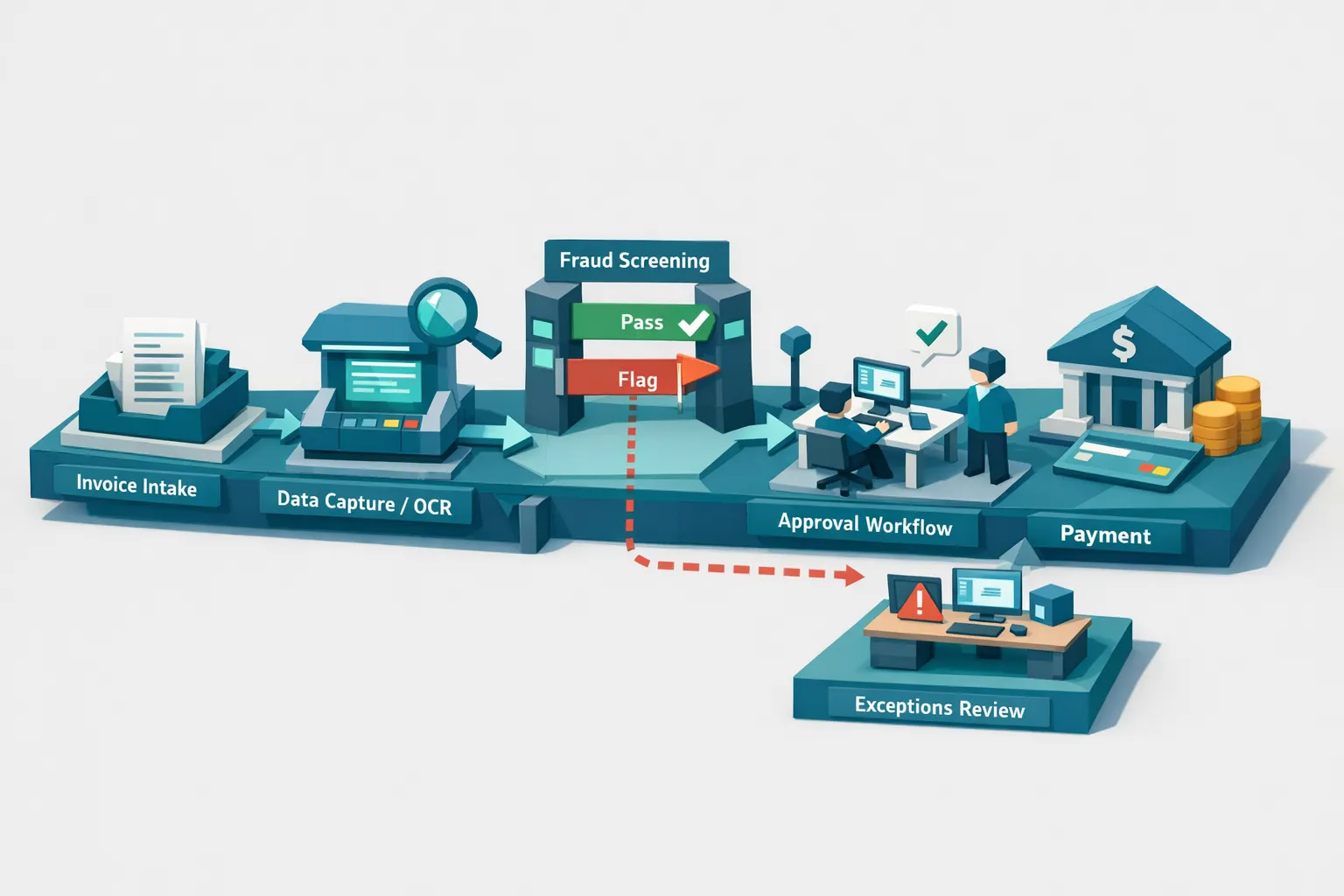
Where fraud screening fits in an automated payables workflow
Most teams get the best results by screening early, before posting and before payment proposals.
Recommended placement: right after capture, before approval
Screen as soon as the document arrives (email, portal, scan, EDI-to-PDF). This enables:
- Faster stops, before the invoice spreads across systems
- Cleaner exception routing, because the “why” is attached to the document
- Better vendor communication, because you can ask targeted questions
A practical triage model that keeps throughput high
You want a workflow that does not turn every invoice into a manual review.
A common model looks like this:
- Low risk score: continue straight-through processing
- Medium risk score: allow processing, but require a targeted review step
- High risk score: quarantine and require fraud review before approval or payment
For AP leaders, this is the key design goal: review less, catch more, because the screening produces evidence-backed flags rather than generic exceptions.
What to look for in fraud screening if you run automated payables
If you already have invoice automation, prioritize screening capabilities that complement your stack instead of replacing it.
1) Full-document coverage, not only field checks
Fraud often lives in the parts of the invoice your system does not validate, such as formatting inconsistencies, background cloning, or altered line item areas.
2) Evidence you can act on
A good system should return more than a yes or no. It should return a risk score plus why it was flagged, so reviewers can work faster and audit teams can defend decisions.
3) Fast enough for real workflows
If screening adds minutes per invoice, teams will bypass it. Look for near-real-time processing that fits your intake pace.
4) Integration that matches automated payables reality
Most AP teams need API-first and event-based patterns:
- API and webhook integration for real-time routing
- Batch processing for large backlogs or nightly runs
- Support for multiple users and projects (useful for multi-entity AP)
5) Strong security and separation of duties
When you introduce a new control point, it needs to align with finance security expectations, including capabilities like 2FA and role-based access patterns.
Docklands AI is built specifically around document and payment fraud screening for invoices and receipts, with AI and forensic analysis designed to flag manipulated, photoshopped, and AI-generated documents before they are paid.
Why payment context improves fraud screening accuracy
One of the common issues with “is this image real” checks is that they can be overly generic. AP fraud is rarely only a visual problem.
Docklands AI strengthens detection by using payment information on a claim, expense, or payment to build a deeper fraud picture, which can reduce false positives and focus reviewers on the invoices that matter.
This matters in automated payables because false positives create operational drag. The best fraud control is the one your team keeps turned on.
Operating model: who reviews flags, and how to avoid bottlenecks
Fraud screening works best when the review process is intentionally lightweight.
A common operating model:
- AP reviewers handle medium-risk invoices using the evidence provided by screening
- Fraud managers or internal audit handle high-risk invoices and repeated patterns
- Vendor management owns remediation when a supplier is implicated
To keep the system from becoming a new bottleneck, define:
- SLAs for review (for example, same day for high risk)
- Clear outcomes (approve, reject, request clarification, escalate)
- A feedback loop to tune thresholds and reduce noise
If you want a deeper AP-focused checklist, Docklands has a related guide on invoice fraud prevention for accounts payable.
Measuring success: metrics that matter in automated payables
Automated payables programs already track cycle time and cost per invoice. Add fraud screening metrics that align with finance outcomes.
Good starting metrics include:
- Percentage of invoices screened (target should be 100 percent)
- Flag rate by risk tier (low, medium, high)
- Confirmed fraud rate and prevented payment value
- Reviewer time per flagged invoice
- Exception leakage (fraud found after payment)
If you need external benchmarking for fraud risk awareness in finance functions, the ACFE Report to the Nations is a widely used reference for occupational fraud patterns.
A note on AI governance, since fraudsters use AI too
CFOs increasingly expect employees and external actors to use AI to generate or alter documents. That changes the control conversation from “spot a typo” to “verify provenance.”
Some organizations address AI governance broadly across departments (marketing, design, finance) by standardizing how AI is operated, controlled, and audited. If you are thinking about governance beyond finance, tools like Virtuall’s Creative AI OS reflect the wider trend toward rule-based control layers for AI at scale.
For AP specifically, the governance takeaway is simple: assume AI-altered documents will reach your intake channels, and design automated payables to screen for them.
Frequently Asked Questions
Does automated payables increase invoice fraud risk? It can. Automation improves speed and reduces manual checks, which can also reduce the chance that a human notices a manipulated invoice. Fraud screening offsets that risk by verifying document integrity at intake.
Where should fraud screening happen in the AP process? Ideally right after invoice capture and before approval or posting. Early screening prevents bad invoices from entering downstream systems and makes exception handling faster.
Can OCR detect photoshopped or AI-generated invoices? OCR is great for extracting text, but it is not designed to detect image tampering, synthetic generation, or metadata anomalies. You generally need document forensics and AI-based integrity checks for that.
Will fraud screening slow down straight-through processing? It should not if implemented correctly. The goal is low-latency screening with risk scoring, so low-risk invoices continue automatically while only a small share routes to review.
What if we cannot enforce purchase orders for every spend category? That is common in construction, multi-site operations, and fast-growing organizations. In PO-less workflows, document authenticity screening becomes a primary control because matching coverage is limited.
What evidence should reviewers get when an invoice is flagged? Reviewers should receive a clear risk score plus evidence-backed reasons, such as tampering signals, metadata irregularities, mathematical inconsistencies, or duplicate matches. This reduces review time and supports auditability.
Add fraud screening to your automated payables workflow
If you are investing in automated payables, fraud screening is one of the highest-leverage upgrades you can make. It helps you keep cycle times low while reducing the odds of paying a manipulated, duplicated, or AI-generated invoice.
Docklands AI provides invoice and receipt fraud detection using AI-generated document detection, tampering analysis, metadata forensics, mathematical checks, and duplicate intelligence, with API and webhook integration designed to fit existing AP workflows.
Explore Docklands AI at docklands.ai to request a demo or evaluate fraud screening in your automated payables stack.
Request a Demo Today!
Book your demo below.


