Manual Edit Detection: How to Find Hidden Cuts and Altered Content in Video, Photos and Documents
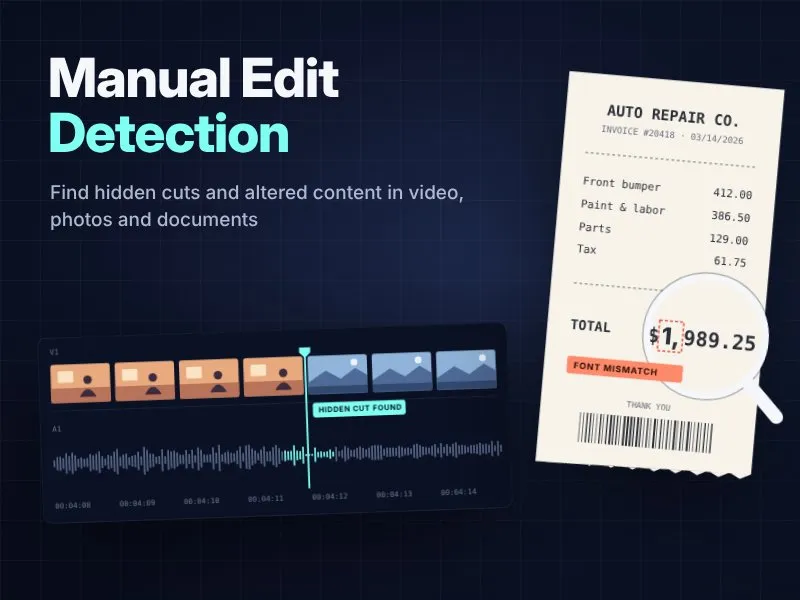
Software can find a lot of edits for you. It can't find all of them.
Manual edit detection is the skill of spotting changes by eye and by careful checking, without leaning only on an automatic tool. Video editors use it to locate cut points that Adobe Premiere Pro missed. Claims adjusters, accountants and newsroom fact-checkers use it to catch a receipt with a changed total or a photo with a patched-in dent.
This guide covers both. You'll learn how to find cuts in footage when Scene Edit Detection lets you down, and how to spot hand-edited images and PDFs before they cost your organization money.
For finance and claims teams that review documents at volume, Docklands AI adds pixel-level checks that flag edited invoices and receipts before they are paid or approved.
What Is Manual Edit Detection?
Manual edit detection means reviewing media yourself to find where it was cut, changed or combined. You look at frames, pixels, text and file data, and you decide whether something was altered.
Two meanings, one skill
The term shows up in two settings:
- Video post-production: You receive a finished, flattened video file and need to rebuild the original edit points so you can re-cut, reframe or apply color correction shot by shot.
- Authenticity checks: You need to know whether a photo, ID, bank statement or contract was changed after it was created.
Both rely on the same habit: slow down, look for breaks in continuity, and confirm with the file itself.
Manual vs. automated detection
Automated tools and human review each catch different kinds of edits. The table below shows where each one works best and where it tends to slip.
| Automated detection | Manual edit detection | |
|---|---|---|
| Speed | Fast on long files | Slower, more focused |
| Strength | Hard cuts, obvious changes | Subtle transitions, context, intent |
| Weakness | Fooled by flashes, fades, fast motion | Depends on reviewer skill |
| Best use | First pass | Verification and final call |
The best workflow uses both. Let the tool make a first pass, then check its work by hand.
Manual Edit Detection vs. Scene Edit Detection in Premiere Pro
Premiere Pro's built-in Scene Edit Detection can find cut points in seconds, but it reads pixels, not context. Knowing how it works helps you see exactly where manual edit detection needs to take over.
How Scene Edit Detection works
Scene Edit Detection is the edit detection option built into Adobe Premiere Pro. Adobe describes it as a way to reach cut points automatically instead of scrubbing through footage manually. You right-click the sequence on the timeline and choose Scene Edit Detection, or select it and go to Clip > Scene Edit Detection.
You then pick what Premiere does with each detected change. It can apply a cut at each detected point, or add a clip marker instead of cutting.
One detail catches many editors out. Premiere also cuts the linked audio track. If you don't want that, Adobe advises separating the audio from the video before running the feature.
Where automated cut detection falls short
Automated tools work by comparing frames. When the picture changes sharply, they flag a cut. That logic breaks in predictable ways:
- Dissolves and fades: A slow blend between shots has no single "jump" frame.
- Flashes and lighting changes: A camera flash or a light switching on can look like a new shot.
- Fast motion and whip pans: Big pixel changes inside one continuous shot trigger false cuts.
- Similar shots: Two angles with matching color and background may read as one clip.
Independent testing backs this up. One test by a post-production vendor found DaVinci Resolve handled a straightforward clip well but struggled badly on a sequence with jump cuts and dissolves, and it missed a cut with an additive dissolve transition entirely. In a separate comparison, Premiere did the job very well and needed only one cut corrected, though it took 90 seconds on a 10-minute clip versus 28 seconds for Resolve.
So even a good result needs a human check. That check is manual edit detection.
How to Find Edits Manually in a Video Timeline
Finding cuts by hand is mostly about a clear routine and knowing what to look for. These steps and clues help you rebuild a flattened video's edit points accurately on the timeline.
Step-by-step method in Adobe Premiere Pro
- Import the file and add it to a new sequence: Match the sequence settings to the clip so the frame rate is correct. A mismatched frame rate can blur the exact cut frame.
- Run Scene Edit Detection with markers, not cuts: Markers are easy to move or delete. Cuts are harder to undo cleanly.
- Unlink audio if you want video-only cuts: Do this before running detection.
- Step through each marker frame by frame: Use the arrow keys to compare the frame before and after.
- Scan the gaps between markers: Watch at normal speed, then at half speed, looking for shot changes the tool skipped.
- Add missing cuts by hand: Park the playhead on the first frame of the new shot and use the Razor tool or Add Edit shortcut.
- Delete false positives: Remove markers that land on flashes, whip pans or motion blur.
- Label your clips: Naming shots now saves time during color grading later.
Clues that reveal a hidden cut
- A sudden change in framing, lens or camera height
- A shift in color temperature or exposure between frames
- Background objects that jump position
- A break in continuous motion, like a hand that "teleports"
- An audio change: room tone shifts, a breath cut short, music that skips
Audio is an underrated tool here. Scrub with the waveform visible. Edits often show up as a sharp edge in the audio track even when the picture looks smooth.
Why Isn't Scene Edit Detection Working? Common Fixes
If the feature is grayed out, slow, or giving poor results, try these steps:
- Check the selection: The clip needs to be on the Premiere Pro timeline and selected.
- Look at linked audio and video: A thread in the Adobe Community reports that the feature can fail when video and audio are unlinked. Try relinking, running it, then unlinking afterward.
- Update Premiere Pro: Bugs in detection are often fixed in later updates.
- Convert awkward files: Variable frame rate phone video and unusual codecs can confuse analysis. Transcode to an editing-friendly format with Adobe Media Encoder first.
- Clean up the source: Heavy compression, noise or corrupted footage lowers accuracy.
- Split long files: Running detection on shorter sections is quicker and easier to review.
When none of that works, manual edit detection is your fallback, and it's often faster than troubleshooting for an hour.
How Other Editing Tools Handle Edit Detection
Premiere Pro isn't the only editor with cut detection built in. Final Cut Pro and DaVinci Resolve take different approaches, and each still benefits from a manual check.
Final Cut Pro
Yes, Final Cut Pro can detect scene cuts. Apple's Edit Detection feature analyzes a rendered video clip, reveals its original edit points and splits it into separate clips in the timeline. You choose Trim > Detect Edits or press Shift-E. Apple flags a limit worth knowing: it splits at hard cuts and may not detect fades. That's exactly where manual review comes in.
DaVinci Resolve
Resolve's Scene Cut Detector offers more control. Detected cuts appear as green lines whose height shows how likely each one is to be a real edit rather than a swish pan, sudden motion, or a jump in color or lighting. A confidence bar lets you filter out weak detections, and you can manually add or delete cuts (Resolve manual). Resolve uses histogram analysis, while Adobe's tool is simpler to use but less customizable.
Manual Edit Detection for Photos, PDFs and Documents
The same careful eye that finds cuts in footage can expose a doctored receipt, ID or claim photo. This section covers why it matters and the visual and file-level signs that give manual edits away.
Why it matters for US businesses
Altered files are behind a large share of fraud. The Coalition Against Insurance Fraud estimates insurance fraud costs the US $308.6 billion a year. On the consumer side, the FTC received 3 million fraud reports in 2025, with $15.9 billion in reported losses, up from just over $12 billion the year before. Inside companies, certified fraud examiners estimate organizations lose 5% of revenue to fraud each year.
Common places where edited files turn up:
- Insurance claims: damage photos with added dents, changed dates on repair invoices
- Expense reports: receipts with a higher total or a different merchant
- Lending and rentals: bank statements and pay stubs with inflated balances
- Identity checks: IDs with a swapped photo or birth date
- Online marketplaces: product photos that hide defects
- Journalism: viral images with added or removed people
- Legal evidence: under Federal Rule of Evidence 901, the party offering an item must show enough evidence to support a finding that it is what they claim it is.
Docklands AI is built for three of these high-risk workflows: insurance claims, accounts payable and employee expenses. It flags manipulated documents and routes them to a human reviewer, so it supports your existing process rather than replacing it.
Visual signs of a manual edit
Most hand edits are made in an image editor or PDF editor, one change at a time. That leaves clues.
Fonts, spacing and alignment
- One number in a slightly different font, weight or size
- Uneven spacing between characters or lines
- Digits that sit higher or lower than their neighbors
- Totals that don't add up to the line items
- Text that looks sharper or blurrier than the rest of the page
Lighting, shadows and background
- Shadows pointing in different directions
- An object lit from the left in a scene lit from the right
- Edges that look too sharp, too soft, or have a faint halo
- Background lines (tiles, fences, horizons) that bend or break near an object
Cloning marks and repeated patterns
- Identical patches of grass, sky, carpet or noise
- Repeated texture where something was "painted out"
- Smudged areas that look smoother than the rest of the image
Zoom in to 200% or 400%. Many edits that look clean at normal size fall apart up close.
Paper documents get edited by hand too. Correction fluid, handwriting over printed text and cut-and-paste alterations show up as texture and font differences once scanned. Docklands AI checks for these physical edits alongside digital ones.
File-level signs: metadata and compression
What the file says about itself can be as useful as what it shows.
- Metadata: Check creation and modification dates, the camera or scanner model, and the software listed. A "bank statement" saved by photo-editing software deserves a second look. Missing metadata isn't proof of editing, since many apps and platforms strip it.
- PDF structure: In a PDF, look at document properties, font lists and whether text is a mix of real text and image layers. An extra embedded font can point to an added line.
- Compression differences: A JPEG saved more than once compresses unevenly. A pasted area may show different blockiness or noise than its surroundings. Pixel-level analysis can highlight these differences, but treat any single result as a hint, not proof.
- Provenance data: Some cameras and apps now attach Content Credentials. The C2PA specification records statements about how an asset was created and edited, including capture device details and edit actions.
Manual Edits vs. AI-Generated Changes
A manual edit is made by a person, step by step: one cloned patch, one retyped number. AI-generated changes are produced by a model that creates or fills large areas at once.
Why the difference matters:
- Different clues: Manual edits leave local seams: a mismatched font, a cloning pattern, a sharp edge. AI edits tend to show global oddities: warped text, inconsistent reflections, strange hands or textures that look plausible but wrong.
- Different tools: Classic forensic checks like compression analysis target manual edits. Detecting synthetic media is a separate research area. NIST's Open Media Forensics Challenge, for example, runs distinct tasks for manipulation detection and deepfake detection.
- Different intent and risk: A hand-edited receipt is usually targeted fraud by one person. A generated image may be created at scale. Your response and escalation path may differ.
Many altered files mix both, so check for each set of signs.
That is why Docklands AI looks for both. It uses pixel and metadata analysis to catch manual edits, and pattern checks to spot AI-generated invoices and receipts.
Free and Advanced Tools That Support Manual Edit Detection
The right tools speed up review by pointing you to the frames, pixels or file data worth a closer look. Many of them are free or already built into software you use.
| Need | Tool type | Examples |
|---|---|---|
| Find video cuts | Built-in features | Premiere Pro Scene Edit Detection, Final Cut Pro Detect Edits, DaVinci Resolve Scene Cut Detector |
| Prepare video files | Transcoding | Adobe Media Encoder |
| Screen invoices, receipts and claim documents | Document fraud detection | Docklands AI: pixel-level edit detection, metadata forensics, AI-generated document detection and math checks on line items and totals |
| Check provenance | Embedded file data | Content Credentials (C2PA), where the file carries them |
No tool replaces judgment. Use tools to point you at areas worth a closer look.
Best Practices for a Repeatable Review Process
A consistent checklist keeps reviews fair, quick and defensible. Follow these steps every time so nothing gets skipped when the stakes are high.
- Always keep the original file. Work on a copy so you never change the evidence.
- Start with context. Does the document match what you'd expect from that bank, insurer or employer?
- Do a fast visual scan, then a slow zoomed scan.
- Check the math and the dates.
- Read the metadata and file properties.
- Compare with a known genuine sample when you have one.
- Ask for the source. A direct download from the bank portal beats a screenshot.
- Write down what you found and how. Notes matter if a claim is denied or a case goes to court.
- Escalate when stakes are high. A certified digital forensics examiner can testify to findings in a way a reviewer usually can't.
Manual review alone won't scale to hundreds of documents a month. Screening every file with Docklands AI first lets your team spend its time on the ones that are flagged.
Final Thoughts
Manual edit detection is a practical skill, not a niche specialty. In a Premiere Pro project, it fills the gaps that automatic Scene Edit Detection leaves around dissolves, flashes and fast motion. In a claims office or finance team, it catches the retyped total or the patched photo that a quick glance would miss.
The method is the same in both worlds. Let tools do the first pass. Then look closely at frames, fonts, shadows, metadata and compression, and trust what the evidence shows. Build that habit into your workflow and you'll spend less time redoing edits and less money on files that were never genuine.
Want to see what Docklands AI finds in your own documents? Your first 1,000 documents are checked free: book a call to claim them.
Frequently Asked Questions
What is scene edit detection?
It's a feature in video editing software that analyzes a finished video and finds where one shot ends and another begins, then adds cuts or markers at those points.
How can I automatically detect cuts in Premiere Pro?
Put the clip on your timeline, right-click it and choose Scene Edit Detection (or use Clip > Scene Edit Detection). Pick whether to add cuts or clip markers, then review the results by hand.
Why isn't scene edit detection working in Premiere Pro?
Common causes include linked or unlinked audio settings, variable frame rate footage, unusual codecs, damaged files or an outdated version. Try updating, transcoding with Adobe Media Encoder and relinking audio.
Can Final Cut Pro detect scene cuts?
Yes. Select a rendered clip in the timeline and choose Trim > Detect Edits or press Shift-E. It handles hard cuts well but may miss fades.
Is manual edit detection reliable enough for legal or insurance use?
It's a strong first line of review. For high-value claims or court evidence, have a qualified forensic examiner confirm the findings and document the chain of custody.
Can you always tell if a photo or PDF was edited?
No. Skilled edits can leave few traces, and missing metadata doesn't prove tampering. Combine visual checks, file checks and a request for the original source.
What software can detect edited invoices and receipts?
Docklands AI analyzes invoices and receipts down to the pixel and flags manipulated, photoshopped and AI-generated documents for human review before they are paid or approved.
7. Reference links
- Adobe Community: Scene Edit Detection doesn't work if video/audio is unlinked
- Apple: Detect and restore edits in Final Cut Pro for Mac
- Elements.tv: Scene Cut Detection in DaVinci Resolve and Premiere Pro
- 4K Shooters: Premiere Pro vs DaVinci Resolve Scene Cut Detection Performance
- Coalition Against Insurance Fraud: The Impact of Insurance Fraud on the U.S. Economy (PDF)
- FTC: Testimony to the Joint Economic Committee on fraud (2026)
- ACFE: Occupational Fraud 2024, A Report to the Nations
- Cornell LII: Federal Rule of Evidence 901
- C2PA Technical Specification (Content Credentials)