Fake Documents: What They Look Like and How to Catch The
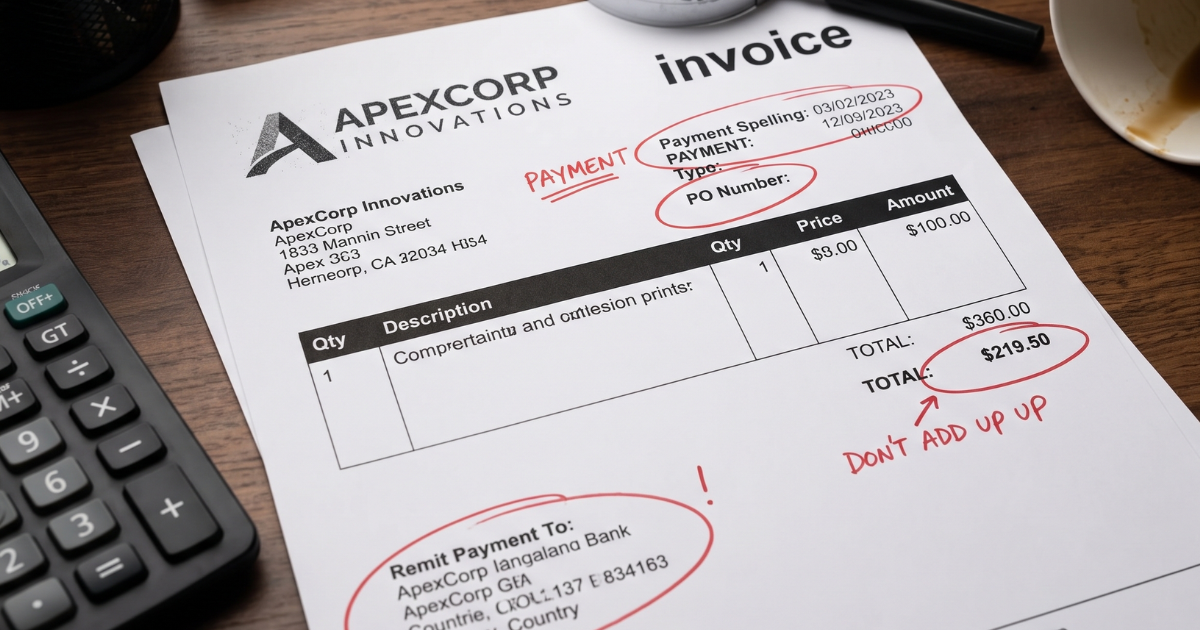

A document only has to look convincing for as long as it takes someone to approve it. That is the whole business model behind document fraud. A fabricated bank statement needs to survive one loan review. A forged invoice needs to survive one payment approval. A doctored ID needs to survive one identity check. Once it clears that moment, the damage is already done.
Fake documents show up across almost every part of a business: onboarding, lending, insurance claims, accounts payable, payroll, and employee expenses. The details differ by document type, but the underlying signs tend to repeat. This guide covers what fake documents actually look like, the specific documents fraudsters target most, and the checks that catch them before they turn into a financial or compliance problem.
What Counts as a Fake Document
Document fraud generally falls into a few categories, and the difference matters because each one needs a different kind of check.
Counterfeit documents are built entirely from scratch. Nothing about them is real, including the identity, business, or transaction they claim to represent.
Forged or altered documents start as a real document, then get edited. A genuine bank statement with an inflated balance, or a real payslip with a changed salary figure, both fall into this category.
Fraudulently obtained genuine documents are the trickiest of the three. The document itself is authentic and was issued by a real institution, but it belongs to someone else, or it is being used for a purpose it was never meant to support. A stolen passport or a legitimate financial record submitted under someone else's name both fit here.
Each type leaves different evidence behind. Counterfeit documents tend to fail on structure and detail. Altered documents tend to fail on consistency. Fraudulently obtained documents tend to fail on context, since the document is real but the person, business, or timeline attached to it does not add up.
The Documents Fraudsters Target Most
Some documents attract far more attention from fraudsters than others, usually because they carry weight in a financial or identity decision.
- Bank statements to support loan applications, rental applications, or insurance claims.
- Pay stubs and tax returns to inflate income for credit, mortgage, or employment purposes.
- Passports and driver's licenses to establish a false identity or bypass verification checks.
- Invoices and receipts to support fraudulent payments, inflated expense claims, or padded insurance losses.
- Utility bills to establish a false proof of address.
Businesses that touch any of these, whether that is a bank reviewing statements, an insurer reviewing claims, or a finance team reviewing vendor invoices, are dealing with the same underlying problem from different angles.
Visual Red Flags Worth Checking First
A close visual read often reveals the first signs, especially on templated documents like bank statements, pay stubs, and official IDs.
Fonts that do not match: Institutions use consistent fonts across every document they issue. A field that uses a slightly different typeface, weight, or spacing than the rest of the page is a common sign of a document that was edited after the original was created.
Logos and letterheads that look slightly off: A blurry logo, an outdated version of a company's branding, or a letterhead that does not match the institution's current design should raise a flag.
Alignment and layout issues: Genuine documents from banks, employers, and government agencies follow a strict layout. Numbers that do not line up in their columns, text that sits unevenly against a table border, or spacing that varies across similar fields all point toward manual editing.
Missing or inconsistent security features: Passports, driver's licenses, and other identity documents include holograms, watermarks, microprinting, and specialized inks that are difficult to reproduce. A document missing these features, or showing them inconsistently, is a strong indicator of counterfeiting.
Paper and print quality on physical documents: Official documents are often printed on specific paper stock with a particular texture or finish. A physical copy that feels unusually thin, glossy, or inconsistent compared with a known genuine sample is worth a second look.
Content Red Flags That Go Beyond the Visuals
Some of the most reliable signs of a fake document have nothing to do with how it looks. They come from what it says.
Numbers that do not reconcile: A bank statement where the running balance does not match the sum of listed transactions. A pay stub where gross pay, deductions, and net pay do not add up. An invoice where the subtotal, tax, and total are mathematically inconsistent. Fraudsters who edit one number often forget to update everything connected to it.
Dates that do not make sense: A transaction dated on a weekend when the account only processes on business days. A pay period that overlaps with another submitted document. An employment letter dated before the company existed at its current address.
Details that contradict each other within the same document: A name spelled two different ways. An account number that changes formatting midway through a statement. A job title on a pay stub that does not match the one on an accompanying employment letter.
Information that does not match external records: A bank statement listing an institution with a different logo, routing number format, or statement layout than what that bank actually issues. An employer verification letter for a company that does not exist at the listed address.
For a closer look at how this plays out on the invoice side specifically, the Docklands post on doctored invoices breaks down how altered totals leave arithmetic evidence behind, and the post on billing fraud red flags covers a broader set of non-math clues.
What Metadata Reveals in Digital Documents
Printed and scanned documents can hide an edit history well. Native digital files, especially PDFs, often cannot.
Every digital file carries metadata, including a creation date, a last modified date, the software used to create or edit it, and sometimes device information. A bank statement that claims to be a direct export from an online banking portal should not show metadata pointing to a PDF editor or design tool. A statement dated for last month should not carry an edit timestamp from yesterday.
This is one reason scanned or flattened images of documents deserve more scrutiny than native files. Compression and screenshots strip away metadata, which is often exactly what someone editing a document wants. The Docklands post on starting fraud detection with original files covers why asking for the source file, not a screenshot, changes what a review can actually catch.
Scanned documents present their own version of this problem. Uneven sharpness, blur patches around specific numbers or names, or sections that look noticeably cleaner than the rest of the page often mark where a scan was digitally edited before or after scanning.
Why AI-Generated Documents Are Changing the Picture
Generative tools have added a new category to watch for. AI-generated documents are not scans of something real that got edited. They are built from nothing, based on patterns learned from thousands of real examples, which means they can look structurally correct while containing invented details.
These documents tend to show subtler signs than a manually edited file: unusual spacing patterns, text that reads slightly off in tone or phrasing, formatting that is almost right but not quite consistent with how a real institution formats its documents, and details that do not hold up under cross-checking even though nothing looks visually wrong.
The Docklands posts on Gen AI claims fraud and deep-fake invoice red flags go deeper into how this category behaves differently from traditional forgery and why a purely visual review misses it more often.
The Business Risk of Missing a Fake Document
The consequences of accepting a fake document scale with what that document was used to support.
- Financial losses: A fraudulent bank statement or income document can support a loan, lease, or credit decision that never should have been approved.
- Compliance and regulatory exposure: Institutions that fail basic verification checks can face fines, penalties, and audit findings, particularly in regulated industries like banking, lending, and insurance.
- Reputational damage: Businesses known for weak document review become an easier target, which compounds the original risk over time.
- Downstream fraud: A fraudulently obtained identity document used to pass one check often becomes the foundation for further fraud, from opening accounts to filing false claims.
None of this requires a large-scale operation. A single accepted fake document can create liability that takes far longer to unwind than it took to submit.
Why Visual Inspection Alone Is Not Enough
A trained reviewer can catch a fair number of fake documents by eye. What that reviewer cannot do is scale.
Document volume works against manual review. A claims team, an accounts payable department, or an onboarding team processing hundreds of documents a week does not have time to check every font, recalculate every total, and inspect every security feature by hand. Fraudsters know this, and modern forgery tools are built to pass a fast visual check, not a thorough one.
This is also where sophistication has caught up with speed. A polished fake bank statement, a well-formatted forged pay stub, or an AI-generated invoice can look completely ordinary to someone moving quickly through a queue. The Docklands post on tampered invoices makes a point worth applying broadly: manipulated documents rarely fail in only one place. The failure is usually distributed across the visuals, the math, the metadata, and the surrounding context, which is exactly why a single-layer check misses it.
Building a Process That Catches Fake Documents
A reliable document review process layers several checks rather than relying on any single one.
- Start with structure: Compare the document's layout, fonts, and formatting against a known genuine sample from the same institution or business.
- Check the math: Rebuild totals, balances, and calculations from the underlying numbers rather than trusting the printed figure.
- Review metadata on digital files: Look for edit history, software signatures, and timestamps that do not match the document's claimed origin.
- Cross-check external details: Confirm that the institution, business, or individual named in the document actually exists and matches the claimed details.
- Look for internal consistency: Names, dates, account numbers, and figures should match each other throughout the document, not just look correct at a glance.
- Preserve original files: Request the source PDF, scan, or photo rather than accepting a screenshot or a compressed copy, since originals carry far more forensic detail.
- Escalate based on combined signals: A single odd font is a minor flag. A mismatched font, a math error, and an inconsistent metadata timestamp together are a much stronger case for closer review.
This kind of process does not need to slow down every legitimate document. Most documents pass cleanly. The goal is building enough structure that the ones that do not pass get caught before they support a decision.
How Docklands Helps Catch Fake Documents Before They Cost You
Docklands AI was built around the recognition that manual review has a ceiling, and document fraud has moved past it. The platform analyzes invoices and receipts at the pixel level, combining several detection layers rather than relying on a single check.
That includes:
- Digital edit detection for texture anomalies, misaligned tables, and copy-paste artifacts.
- Metadata forensics comparing a document's edit history and software signature against its claimed origin.
- AI-generated content detection to catch documents produced by generative tools rather than a genuine source system.
- Mathematical checks that verify totals, tax, and line items automatically.
- Physical tampering detection for correction fluid, handwritten edits, and cut-and-paste alterations.
These checks apply directly to the areas where fake documents cause the most damage for Docklands' customers: insurance claims, accounts payable, and employee expenses. For teams whose current invoice workflow automates approvals but does not inspect for tampering, the post on invoice workflow software's blind spot covers where that gap tends to show up.
FAQ
What is the difference between a forged document and a counterfeit document?
A forged document is a real document that has been altered after it was issued, such as an edited balance on a bank statement. A counterfeit document is built entirely from scratch, with no genuine original behind it.
Can a completely genuine document still be part of document fraud?
Yes. A real document that belongs to someone else, or that is used to support a claim or application it was never meant for, is a form of fraud even though nothing on the document itself was edited.
What is the fastest way to check if a document has been edited digitally?
Check the file's metadata for edit history, the software used to create or modify it, and whether the timestamps match the document's claimed origin. A native file that shows edits from design or editing software after its supposed issue date is a strong signal.
Are AI-generated documents harder to catch than traditional forgeries?
Often yes, since they can be structurally consistent while containing fabricated details. Catching them usually requires checking content accuracy and cross-referencing against real records, not just a visual review.
Which industries face the highest risk from fake documents?
Banking, lending, insurance, and any business handling accounts payable or employee expense claims face regular exposure, since all four rely on documents like bank statements, pay stubs, invoices, and receipts to support financial decisions.
The Takeaway
Fake documents rely on being reviewed quickly and trusted by default. The response is a process that checks structure, math, metadata, and context together, rather than a single glance at whether something looks right.
Businesses reviewing invoices, receipts, and claims at volume can see how Docklands AI applies these checks automatically by visiting Docklands AI or booking a demo.
Request a Demo Today!
Book your demo below.